
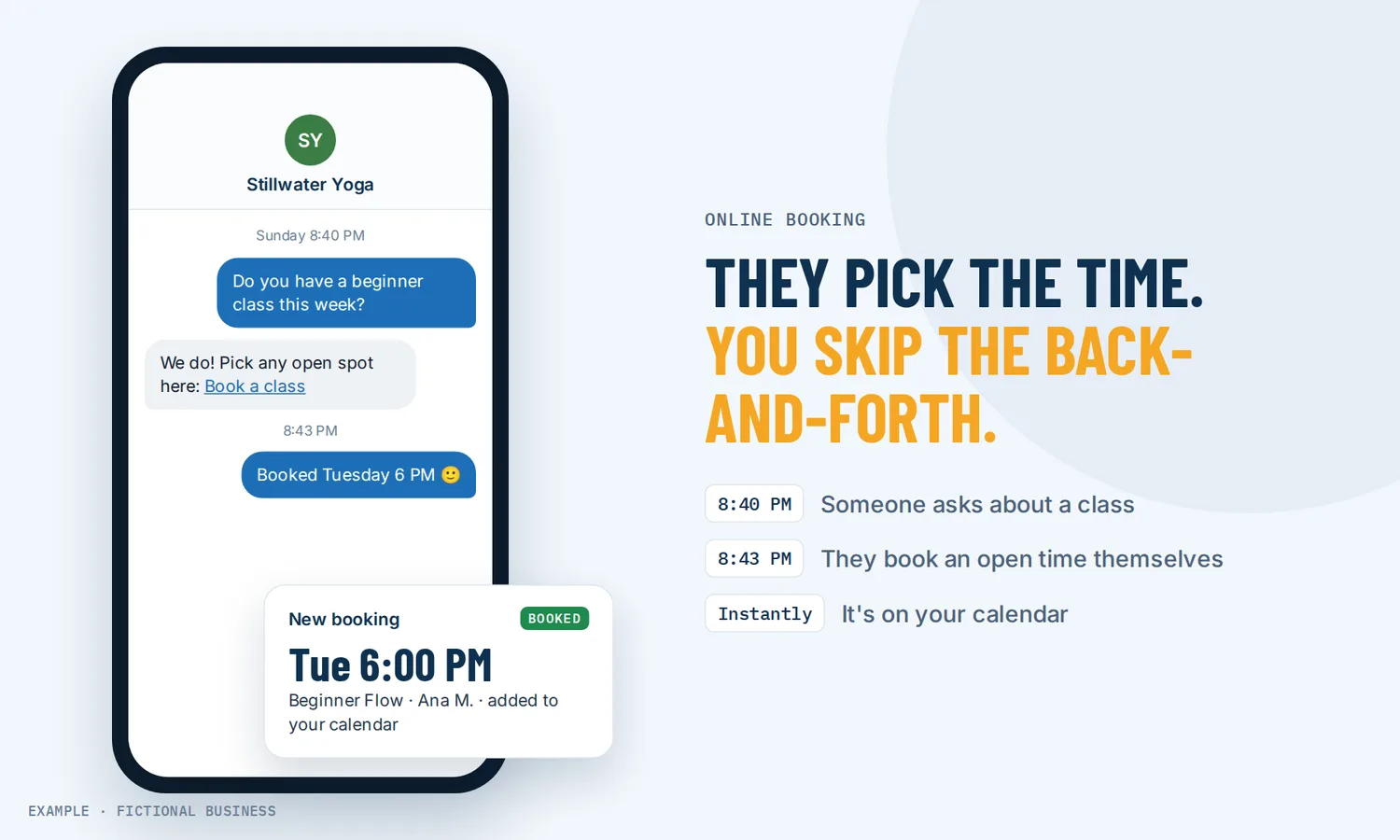
Online booking for small businesses: more customers booked, less time going back and forth.
An online booking system lets customers pick an open time from your website or a link, answer a few questions and get a confirmation, while the appointment lands on your calendar. For small business owners, that means fewer calls spent finding a time and more hours for paid work.
Get online booking set up for you
What online booking is and how it works
Online booking replaces the "when are you free?" exchange with a page that shows only the times you can actually take. You set the rules once. The customer does the picking.
Here is how it works on the Revenue Growth HQ platform:
- You set your availability. Weekly working hours, days off, buffers between appointments, how much notice you need and how far ahead people can book.
- You connect your calendar. Google Calendar or Outlook sync blocks the times you are already busy, so a dentist appointment on your personal calendar is not offered to a customer.
- You share it. Put the booking calendar on your website, or send the link in an email, a text, a social profile or a chat reply.
- The customer books. They pick a day and time (shown in their own time zone, or locked to yours), answer your intake questions and confirm.
- Everyone is told. The customer gets the confirmation messages you have switched on, you get an alert, and the booking appears on their contact record with their answers.
What online booking changes for a small business
Less time on the phone
A booking made by phone or email is often a small negotiation. You offer Tuesday, they offer Thursday, someone checks a calendar, someone calls back. Online booking cuts that loop out. The customer sees what is open and takes it, and you find out when it is already on your calendar.
Bookings while you are closed
People decide to book when it suits them, which is often after you have stopped answering the phone. A booking page keeps working in the evening and on weekends, so a customer who is ready to book late on a Sunday does not have to wait for Monday morning, or call someone else.
A choice for customers who would rather not call
Plenty of people would rather book on a screen than call. In a 2019 nationwide survey of 1,049 consumers about healthcare appointments, 45% preferred to book by computer or smartphone and 55% by phone. The split depended on age: 55% of people aged 18 to 29 preferred to book on a device, against 32% of people 60 and over. It is one industry in one year, but it suggests a phone-only business makes booking harder for a large group of people.
Better information before the appointment
A booking form can ask the questions you would otherwise ask on the call: what the job is, what they have tried, their budget range. Answers save to the customer's contact record. If an answer shows the customer is not a fit, the form can turn them away before a slot is taken, so your calendar fills with people you can help.
Try it as your customer would
Pick a day and a time, and see what your customer gets and what lands on your calendar. This is a demo: nothing is booked and no message is sent.
Book a visit with our demo business
This is a demo. Nothing is booked and nothing is sent.
1. Pick a day
How online booking plays out
A consultant. Let's suppose you sell consulting by the hour and your prospects are spread across the country. A prospect reads one of your articles late in the evening and clicks your booking link. They see your open times in their own time zone, pick one, and answer your intake questions about company size and the problem they want solved. With Zoom or Google Meet connected, the booking gets its own video link. The next morning, the call is on your calendar with the prospect's answers attached.
A repair or home service business. Let's suppose you run a repair business with three technicians. One booking link spreads new jobs across the team based on each technician's own hours, and each person's Google or Outlook calendar keeps them from being double-booked. When a customer can't make Thursday after all, they use the reschedule link in their confirmation and move to Friday on their own, and Thursday's slot opens for someone else. Your technicians see the change on the free mobile app from the job site.
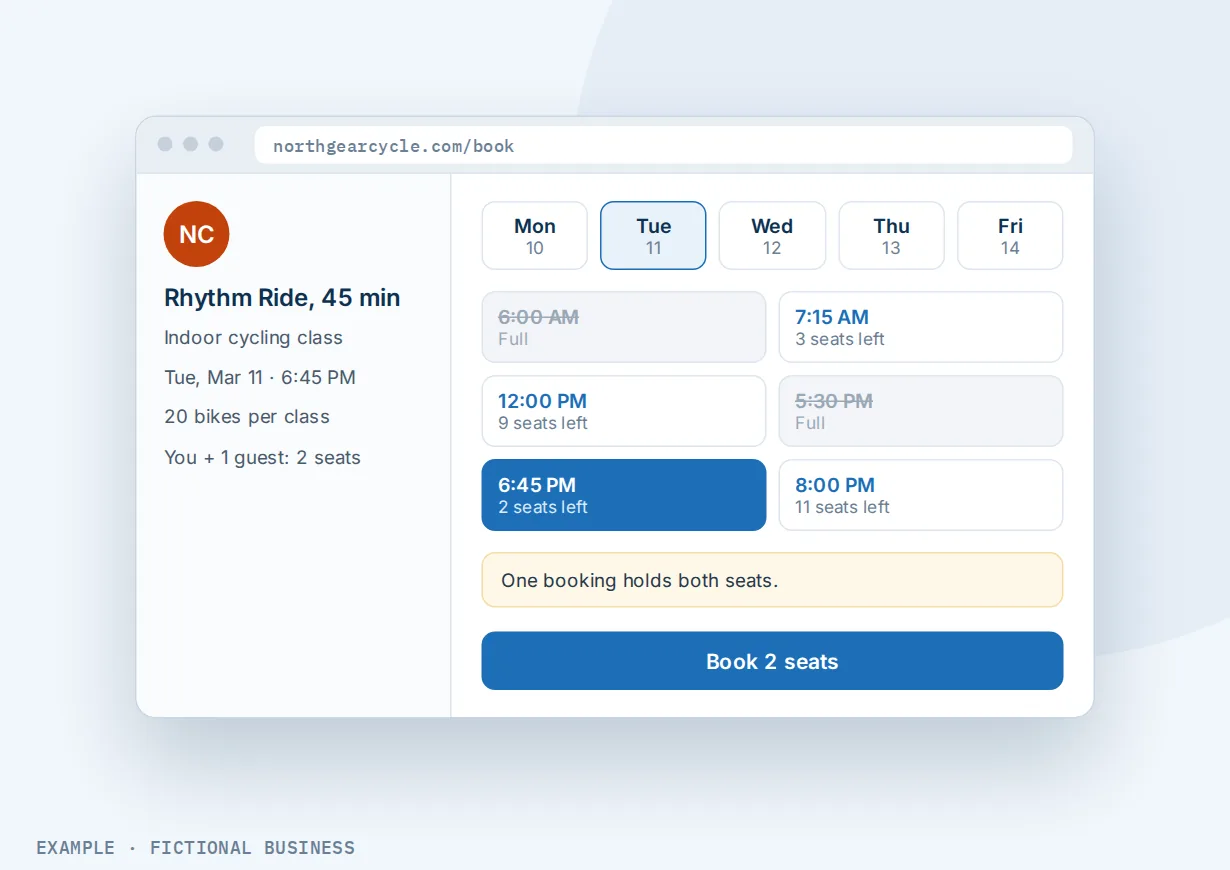
A studio or class business. Let's suppose you run a fitness studio with group classes. Each class has a set number of seats, and the calendar stops taking bookings when it is full. You can set up a regular with a recurring booking for the same class each week, and a member who wants to bring a friend can add a guest and take two seats in one booking.
What to look for in an online booking system for small business
Questions to ask before you commit:
- Can customers book from your website and from a link? You will want both: a calendar on your site and a link you can send anywhere.
- Does it sync with the calendar you already use? Google Calendar and Outlook sync should block your busy times so you are not double-booked.
- Does it fit how you work? One person, a team that shares bookings, a class with seats, or a menu of services on one page.
- Can you set the rules? Buffers between appointments, minimum notice, how far ahead people can book, and a daily limit.
- Can customers reschedule and cancel themselves, with a cutoff before the appointment so you are not left with a same-hour gap?
- Can you ask your own questions on the booking form, and do the answers go somewhere useful?
- Can people book from your Google listing? Put your booking link on your Google Business Profile so someone who finds you in search can book without visiting your site.
- Can you take payment in full, as a deposit, or as a card on file? See taking payment or a card at booking.
- Do confirmations and reminders go out by email and text, at times you choose?
- Does the booking connect to the rest of your customer records, so you can see a customer's history and bring back past customers who stopped booking?
A tool that does only the first two suits a one-person business with a simple schedule. The more of the list you need, the more it pays to have booking inside the same system as your contacts and messages.
Online booking works better with reminders, automation and AI
Booking gets an appointment on the calendar. What happens around the booking decides whether the customer shows up and comes back.
Booking plus reminders. Booking online by itself does not seem to change who shows up. A 2023 study of 74,731 visits over one month at a large orthopedic practice found a 4.5% no-show rate for online-scheduled visits and 4.4% for visits scheduled by staff, not a statistically significant difference. Reminders are what the research links to better attendance: a Cochrane review of seven trials with 5,841 people found that text message reminders improved attendance compared with no reminder. On the platform, each calendar can send appointment reminders by email or text at the times you choose, with a reschedule link inside.
Booking plus workflow automation. A new booking can start a workflow: tag the customer, send a preparation guide, notify a team member, or send a thank-you and a review request after the visit. The trigger can be limited to one calendar, so a consultation and a paid session start different follow-up. See automating your follow-up.
Booking plus an AI chat assistant. Some customers would rather ask a question first. An AI assistant that answers and books can reply to messages, collect details, offer open times and book, cancel or reschedule an appointment in the conversation, into the same calendar your booking page uses.
Booking plus an AI voice receptionist. Some customers will call no matter what. An AI receptionist that answers your phone can pick up incoming calls, ask your qualifying questions and book the caller into an open time while you are with another customer. AI use is billed by use, like texts.
Online booking options: from free to done-for-you
The right choice depends on how many people take bookings, what else the booking needs to do, and how much setup you want to do yourself.
Free standalone scheduling tools. Many calendar and scheduling apps offer a free booking link. For a one-person business with one type of appointment, that may be all you need. Free plans vary a lot, so check what yours leaves out (team calendars, reminders, payments, intake questions, your own branding) before you build around it. The bookings also live apart from your customer list and messages.
Paid scheduling apps. A paid booking app adds team calendars, payments, reminders and more control for a monthly fee that often rises with the number of staff. The catch is that it is one more app: your texting, email, reviews and customer records live somewhere else, and you connect them with integrations or copy-paste.
All-in-one platforms. Here, booking sits in the same system as your contacts, inbox, payments, reminders and automation. A booking can start your follow-up without a connector, and it shows on the customer's record. The tradeoffs: more to set up, and more features than a one-calendar business may want.
Hiring someone. A receptionist, an assistant or an answering service books by phone with a human touch. That has real value, but it costs wages or fees, and coverage ends when their shift does. You can also hire someone to set up any of the options above for you, which saves your time but leaves you dependent on them for changes.
Here's our solution
Revenue Growth HQ is an all-in-one platform with online booking built in, alongside a website for your business, a chat box for website visitors, your inbox, payments, reminders, automation and AI assistants. The plan is $97 a month (or $970 a year) and includes $30 of usage credit each month, which covers your phone number, calls, texts, email and most AI features. Use beyond $30 in a month is billed at the same rates as buying the software directly.
Setup is $197, one time. You choose 3 setups from our list for us to build in your account, and appointment reminders with an online booking calendar can be one of them. With any choice, we build your knowledge base from your website, and when a choice calls or texts, we set up your business phone number and its texting registration. See the setups and choose your 3.
Limits to know
- No waitlist. When a slot or class is full, the calendar stops taking bookings. There is no built-in list for people waiting for an opening.
- Texts cost money and need registration. Text reminders are billed per message, and business texting needs carrier registration first. Email reminders do not.
- One meeting location per calendar. The customer does not choose between phone and video on one calendar. Offering both means two calendars.
- Length choices are hidden on narrow screens. A calendar that offers several appointment lengths shows that choice only on wider screens. On most phones it books the default length.
Online booking features included
- Booking from your website or a shareable link
- Times shown in the visitor's own time zone, or locked to yours
- One-person, team, collective, group class and multi-service calendars
- Working hours, date-specific hours, buffers, minimum notice and daily limits
- Google Calendar and Outlook sync, so busy times are blocked
- Confirmation, reminder and follow-up messages by email and text
- Reschedule and cancel links for customers, with a cutoff you set
- Full payment, a deposit, or a card on file at booking
- Your own questions on the booking form
- Zoom or Google Meet links on standard and team calendars
- Recurring appointments
- Confirm each booking automatically, or approve requests first
- Bookings on the customer's record, able to start your follow-up
- Booking from the client portal
- View, book and reschedule from the mobile app
Frequently asked questions
Do customers prefer to book online?
Many do, and many still prefer the phone. In a 2019 survey of 1,049 consumers about healthcare appointments, 45% preferred to book by computer or smartphone and 55% by phone, with younger people leaning toward booking on a device. Good research on small businesses in general is scarce, so the safe course is to offer online booking alongside your phone.
Can customers book from my website?
Yes. Each booking calendar comes with embed code for your website and a shareable link, so you can put the calendar on a page and also send the link in emails, texts, social profiles and chat replies. If your website is built on the platform, the calendar drops into the page directly.
Does online booking sync with Google Calendar or Outlook?
Yes. Connect Google Calendar or Outlook (including Office 365 accounts), and times you are busy there are blocked on your booking page. The default sync only blocks time. A two-way mode also turns outside events into appointments, which can create contacts for outside guests, so it is worth choosing deliberately.
Can I take payment when someone books?
Yes. A calendar can take full payment at booking, take a flat or percentage deposit, or save a card on file without charging it. You need a connected payment account such as Stripe, Square or PayPal, and that processor charges its own fees. A deposit's balance becomes a draft invoice that you send afterward; it is not collected automatically. More on taking payment or a card at booking.
Does online booking reduce no-shows?
Not by itself, according to the best evidence we found. A 2023 study of 74,731 visits found nearly the same no-show rate for online and staff-scheduled visits. Research links appointment reminders to better attendance, and a deposit gives customers a reason to keep the time. Each calendar can send reminders and take payment, so online booking makes both easy to add.
Can customers reschedule or cancel themselves?
Yes, if you allow it. Each calendar has switches for reschedule and cancel links, and you can stop the links from working a set time before the appointment, so last-minute changes still come to you. A rescheduled booking restarts any follow-up tied to it, which is worth knowing when you plan reminders.
What does an online booking system cost?
Free booking links suit simple schedules, and paid scheduling apps charge monthly, often more as you add staff. On Revenue Growth HQ, online booking is included in the $97-a-month plan, which comes with $30 of usage credit each month for texts, email and most AI features. Use beyond that is billed by use, and card payments carry the processor's fee. Setup is $197, one time, for 3 setups you choose.
Have us set up your online booking
For $197 one time, we build three setups in your Revenue Growth HQ account, and appointment reminders with an online booking calendar arrive already ticked. We set up your booking calendar, texts before each appointment with a link to reschedule, and a rebooking text after a no-show. You can swap it for any other on the list. The plan is then $97 a month.
Sources
- Zion, A. and Hollmann, T. "Healthcare Appointment Booking: Audience Preferences for Online vs. Over the Phone." Zion & Zion, 2019. https://www.zionandzion.com/download/research/HealthcareAppointmentBookingPreferencesResearch.pdf (checked 2026-10-18)
- Kachooei, A. R. et al. "The effect of outpatient web-based online scheduling versus traditional staff scheduling systems on progression to surgery and no-show rates." J Res Med Sci, 2023. https://pmc.ncbi.nlm.nih.gov/articles/PMC10199359/ (checked 2026-10-18)
- Gurol-Urganci, I. et al. "Mobile phone messaging reminders for attendance at healthcare appointments." Cochrane Database of Systematic Reviews, 2013. https://www.cochrane.org/CD007458/EPOC_mobile-phone-text-messaging-reminders-for-attendance-at-healthcare-appointments (checked 2026-10-18)