
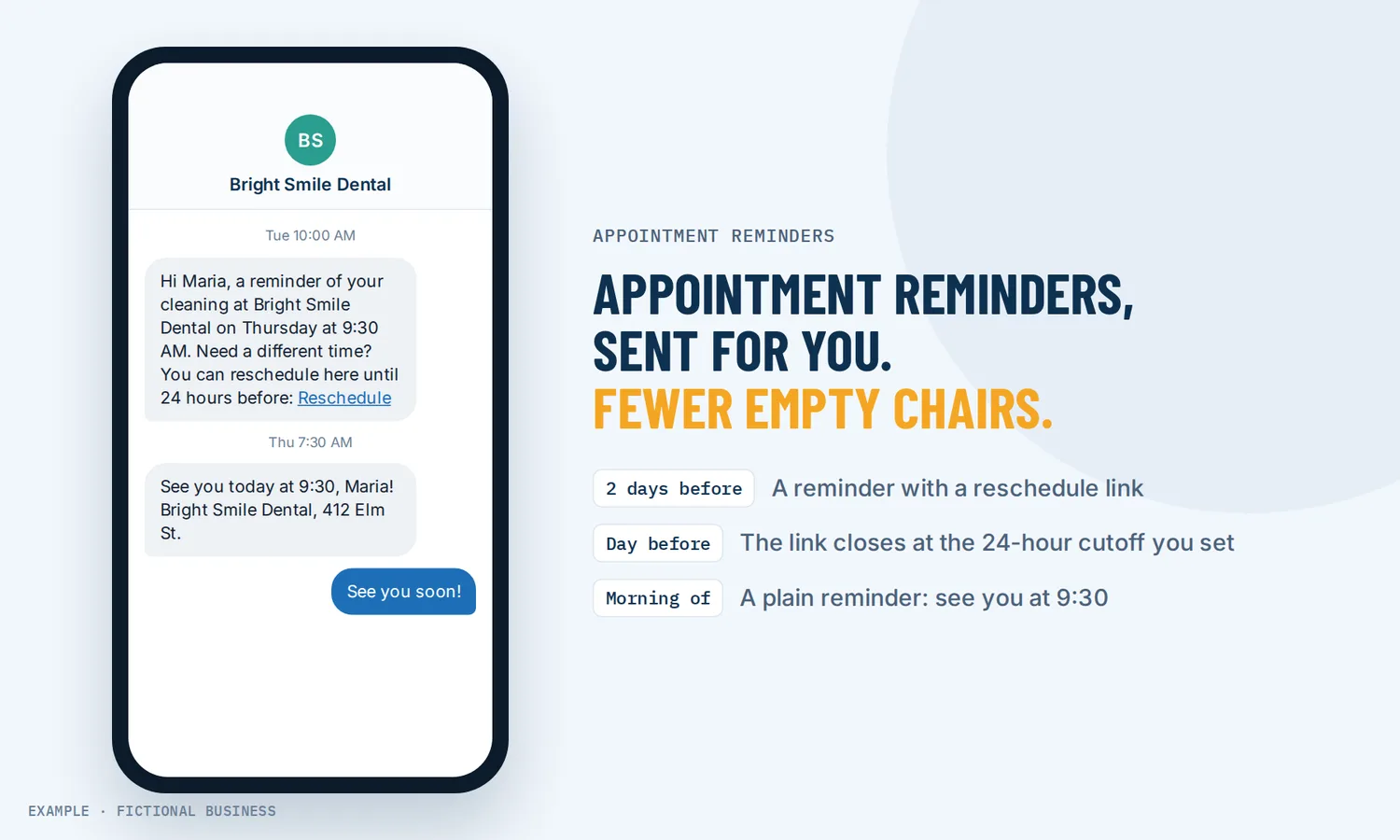
Automated appointment reminders: fewer empty slots, no reminder calls to make.
Automated appointment reminders are texts and emails that go out on their own before each booking, at the times you choose, so customers remember to come or tell you early that they can't. For small business owners, that means fewer empty slots and no afternoon spent calling tomorrow's list.
Get appointment reminders set up for you
What an automated appointment reminder is and how it works
A reminder is a short message tied to one appointment. It knows who booked, when and where, and it goes out a set time before the visit. You write it once; the platform sends it for each booking on that calendar.
Here is how it works on the Revenue Growth HQ platform:
- You switch on the messages you want. Each booking calendar can send a confirmation when someone books, a reminder before the appointment, a follow-up after it, and a message when an appointment is cancelled or rescheduled.
- You pick the channel. Email, text, WhatsApp, or a mix. Your team can get their own alerts in the app.
- You choose the timing. Set how far ahead the reminder goes out, such as the day before. For a second reminder a few hours before, or a third, you add them with a workflow.
- You write the wording. Merge fields fill in the customer's name, the date and time, and links to reschedule or cancel.
- Customers respond. They come, or they use the link to move the booking, which opens the slot for someone else. If an appointment ends up marked as a no-show, that can start a follow-up of its own.
What an appointment reminder changes for a small business
More people show up
A Cochrane review of seven randomised trials with 5,841 people found that text message reminders improved attendance compared with no reminder. Across those trials, 67.8% of people with no reminder attended, against 78.6% of people who got a text. The trials were in healthcare and the reviewers rated the evidence low to moderate quality. An older randomised trial of 901 children's clinic appointments found the same pattern with mailed postcards: the no-show rate fell from 19% without a reminder to 10% with one.
Cancellations come early enough to fill
A reminder also gives a customer who can no longer make it an easy moment to say so. When the reminder carries a reschedule link, the change can happen a day ahead instead of as an empty chair, and the open slot goes back on your booking page for someone else to take.
Less staff time on reminder calls
Reminder calls work. In the same Cochrane review, phone call reminders did about as well as texts, with 80.3% attendance. But calls take staff time. Two of the trials that compared costs found text reminders cost 55% and 65% less per attended appointment than phone calls. An automated reminder goes out whether you have three bookings tomorrow or thirty, and it doesn't depend on someone remembering to send it.
The wording does real work
What the reminder says matters. In UK hospital trials with about 20,000 patients, a reminder text that stated the specific cost of a missed appointment cut missed appointments from 11.1% to 8.4% compared with the hospital's standard reminder, a relative drop of 23%. You write your own wording and can change it, so you can test what works for your customers.
How it plays out
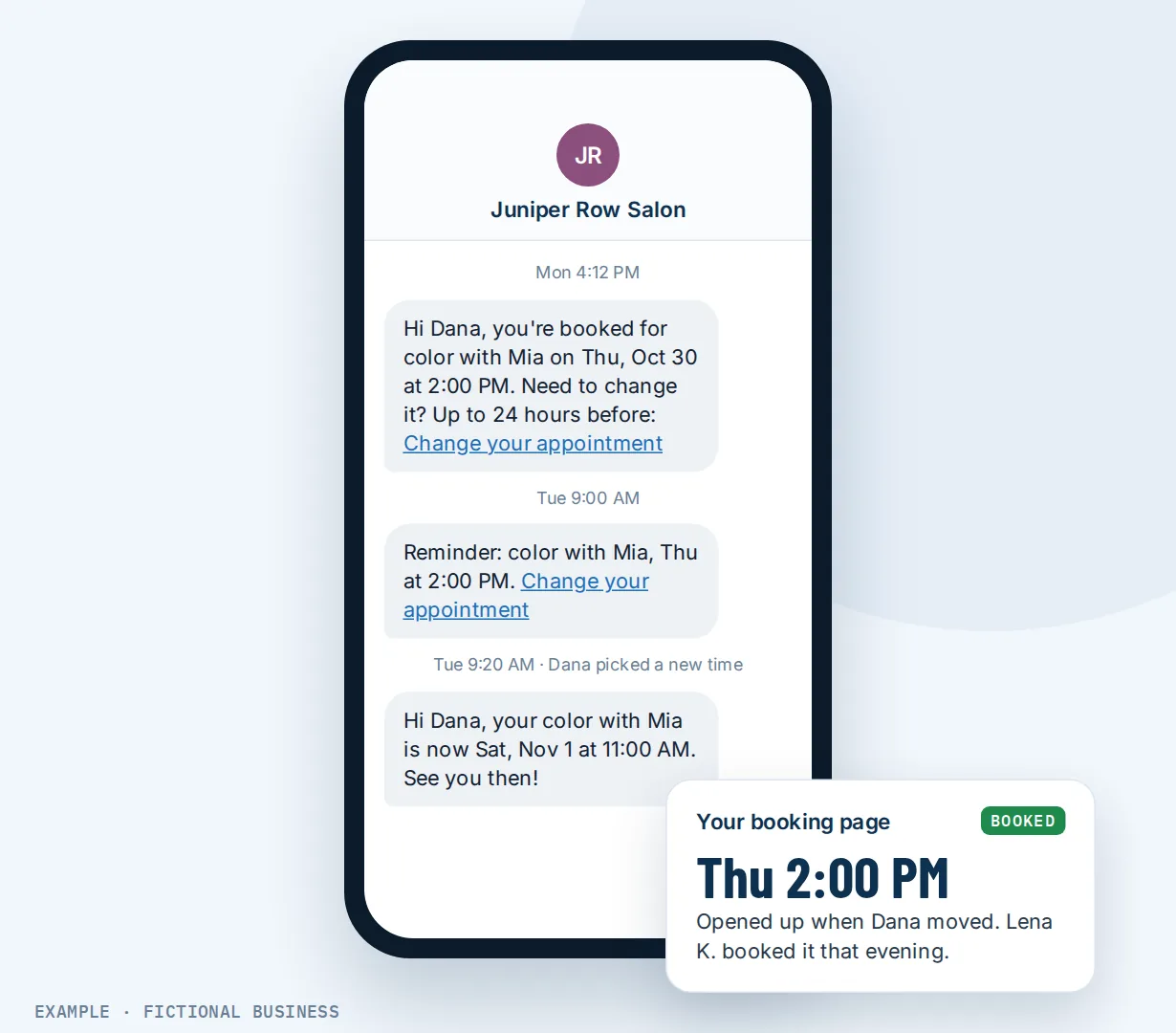
A salon or spa. Let's suppose you run a salon with four stylists and most bookings are made a week or two ahead. Each booking gets a confirmation text, an email reminder two days before with a reschedule link, and a short text the morning of. A client who has a conflict moves her color appointment from Thursday to Saturday from the link in the email. Thursday's slot shows as open on your booking page, and another client books it that evening.
A consultant or coach. Let's suppose you sell discovery calls to prospects across several time zones. A reminder email goes out the day before with the video link, and a text goes out an hour before. When a prospect still misses the call, the appointment is marked as a no-show, and that starts a follow-up the next morning: a friendly note with a link to rebook. A prospect who would have drifted away books a new time.
A home service business. Let's suppose you run a pest control or cleaning business, and a missed visit means a technician drove across town for nothing. The day before, the customer gets a reminder asking them to reply C to confirm or use the link to reschedule. Replies that confirm mark the appointment as confirmed, so the morning schedule shows who has confirmed. After the visit, a follow-up thanks them and asks for a review.
What to look for in automated appointment reminders
- Does it send by text and by email? Some customers act on texts, some on email. Being able to use both, or pick per calendar, matters.
- Can you set more than one reminder? A reminder two days out gives time to rebook the slot; one a few hours out catches the forgetful.
- Can you write your own wording? Including the customer's name, the time, the place, and what to bring.
- Can reminders carry a reschedule link, with a cutoff so last-minute changes still come to you?
- Can customers confirm by replying? And does the reply show up somewhere your team will see it?
- Does it follow up after the appointment? A thank-you, a review request, or a rebooking link for the next visit.
- What happens after a no-show? Look for a way to start a follow-up automatically instead of relying on someone to remember.
- What does each text cost? Texts are usually billed per message or per segment, and texting US numbers needs carrier registration first.
- Is it tied to your booking calendar, so a reschedule updates the reminders instead of sending them for the old time?
Basic reminder tools cover some of this list. If you want all of it, it pays to have reminders inside the same system as your bookings, contacts and messages.
Appointment reminders work better with automation, texting and deposits
Reminders plus workflow automation. The built-in reminder covers the common case. A workflow lets you go further: a reminder days before and another hours before, a confirm-by-reply that updates the appointment, a rebooking message when an appointment is marked as a no-show, and a thank-you after the visit. Each workflow can be limited to one calendar, so a first consultation and a regular visit get different messages. See automating your follow-up.
Reminders plus two-way texting. A reminder text often gets a reply: "Running 10 minutes late", "Can we do 3 instead?" With business texting, replies come back to your business number, and your team answers them in the same conversation.
Reminders plus online booking. Reminders work best when a booking is easy to move. With an online booking system for small business, the reschedule link in each reminder opens your live calendar, the customer picks a new time, and the old slot opens for someone else.
Reminders plus a deposit at booking. For appointments where a no-show costs you real money, reminders and deposits do different jobs. The reminder helps people remember; taking payment or a card at booking gives them a reason to keep the time or give notice.
Appointment reminder options: from free to done-for-you
The right choice depends on how many appointments you book and how much a no-show costs you.
Doing it by hand. You or someone on your team calls or texts tomorrow's customers each afternoon. It costs nothing but time, and a call can catch problems a text would miss. It also stops the day someone is sick or busy, and it gets harder as bookings grow.
Free reminders in a scheduling app. Many booking apps include basic email reminders, sometimes text reminders, on free or low tiers. For a one-person business with one type of appointment, that may be enough. Check whether texts cost extra, whether you can change the wording, and whether you get more than one reminder.
Standalone reminder software. Reminder tools add text, email and sometimes voice reminders, confirm-by-reply and templates, for a monthly fee plus text costs. The catch is that they sit next to your calendar and your customer records, connected by an integration that can break or lag.
All-in-one platforms. Reminders sit in the same system as your booking calendars, contacts, inbox, payments and automation. A reschedule updates the reminders, and a no-show can start a follow-up without a connector. The tradeoffs: more to set up, and more features than a business that only needs reminders may want.
Hiring someone. A receptionist or answering service can make reminder calls with a human touch. That costs wages or fees, and coverage ends when their shift does. You can also hire someone to set up any of the options above, which saves your time but leaves you depending on them for changes.
Here's our solution
Revenue Growth HQ is an all-in-one platform with appointment reminders built into its booking calendars, alongside your inbox, payments, automation and AI assistants. The plan is $97 a month (or $970 a year) and includes $30 of usage credit each month, which covers your phone number, calls, texts, email and most AI features. Use beyond $30 in a month is billed at the same rates as buying the software directly. Texting US numbers also needs carrier registration, which has a one-time fee and a monthly fee. You see the usage rates before setup starts.
Setup is $197, one time. You choose 3 setups from our list for us to build in your account, and appointment reminders with an online booking calendar can be one of them. With any choice, we build your knowledge base from your website, and when a choice calls or texts, we set up your business phone number and its texting registration. See the setups and choose your 3.
Limits to know
- Customer messages start switched off. A new calendar alerts your team but sends the customer nothing until you turn on email or text messages and a reminder.
- One reminder time per channel in calendar settings. A second or third reminder is set up as a workflow.
- Texts cost money and need registration. Texts are billed per segment, so shorter is cheaper, and texting US numbers needs carrier registration before reminders can go out. Email reminders need neither.
- No-shows are marked, not detected. Someone on your team, or an automation, marks an appointment as a no-show; that is what starts a no-show follow-up.
Appointment reminder features included
- Confirmation, reminder, follow-up, cancellation and reschedule messages for each calendar
- Email, text, WhatsApp and in-app alerts
- Reminder and follow-up timing you set
- More reminders, at the intervals you choose, through workflows
- Your own wording, with the customer's name, time and links filled in
- Reschedule and cancel links, with a cutoff you set
- Messages to the customer, their guests, the assigned team member and extra recipients
- Reply-to-confirm through automation
- Appointment statuses: confirmed, showed, no-show, cancelled
- Follow-up that starts when an appointment is marked as a no-show
- Test sends before you switch a message on
Frequently asked questions
Do appointment reminders reduce no-shows?
In healthcare research, yes. A Cochrane review of seven randomised trials found that text reminders improved attendance compared with no reminder: 78.6% attended with a text against 67.8% without one. Those trials were in healthcare, so your numbers will differ. An older trial found the same pattern with mailed postcards.
How far in advance should I send an appointment reminder?
Far enough ahead that a customer who can't come has time to tell you and you have time to fill the slot, and close enough that they still remember. One reminder a day or two before and a short one a few hours before is a sensible starting point. On the platform, you set the timing per calendar and can add more reminders with a workflow.
Should reminders be texts or emails?
Both have a place. Texts are short and read quickly on a phone; emails have room for directions, preparation notes and links. A common setup is a reminder email a day or two ahead and a short text the day of. Texts are billed per segment and need carrier registration first; emails do not.
What should an appointment reminder text say?
Your business name, the customer's first name, the day and time, the place or video link, and one clear action: reply to confirm, or use the link to reschedule. Keep it short to keep it cheap. Research on hospital reminders found that wording matters, so it is worth trying a version that says what a missed appointment costs.
Can customers confirm or reschedule from the reminder?
Yes. Reminders can include reschedule and cancel links that open your booking calendar, with a cutoff you set before the appointment. Confirm-by-reply is built as a short workflow: a reply containing the word you choose marks the appointment as confirmed.
What happens when someone doesn't show up?
When an appointment is marked as a no-show, a workflow can start on its own: a polite message with a link to rebook, a task for your team to call, or both. Marking the no-show is done by your team or by an automation; the platform does not decide on its own that someone didn't come.
What do automated appointment reminders cost?
Reminder features are included in the $97-a-month plan, which comes with $30 of usage credit each month for texts and email. Use beyond that is billed by use, and texting US numbers needs carrier registration, which has a one-time fee and a monthly fee. You see the rates before setup starts. Setup is $197, one time, for 3 setups you choose.
Have us set up your appointment reminders
For $197 one time, we build three setups in your Revenue Growth HQ account, and appointment reminders arrive already ticked. We set up your booking calendar, texts before each appointment with a link to reschedule, and a rebooking text after a no-show, along with your business number and its texting registration. You can swap it for any other on the list.
Sources
- Gurol-Urganci, I. et al. "Mobile phone messaging reminders for attendance at healthcare appointments." Cochrane Database of Systematic Reviews, 2013. https://www.cochrane.org/CD007458/EPOC_mobile-phone-text-messaging-reminders-for-attendance-at-healthcare-appointments (checked 2026-10-18)
- Quattlebaum, T. G., Darden, P. M. and Sperry, J. B. "Effectiveness of computer-generated appointment reminders." Pediatrics, 1991. https://pubmed.ncbi.nlm.nih.gov/1910162/ (checked 2026-10-18)
- Behavioural Insights Team, Department of Health and Barts Health NHS Trust. "A zero-cost way to reduce missed hospital appointments." GOV.UK, 2016. https://www.gov.uk/government/publications/reducing-missed-hospital-appointments-using-text-messages/a-zero-cost-way-to-reduce-missed-hospital-appointments (checked 2026-10-18)