
Live chat for your website: answer visitors while they are still on the page.
Live chat for your website puts a small chat box on your pages, so a visitor with a question can type it and get an answer from your team without picking up the phone. For small business owners, that means fewer visitors leaving with an unanswered question, and more of them turning into conversations you can follow up.
This page is about chat answered by people. If you want software to reply for you, see the AI assistant that answers and books.
Get website chat set up for you
What live chat is and how it works
A live chat widget is a chat window that sits in the corner of your website, or inside a page, and opens when a visitor clicks it. The visitor types, your team replies, and the conversation happens in real time.
Here is how it works on the Revenue Growth HQ platform:
- You set up the chat box. Pick your colors, icon, avatar photos, greeting and title, and choose whether it floats in a corner or sits inside a page.
- You put it on your site. On a site built on the platform, you choose the widget in the site settings. On WordPress, Wix, Squarespace, Shopify and others, you paste a short piece of code or use a plugin.
- A visitor starts a chat. You can ask for their name and a phone number or email before the chat opens, so you know who you are talking to.
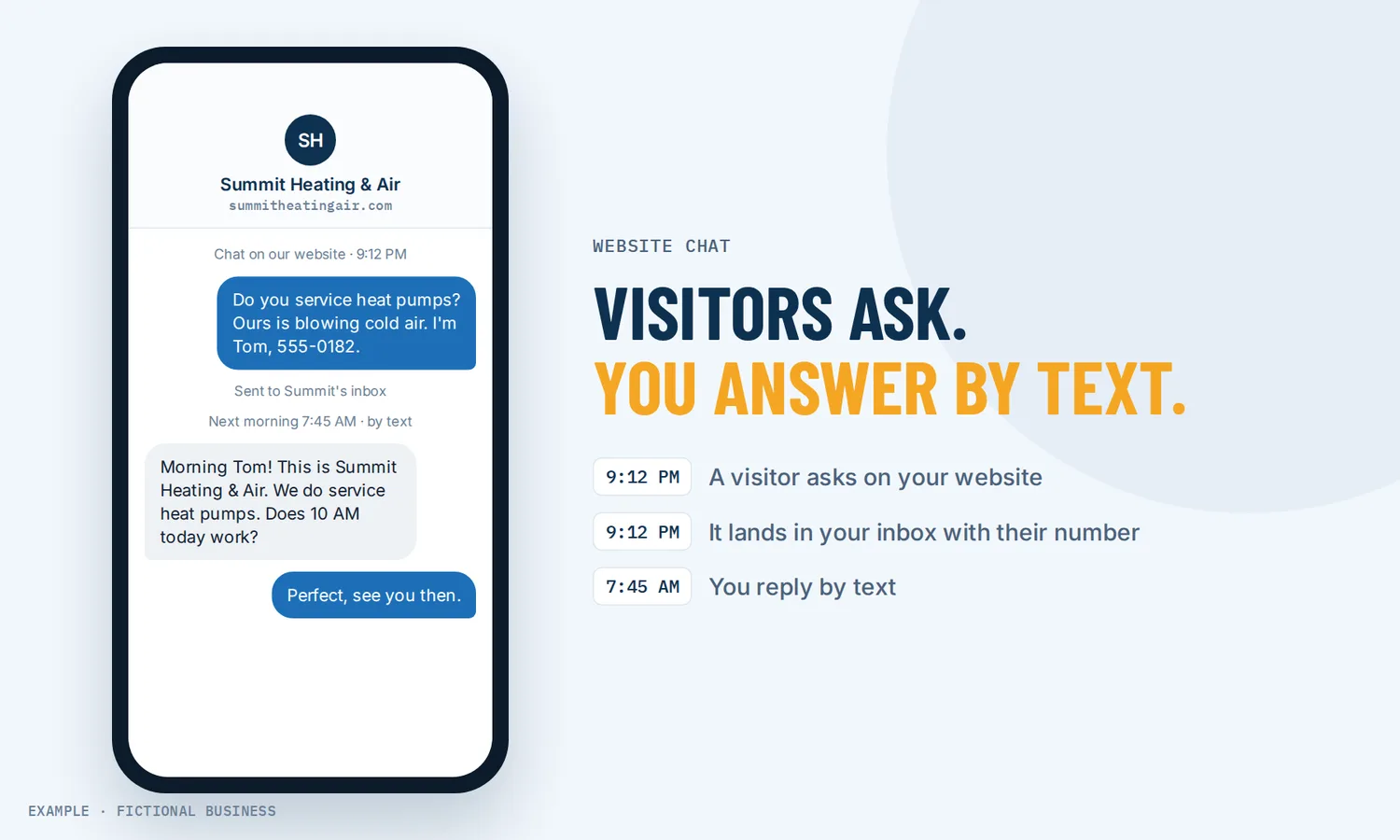
- Your team gets an alert and replies. The message lands in your inbox next to your texts and emails, and the person on duty gets an alert in the app, by email or by text.
- The conversation continues later if needed. If nobody answers in time, the chat asks for the visitor's contact details, so you can carry on by text or email.
What live chat changes for a small business
Questions get asked instead of abandoned
A visitor with a question has three choices: find the answer on the page, call you, or leave. A chat box adds a fourth that takes less effort than a call. A peer-reviewed study of sellers on Taobao, a large online marketplace in China (Sun, Chen and Fan, 2021), found that live chat had a positive effect on the share of visitors who bought, and that the effect was stronger when the product page gave less information. That was online retail, but the lesson carries over: the less your page answers by itself, the more a quick answer from a person is worth.
You learn who the visitor is
An anonymous website visit tells you nothing. A chat with a contact form in front of it gives you a name and a phone number or email, saved as a contact record. Even if the visitor does not buy that day, you can follow up, and the chat history sits on their record for whoever talks to them next.
Fewer back-and-forth emails
A visitor can send a photo of the problem, a PDF of a plan, or a voice note instead of typing a long explanation. Your team sees the context before replying, which can save a round of questions.
One more channel without one more app
Live chat on the platform is not a separate tool with its own login. Chats arrive in the inbox your team already uses for texts and email, so your team does not have to watch a second screen to catch them.
How live chat plays out
A contractor quoting jobs. Let's suppose you run a remodeling business and get most leads from your website. A homeowner browsing your kitchen page at lunch opens the chat and asks whether you handle small jobs. Before the chat opens, the form asks for their name and phone number. Your office manager sees the alert, replies that you do, and asks for a photo. The homeowner sends two pictures of the cabinets from their phone. By the end of the chat, you have a contact, photos and a rough scope, and the office manager sends a link to book an estimate visit.
A software or service firm with a sales team. Let's suppose you sell a service to other businesses and have two salespeople. Visitors on your pricing page often have one question before they will book a call. You put a separate chat widget on your pricing page, and a workflow assigns its chats to your senior salesperson, whose phone gets the alert. When the chat ends, the prospect is already a contact in your system with the conversation attached, ready for follow-up.
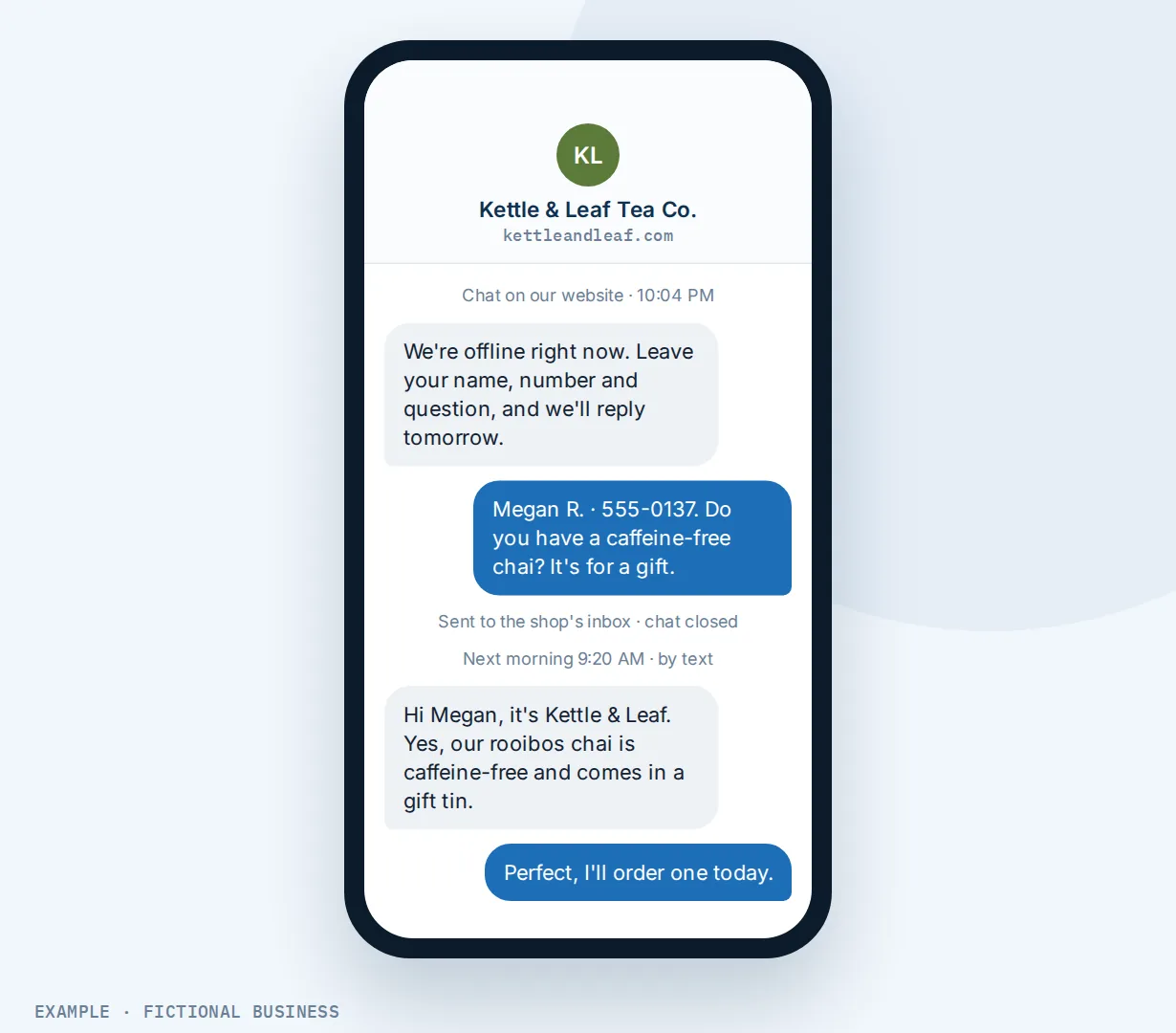
A shop that closes at six. Let's suppose you run a specialty store with an online catalog. You set office hours so that from nine to six the chat shows your normal greeting and your staff answer. After six, the chat shows a "we're offline" message and a short form instead. A visitor who writes at 10 p.m. leaves their details and question, and the next morning your staff answer by text or email.
What to look for in live chat software for small business
Questions to ask before you commit:
- Does it fit how many people you have? Live chat needs someone to answer. Look for office hours and an after-hours mode that collects details instead of leaving visitors waiting.
- What happens when nobody replies in time? A fallback that asks for contact details after a set wait turns a dead chat into a follow-up.
- Can you ask for contact details first, and choose which fields are required?
- Where do chats arrive? One inbox with your texts and email beats one more app to watch.
- Can you route chats to the right person, by page or by widget, and do alerts reach phones?
- Can visitors send photos, documents and voice notes? Check the file types and size limits.
- Does it filter spam without making real visitors solve a puzzle?
- Can it match your brand and stay out of the way on phones, with a choice of corner or inline placement?
- Does it slow your site down? Look for an option that loads the chat only after the visitor scrolls or taps.
- Can you add AI replies later in the same widget if your volume grows?
A free standalone chat tool may cover the first few. The further down the list you go, the more it pays to have chat inside the same system as your contacts, messages and bookings.
Live chat works better with AI, your inbox and booking
A chat answers a question. What happens around the chat decides whether the visitor becomes a customer.
Live chat plus an AI assistant. People are not at their desks all day. An AI assistant that answers and books can reply in the same chat box, collect the visitor's details, offer open times and book them in. Your team can step in from the inbox at any time. AI replies are billed by use.
Live chat plus one inbox. Chats sit in the same inbox as your texts, email and social messages. If you follow up a chat by text or email after the visitor leaves, it all sits on the same contact, so the next person to reply sees the history.
Live chat plus online booking. A good end to many chats is a booked appointment. Your team can send a link to booking calendars customers book themselves, and the appointment lands on your calendar with the contact already in your records.
Live chat plus your website. If your site is a website built on the same platform, adding the chat is a setting rather than code, and the forms, booking calendars and chat on your pages all feed the same contact records. A new chat can also start your follow-up automation, such as assigning the chat or sending an alert to a manager.
Live chat options: from free to done-for-you
The right choice depends on how many people can answer, how much the chat needs to connect to, and how much setup you want to do.
Free chat tools. Several chat vendors offer a free plan or trial. For a business with one person at a desk, that may be enough to start. Check what the free plan leaves out, such as office hours, file sharing, team routing and your own branding, and remember that the chats and contacts live in a separate app from your texts, email and customer records.
Paid chat software. Paid chat apps add team features, reports and integrations, often priced per seat. They work well for larger support teams. For a small business, the cost is usually one more app to watch and connect to everything else.
All-in-one platforms. Chat sits in the same system as your contacts, inbox, booking, texting and automation. A chat with a contact form becomes a contact on its own, can start follow-up without a connector, and can add AI replies in the same chat box. The tradeoff is more to set up, and more features than a chat-only business may want.
Hiring someone. Outsourced chat services staff your chat with trained agents. That covers hours your team cannot, at a monthly or per-chat cost, and the agents know less about your business than you do. You can also hire someone to set up any of the options above, which saves your time but leaves you dependent on them for changes.
Here's our solution
Revenue Growth HQ is an all-in-one platform with live chat built in, alongside your inbox, online booking, contact records, texting, automation and AI assistants. The plan is $97 a month (or $970 a year) and includes $30 of usage credit each month for your phone number, calls, texts, email and most AI features. Use beyond $30 in a month is billed by use, at the same rates as buying the software directly. You see the rates before setup.
Setup is a one-time $197. You choose 3 setups from our list for us to build in your account, and website chat can be one of them. With any choice, we build your knowledge base from your website. See the setups and choose your 3.
Limits to know
- Someone has to answer. Live chat works when a person is free to reply. If you set office hours, the chat collects details for a follow-up outside them.
- One message for all pages. A chat widget shows the same greeting on every page. Different greetings for different pages need separate widgets.
- Text replies need a number and registration. Following up by text needs a business phone number and carrier registration, and texts are billed by use.
- File limits. Visitors can send up to five files per message, up to 25 MB each.
Live chat features included
- Chat box in a page corner or inline in a page
- Your colors, icon, avatar photos, greeting and title
- Different prompts for first-time and returning visitors
- Contact form before the chat starts, with custom fields
- Office hours with an after-hours message and contact form
- Fallback message that asks for contact details if nobody replies in time
- Photos, PDFs and voice notes from visitors
- Chats in the same inbox as texts and email
- Assign chats to team members, by hand or automatically
- Alerts in the app, by email or by text
- Spam protection that flags bot submissions without a puzzle
- Consent notice and checkbox
- Option to load the chat only after the visitor scrolls or taps
- Install on platform sites, WordPress, Wix, Squarespace, Shopify and more
- Several chat widgets per account
- Chat events tracked in Google Analytics 4
Frequently asked questions
What is the difference between live chat and a chatbot?
Live chat is answered by a person on your team. A chatbot, or AI assistant, replies with software. On the platform, both can run in the same chat box: the AI replies, and your team can step in from the inbox at any time.
Do I need someone watching the chat all day?
No. Set office hours, and outside them the chat shows an offline message and a short form instead. During hours, a fallback asks for contact details if nobody replies within the wait you set. Either way, you get the visitor's details and question and can answer by text or email when you are free.
Will a live chat widget slow down my website?
It adds a script to your page. To reduce the effect, you can switch on an option that loads the chat only after the visitor scrolls, clicks or taps, or after about eight seconds.
How do I add live chat to my website?
On a site built on the platform, choose the chat widget in your site's settings. On another site, copy the widget code and paste it into your site, or use Google Tag Manager. WordPress has a plugin, and there are guides for Wix, Squarespace, Shopify, Duda and Weebly.
Can visitors send photos or documents in the chat?
Yes. Visitors can send JPG, PNG, HEIC and PDF files, and record voice notes, up to five files per message and up to 25 MB each. Your team sees them in the conversation and can save them to the contact. You can switch file uploads and voice notes off if you do not want them.
Does live chat replace my contact form?
It works alongside it. Some visitors prefer to fill in a form, and some would rather ask a quick question first. Both feed the same contact records on the platform. If you collect details with online forms too, every lead still lands in one place.
What does live chat cost?
Free chat tools exist, and paid chat apps often charge per seat. On Revenue Growth HQ, live chat is included in the $97-a-month platform. Text messages used to follow up and AI replies, if you add them, are billed by use once the plan's $30 monthly usage credit is spent; you see the rates before setup. Setup is a one-time $197 for 3 setups of your choice, and website chat can be one of them.
Get website chat set up for you.
For a one-time $197 setup, we build 3 setups of your choice in your Revenue Growth HQ account, with website chat already ticked. You can swap it for any other on the list. With any choice, we build your knowledge base from your website. The plan is then $97 a month. You can try the chat on our homepage first.
Sources
- Sun, H., Chen, J. and Fan, M. "Effect of Live Chat on Traffic-to-Sales Conversion: Evidence from an Online Marketplace." Production and Operations Management, 2021. DOI 10.1111/poms.13320. https://academicnewsletter.sufe.edu.cn/info/378540 (checked 2026-10-18)