
Win back past customers: more repeat business from people who already know you.
To win back past customers, you find the people who used to buy from you and have gone quiet, then send them a timely check-in or offer that makes it easy to come back. On Revenue Growth HQ, the list builds itself from your booking history, and the messages go out by email or text on a schedule you set.
Book a free Revenue Leak Audit
What a win-back campaign is and how it works
A customer win-back campaign is a short sequence of messages to people who bought before and have not been back for longer than usual. It goes only to the people who have drifted, at the point they drift.
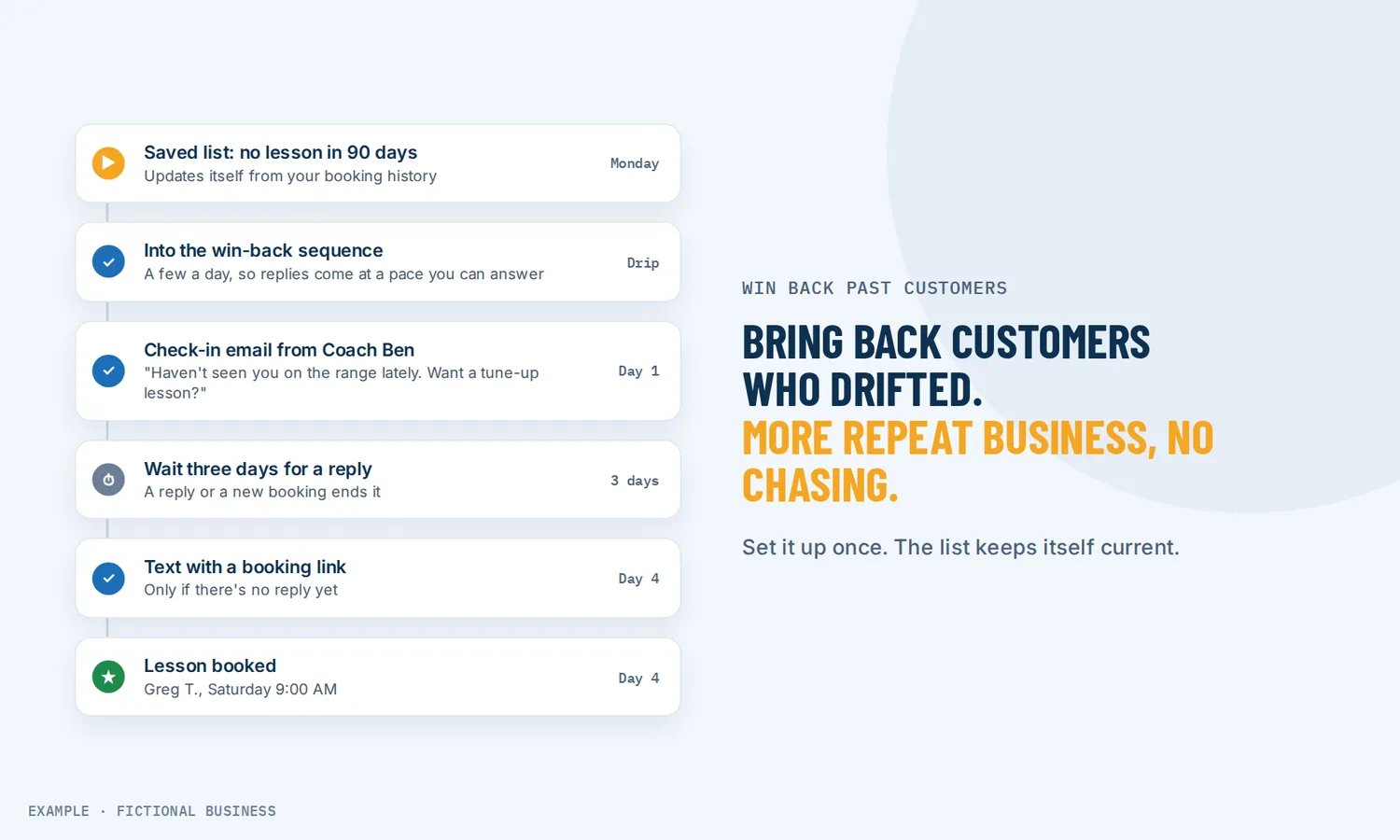
Here is how it works on the Revenue Growth HQ platform:
- You decide what "lapsed" means for your business. A cleaning customer who books monthly is late after six weeks. A dental patient is late after seven months. Pick the gap that fits your buying cycle.
- The platform finds them. A saved list filters contacts by last appointment date, for example "last appointment more than 90 days ago" and tagged as a customer. You can also filter on when they last opened or clicked one of your emails.
- A sequence starts. Either the whole list goes into a win-back workflow at once, at a scheduled time or in small batches, or each customer enters it automatically a set time after their last visit.
- Messages go out by email, text or both. A soft check-in first, then, if there is no reply after a few days, a second message with a reason to book.
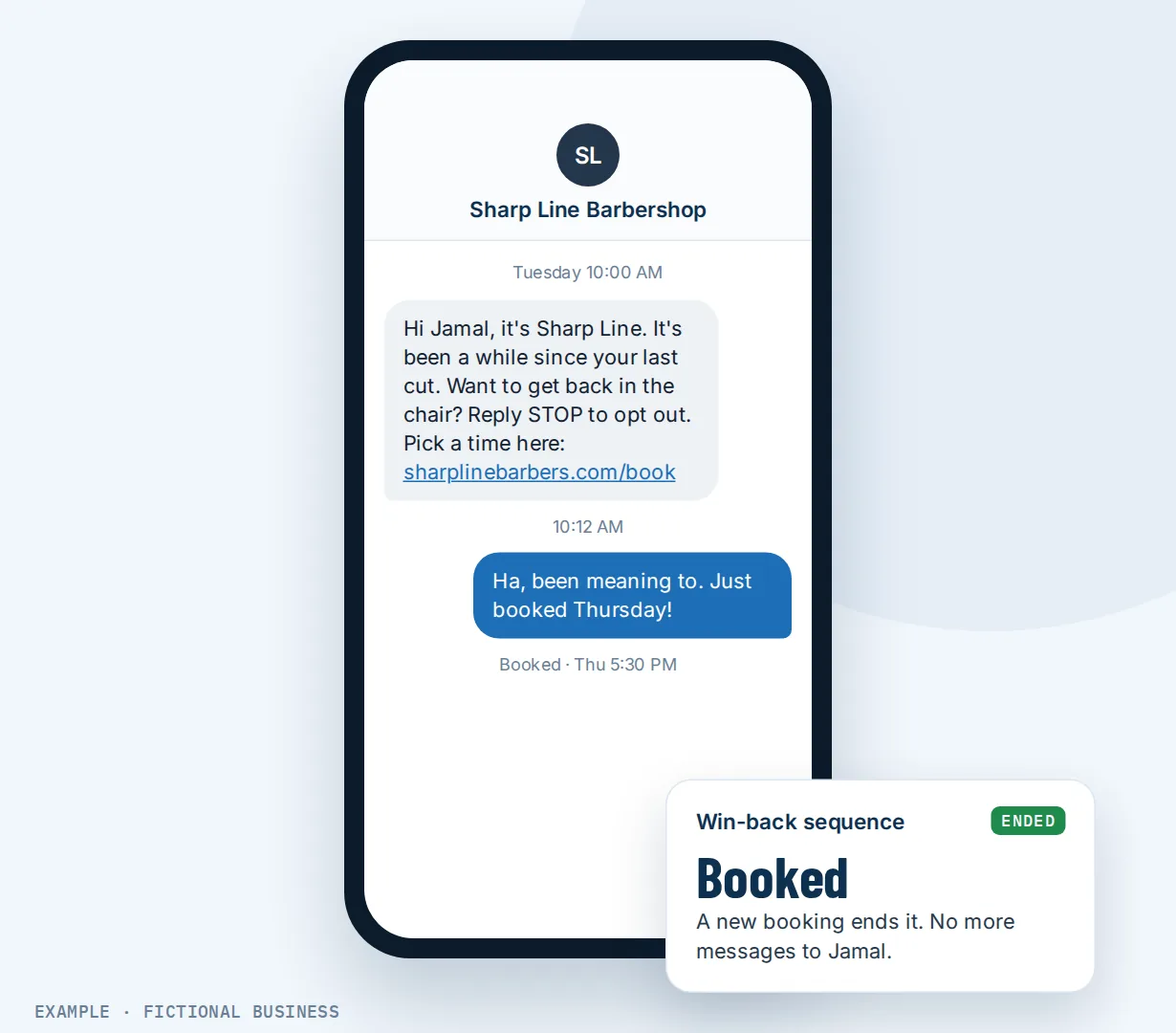
- It stops when they respond. A reply takes them out of the sequence, and a new booking can end it too, so a customer who just came back does not get a "we miss you" email the next day. Your team can get an alert on their phone when someone replies.
What a win-back campaign changes for a small business
Revenue from people who already trust you
A past customer already knows your work and your prices. In a 2014 Harvard Business Review article, Amy Gallo wrote that, depending on the study and the industry, acquiring a new customer is anywhere from five to 25 times more expensive than keeping an existing one. The same article reports research by Frederick Reichheld of Bain & Company that a 5% increase in customer retention increases profits by 25% to 95%. The ranges are wide and they are not about small businesses in particular, but the direction is clear: a customer you keep is cheaper than one you replace.
Nobody has to remember to chase them
Many small business owners know a few regulars have gone quiet but have no time to work out who and write to each one. A saved list does the looking, and the workflow does the sending.
The message arrives while it still makes sense
A note six weeks after the last visit reads as a friendly reminder. The same note two years later reads as spam. When the sequence is timed from the last appointment, each customer hears from you around the point they would normally have booked again.
You learn why people stopped
Not everyone who lapses was unhappy. Some moved, some forgot. A check-in that asks a simple question brings replies into one inbox, and a pattern in them (a price, a wait, a missed callback) is worth knowing either way.
How win-back plays out
A home cleaning business. Let's suppose you run a cleaning service and most customers book every two to four weeks. You set a saved list for customers whose last appointment was more than eight weeks ago. Once a month you put that list into your win-back workflow in drip mode, a few dozen people a day so replies don't arrive all at once. The email says you have a few open spots this week and asks them to reply with a day that suits them. Anyone who replies leaves the sequence and lands in your inbox, where you or a team member offers a time. A version of this (one email, reply to book) is what we built and ran on our own demo cleaning business.
A salon or spa. Let's suppose you run a salon where regulars come every six weeks. Each appointment marked as showed starts a workflow that waits ten weeks. If the customer books again in that time, the workflow ends there and nothing is sent. If not, they get a short text with a link to your booking page. Three days later, with no reply, a second message follows by email with a seasonal service they have not tried.
A B2B service. Let's suppose you sell quarterly services to other businesses, such as equipment servicing or bookkeeping reviews. When a job is marked won, the platform sends a thank-you, then sets a follow-up date three months out. On that date a check-in email goes out asking if they want to book the next visit.
What to look for in a way to win back past customers
Questions to ask before you choose a tool or a method:
- Can it find lapsed customers by itself? Look for a filter on last appointment or last purchase date, so the list is current without an export to a spreadsheet.
- Can you combine filters? "Last appointment more than 90 days ago" AND "tagged customer" is a more useful list than either alone.
- Can it run on a timer from each customer's last visit, as well as on a list you send to once?
- Does it stop when the customer replies or rebooks? A sequence that keeps going after someone books makes you look careless.
- Can it send email and text from one sequence, with a wait between steps and a different message if there's no reply?
- Can you send in batches? Putting a large list in at once can bury you in replies on a busy day.
- Does it respect sending hours, so a text does not arrive at 2 a.m.?
- Do replies come back to one inbox, with an alert to whoever handles them?
- Does it handle opt-outs? A customer who replies STOP should stop getting texts.
A spreadsheet and a mail merge cover the first send. The rest of the list is where a system that holds your bookings, contacts and messages together saves the most time.
Win-back works better with automation, booking and campaigns
Win-back plus workflow automation. The sequence itself is a workflow: a trigger (a tag added, a list put in, or a visit marked showed), a wait, a message, a wait for a reply with a timeout, and a second message. Goal steps end the sequence early when someone books, and branches send different messages to different groups. You can describe the sequence in plain words and have the AI builder draft it for you to check. See automated follow-up workflows.
Win-back plus a booking page. The easiest message to act on has a link that goes straight to an open time. When the link points to your booking page that customers use themselves, the returning customer picks a slot without a phone call, and that new booking can end the win-back sequence on its own.
Win-back plus email campaigns. Some messages suit a single, designed email rather than a sequence: a seasonal offer or a note that you have added a new service. You can send a marketing email to a saved group of past customers, built from tags, contact fields and engagement.
Win-back plus group texts. Text is short and gets read on the phone. For a quick "we have openings next week" note, you can send one text to many past customers at once. Texts are billed by use, and texting US numbers needs carrier registration first.
Win-back plus an AI chat assistant. When a past customer replies "do you have anything Thursday?", an AI assistant can answer, offer open times and book them in the same conversation. AI replies are billed by use.
Win-back options: from free to done-for-you
The right choice depends on how many past customers you have, how often they buy, and how much of the follow-up you want to run yourself.
By hand. Scroll your calendar or invoices, make a list, and call or text people one by one. It costs only time and is the most personal. It also tends to happen once, in a quiet week.
An email tool on its own. A standalone email service can send a "we miss you" email to a list you upload. The catch is that it doesn't know who booked last week. You export the list from your booking system, and the list is out of date the day after you send.
Separate apps joined together. Connector tools can pass "last booked" data from your booking app to your email or texting app. It works, but each app is a monthly fee and each connection can break without anyone noticing.
All-in-one platforms. Booking history, contacts, email, texts and automation sit in one system, so the list of lapsed customers stays current and the sequence can end when someone books. The tradeoffs: more to set up, and more features than a business with a handful of customers may want.
Hiring someone. A marketing assistant or agency can run win-back campaigns for you, at the cost of wages or fees, and the follow-up depends on their time.
Here's our solution
Revenue Growth HQ is an all-in-one platform where your bookings, contacts, inbox, email, texts and automation work together. Finding past customers, saved lists and win-back workflows are included in the $97-a-month plan. The emails and texts the sequence sends, and any AI replies, are billed by use, and you see the rates before setup. Setup is priced by how much you want done: we can build your lapsed-customer list and win-back sequence for you, or show you how and let you do more of it yourself.
The first step is a free 20-minute Revenue Leak Audit, where we look at how many past customers your business could be bringing back.
Limits to know
- A last-appointment list finds customers who booked on your calendars. For customers you served before you switched, or jobs never booked on a calendar, add a tag or a date when you import them so a list can find them too.
- Texts cost money and need registration. Each text is billed, and texting US mobiles waits on carrier registration. Email does not need it.
- A workflow left in draft sends nothing. Contacts tagged while it is in draft are not picked up later when you publish it, so publish before you tag or put a list in.
- Bad addresses fail. An old or mistyped email address errors for that contact, so an old list will have some misses.
Win-back features included
- Saved lists filtered by last appointment, last activity, email opens and clicks, tags and more
- Win-back workflows started by a tag, a list or a visit status
- Wait steps, including waiting for a reply with a timeout
- Goal step that ends the sequence when a customer rebooks
- Stop the sequence when a customer replies, on any channel
- Email and text in one sequence
- Branches for different messages to different groups
- Send a list all at once, at a scheduled time, or in drip mode
- Sending hours, so messages wait for your open window
- Reply alerts to your team, including on the mobile app
- Automatic text opt-out when a customer replies STOP
- Follow-up dates set automatically after a job, for a check-in later
Frequently asked questions
How do I win back lost customers?
Start by defining "lapsed" for your business, based on how often a regular normally buys. Make a list of customers past that point, starting with the most valuable. Send a short, personal check-in that makes it easy to rebook, follow up once if there is no reply, and stop when they answer. Read the replies: they tell you why people left.
When should I send a win-back message?
Send it around the time the customer would normally have come back, not months later. A monthly service might check in after six to eight weeks; a twice-a-year service might wait seven or eight months. Base it on your own buying cycle.
What should a win-back email say?
Keep it short and about them: a friendly note that you have not seen them in a while, one reason to come back (open times this week, a new service, a seasonal job), and one easy action, such as "reply with a day that suits you" or a booking link. A discount is optional; you can lead with the check-in and save any offer for the second message.
Should I send a win-back message by email or text?
Both have a place. Email carries more detail and needs no carrier registration. Text is short and read quickly on the phone, but texting US numbers needs registration first. Both are billed by use. A common pattern is email first, then a short text if there is no reply, to customers who have agreed to hear from you by text.
Can win-back messages run automatically?
Yes. You can put a saved list of lapsed customers into a workflow whenever you choose, or have each customer enter a workflow on their own a set time after their last visit. The workflow sends the messages, waits for replies, and ends when the customer replies or books again.
How do I stop messaging customers who come back?
Turn on "stop on response" so a reply takes the customer out of the sequence, and add a goal step on appointment status so a new booking ends it. With both, a customer who rebooks or answers does not get the next message.
What does a win-back campaign cost?
Doing it by hand costs only time. Email tools and connector apps usually charge monthly. On Revenue Growth HQ, saved lists and win-back workflows are included in the $97-a-month plan; the emails and texts sent are billed by use, and texting US numbers needs carrier registration with its own fees. Setup is priced by how much you want done.
Find out how many past customers you could bring back.
Book a free 20-minute Revenue Leak Audit. We'll look at your customer list and booking history and show you where repeat business is slipping away, and what a win-back sequence would look like for your business.
Sources
- Gallo, A. "The Value of Keeping the Right Customers." Harvard Business Review, October 29, 2014. https://hbr.org/2014/10/the-value-of-keeping-the-right-customers (checked 2026-10-18)