
Email marketing for small business: stay in touch with customers who already know you.
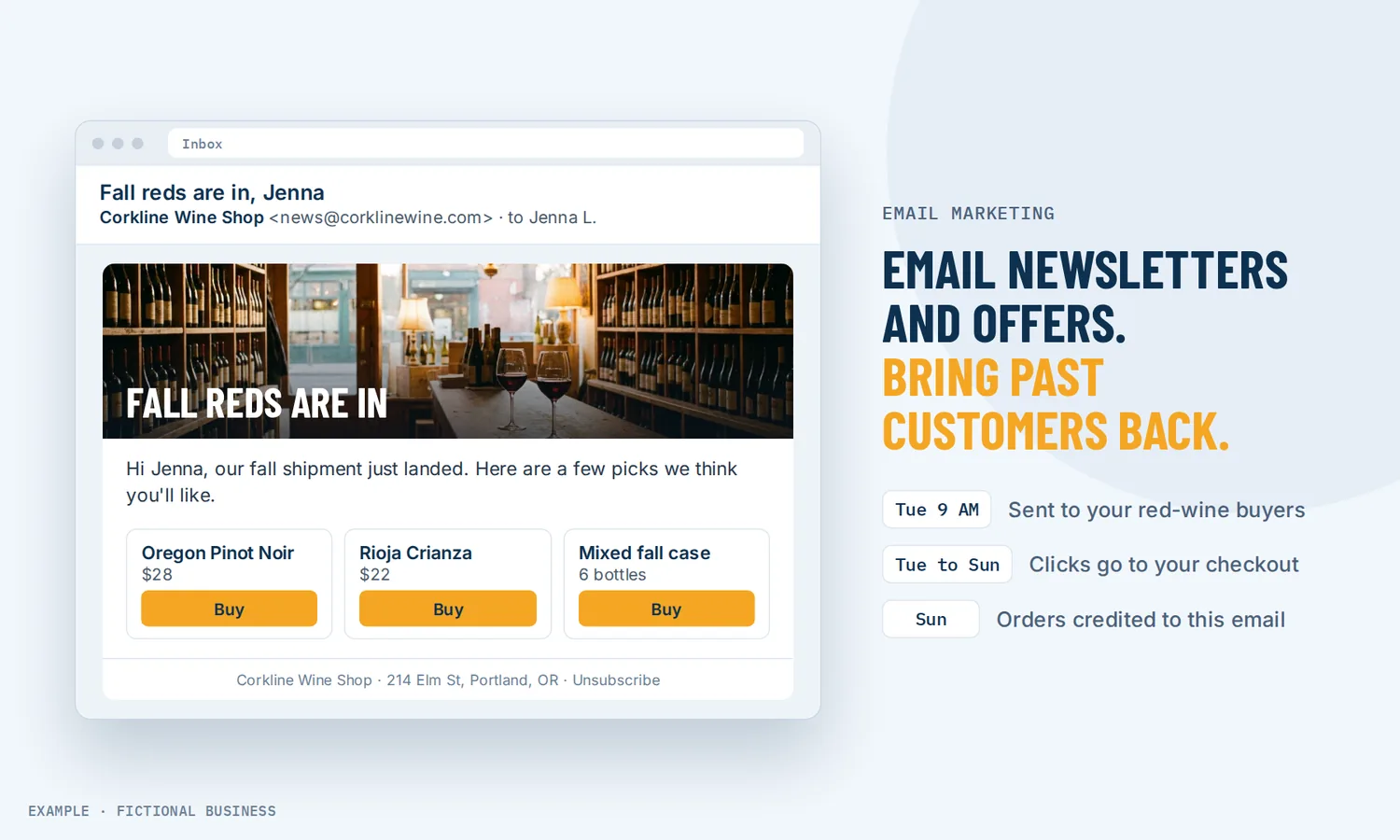
Email marketing for small business means sending a designed newsletter or offer to people who asked to hear from you, and seeing who opened and clicked. On Revenue Growth HQ, you build the email, pick the group of customers it goes to, and send it now or on a schedule, from the same system that holds their bookings and purchases.
Book a free Revenue Leak Audit
What email marketing is and how it works
An email campaign is one message sent to many people at once: a monthly newsletter, a seasonal offer, a new service announcement. It goes to people who gave you their address and agreed to hear from you, and each one can unsubscribe.
Here is how it works on the Revenue Growth HQ platform:
- You build the email. Start from a saved template with your logo and colors, a blank drag-and-drop layout, or a plain text editor for a personal-looking note. Merge fields add each customer's first name or other details.
- You choose who gets it. Pick one or more tags, a saved group of contacts, or build a filter on the spot (for example, customers tagged "VIP" who opened an email in the last 60 days). Your contacts come from your customer records, forms and bookings.
- You test it. Preview on desktop and mobile, and send a test to yourself.
- You send or schedule it. Send now, pick a date and time, or spread a large list over several batches.
- You read the results. Each campaign shows delivered, opens, clicks, unsubscribes and bounces, down to which contact did what.
What email marketing changes for a small business
Repeat business from people who already know you
Your past customers already trust you. A regular email keeps your name in front of them, so when they need you again, or a friend asks for a recommendation, you are more likely to be the business they think of.
A list you control
A social network decides which followers see each post. An email is sent to each person on your list, and the list stays with your business for any offer you launch next.
Offers sent to the people who care about them
One email to everyone tends to grow unsubscribes. Because your contacts carry tags and history, you can send a spring tune-up offer only to past HVAC customers, or a new class schedule only to members. Smaller, better-fitted sends tend to get read, and fewer people mark them as spam, which helps later emails reach the inbox.
Less time per send
Once a template holds your header, footer and colors, a new email is a matter of writing the middle and picking the group. An RSS email can send your newest blog posts on a schedule you set, and it skips the send when there is nothing new.
How email marketing plays out
A home service business. Let's suppose you run a lawn and garden company. In late winter you send a "book your spring cleanup" email to every customer tagged with last year's service, in batches over a few days, with a button to your booking page. Customers who did not open it get the same email again a few days later with a new subject line. The ones who book appear on your calendar, and the campaign report shows who clicked.
An online teacher or coach. Let's suppose you sell a video course and run a paid member group. A monthly newsletter goes to everyone on your list with one useful lesson and a link to your online course or membership. A separate email goes only to members, inviting them to this month's live session in your member community.
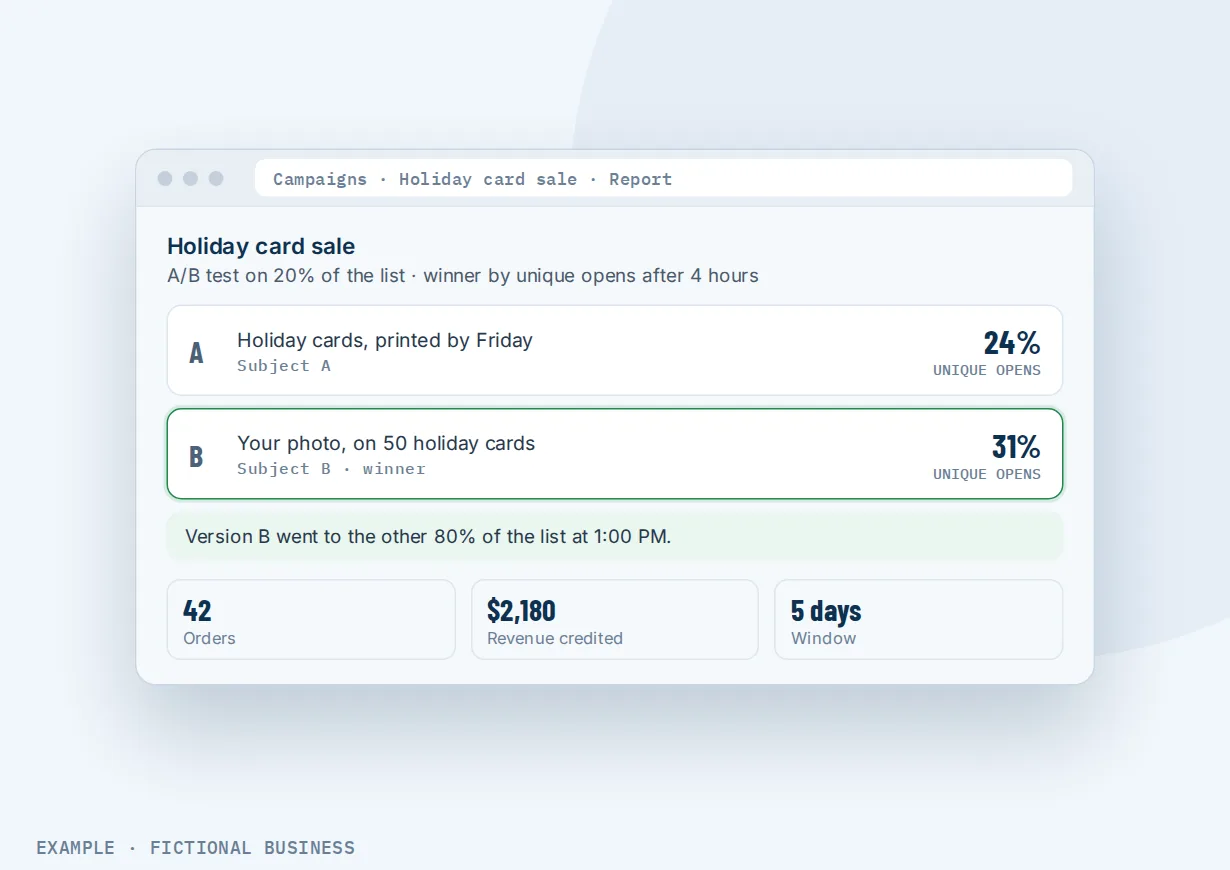
A shop with products. Let's suppose you sell skincare online and in person. Before a holiday weekend, you test two subject lines on part of your list; after four hours, the one with more opens goes to everyone else. The email shows three products with a button to each checkout page, and the campaign's report shows the orders and revenue credited to it over the following five days.
What to look for in email marketing for small business
Questions to ask before you pick a tool for email marketing for small businesses:
- Is the builder easy enough to use every month? Drag-and-drop blocks, saved templates and a mobile preview.
- Can you send to part of your list? Tags, saved groups and filters on activity let you send each offer to the people it fits.
- Can you schedule and test? Look for scheduled sends, a test email, and A/B tests on subject lines or content.
- Does it handle unsubscribes and bounces for you? Each email should carry an unsubscribe link, and anyone who unsubscribes, complains or bounces should drop off future sends without anyone doing it by hand.
- Does it help you meet the sending rules? A verified sending domain with SPF, DKIM and DMARC records is what large inbox providers expect.
- Are the reports honest? Opens, clicks and unsubscribes per campaign, and ideally the sales a campaign brought in.
- Is it connected to your customers? If the email tool is separate, every list has to be exported and imported. Inside the same system as your bookings, purchases and messages, a list stays current by itself.
- How is it priced? Some tools charge by list size, others by emails sent. Know which before your list grows.
A one-person business sending one newsletter a month can get by with a simple standalone tool. The more you want to send different emails to different customers, the more it pays to have email in the same place as your customer records.
Email marketing works better with automation and AI
A campaign reaches your list once. These pairings cover what happens before and after.
Email plus an AI writer. A blank page is where many newsletters stall. The builder's AI writer drafts text from a title, a few keywords and the tone you pick, and gives you up to five versions to choose from. It can also write the variations for an A/B test. You edit and approve the result; AI writing is billed by use. More on the AI writing assistant.
Email plus win-back automation. A campaign is a one-time send. Customers who quietly stop coming back need something that runs on its own. Bringing back customers who stopped buying groups people who haven't booked in a while and sends them a check-in or offer automatically. An opened email or a clicked link can also start a workflow, such as tagging the contact or sending a follow-up, through your automated follow-up.
Email plus an online store. An email can carry a product block with a photo, name, price and a button to its checkout page. The campaign report then shows orders and revenue credited to that email within five days, by default. The block links to checkout rather than taking payment inside the email. See selling products from your website.
Email plus a text campaign. Some offers can't wait for someone to check their inbox. A short text to your whole list works for a same-day reminder or a last call, while the email carries the full story. Send texts only to people who agreed to get them; texting is billed by use and US numbers need carrier registration first.
Your options: from free to done-for-you
Small business email marketing can run on anything from your own inbox to a full platform. The right choice depends on how big your list is, how many different groups you write to, and how much setup you want to do yourself.
Your regular inbox. Sending a group email from your own mailbox is free and familiar. It works for a few dozen people you know well, but it has no unsubscribe link and no reports, and it gets unworkable as the list grows.
Free plans from email marketing tools. Many email tools have a free tier with a contact or sending cap. It is a fair way to start. Check what the free plan leaves out (scheduling, automation, removing the tool's branding) and what the paid tier costs once your list grows.
Paid standalone email tools. A dedicated email app adds better templates, segmentation and automation, often priced by list size. The catch: your customer records, bookings and payments live elsewhere, and lists move between systems by import, export or an integration you keep working.
All-in-one platforms. Here, email sits in the same system as your contacts, booking, payments and texting. Bookings, purchases and tags are already on each contact record, so the group for each email is ready when you need it. The tradeoffs: more to set up, and more features than a once-a-month newsletter needs.
Hiring someone. A freelancer or agency can write, design and send your emails. That saves your time, and a good writer can lift results, but it costs a monthly fee and leaves you dependent on them for each send.
Here's our solution
Revenue Growth HQ is an all-in-one platform with email marketing built in, alongside your customer records, website, booking, payments, texting, automation and AI assistants. The platform is $97 a month, and email marketing is included. Email sending and AI writing help are billed separately, by use; you see the rates before setup. Setup is priced by how much you want done: we can set up your sending domain, a branded template and your first customer groups, or show you how and let you do more of it yourself.
The first step is a free 20-minute Revenue Leak Audit, where we look at who you are already in touch with and which past customers have gone quiet.
Limits to know
- Opens are an estimate. Some email apps load images when a message arrives, not when it is read, so open counts run high. Use opens to compare one email with another, and judge results by clicks and sales.
- Best-time sending needs history. The AI send-time option needs at least 1,000 emails delivered from your account in the last 60 days, and it does not work with A/B tests or batch sends.
- An A/B test checks one thing. Each campaign tests either the subject line or the content, not both.
- Your domain has to be set up first. Campaigns send from a verified domain, which takes a few DNS records before your first send.
Email marketing features included
- Drag-and-drop email builder with saved templates
- Plain text editor for personal-looking emails
- Merge fields for names and other contact details
- AI writing help in the builder (billed by use)
- Import an existing email from another platform as a template
- Send to tags, saved groups or filtered segments
- Send now, schedule, or send in batches
- AI-suggested send time once your account has enough history
- RSS emails that send your newest blog posts
- A/B tests on subject lines or content
- Resend to contacts who did not open (RSS and batch sends)
- Opens, clicks, unsubscribes, bounces and attributed revenue per campaign
- Product blocks with links to checkout
- Automatic unsubscribe link and suppression of unsubscribes, complaints and bounces
- Email opens and clicks can start an automation
Frequently asked questions
How do I start email marketing as a small business?
Start with the people who already know you: past customers and leads who gave you their email and agreed to hear from you. Add a sign-up form to your website. Pick one simple format and send it on a regular schedule. A common email newsletter for small business carries one useful tip and one offer a month. Give it a few months of clicks and unsubscribes before changing much.
How often should a small business send marketing emails?
Often enough that people remember you, and only as often as you have something worth reading. One email a month is an easy place to start, with more around seasonal offers. Watch unsubscribes and spam complaints: a rise after a change in frequency is your answer. A smaller, better-fitted group usually beats more email to everyone.
What is a good email open rate?
There is no reliable single number. Privacy features in some email apps load images when a message arrives, not when it is opened, so opens count people who never read the email. Use your open rate to compare your own emails with each other, for example two subject lines, and judge results by clicks, replies, bookings and sales.
What are the legal rules for marketing emails in the US?
The federal CAN-SPAM Act applies to commercial email, including email to other businesses. The main rules: no misleading From lines or subject lines, identify the message as an ad, include your valid physical postal address, give a clear way to opt out, and honor opt-outs within 10 business days. Campaigns on the platform carry an unsubscribe link by default, and unsubscribes are suppressed automatically.
Will my emails land in spam?
Following the rules large inbox providers publish lowers the odds. Gmail asks every sender to authenticate their domain, and senders of more than 5,000 messages a day to Gmail need SPF, DKIM and DMARC, one-click unsubscribe, and a spam rate below 0.30%, with 0.10% as the target. Send to people who asked to hear from you, and keep the list clean.
Can I bring my existing list from another email tool?
Yes. You can import your contacts with a CSV file and tag them to keep the groups you had. Templates can come too: forward an existing email to an import address and the AI turns it into an editable template, which you should check before sending. Only bring contacts who agreed to hear from you.
What does email marketing cost on Revenue Growth HQ?
Email marketing is included in the $97-a-month platform. Each email you send is billed by use, as is AI writing help, and you see the rates before setup. Setup is priced by scope: we can set up your sending domain, template and first groups, or show you how.
Ready to hear from your past customers again?
Book a free 20-minute Revenue Leak Audit. We'll look at who is already on your list, which customers have gone quiet, and what one well-aimed email could bring back.
Sources
- Google. "Email sender guidelines." Google Workspace Admin Help. https://support.google.com/a/answer/81126 (checked 2026-10-18)
- Federal Trade Commission. "CAN-SPAM Act: A Compliance Guide for Business." https://www.ftc.gov/business-guidance/resources/can-spam-act-compliance-guide-business (checked 2026-10-18)
- Apple. "Protect email privacy in Mail on Mac." Mail User Guide. https://support.apple.com/guide/mail/protect-email-privacy-mlhlp1205/mac (checked 2026-10-18)