
CRM for small business: every customer's history in one record, so nobody starts from zero.
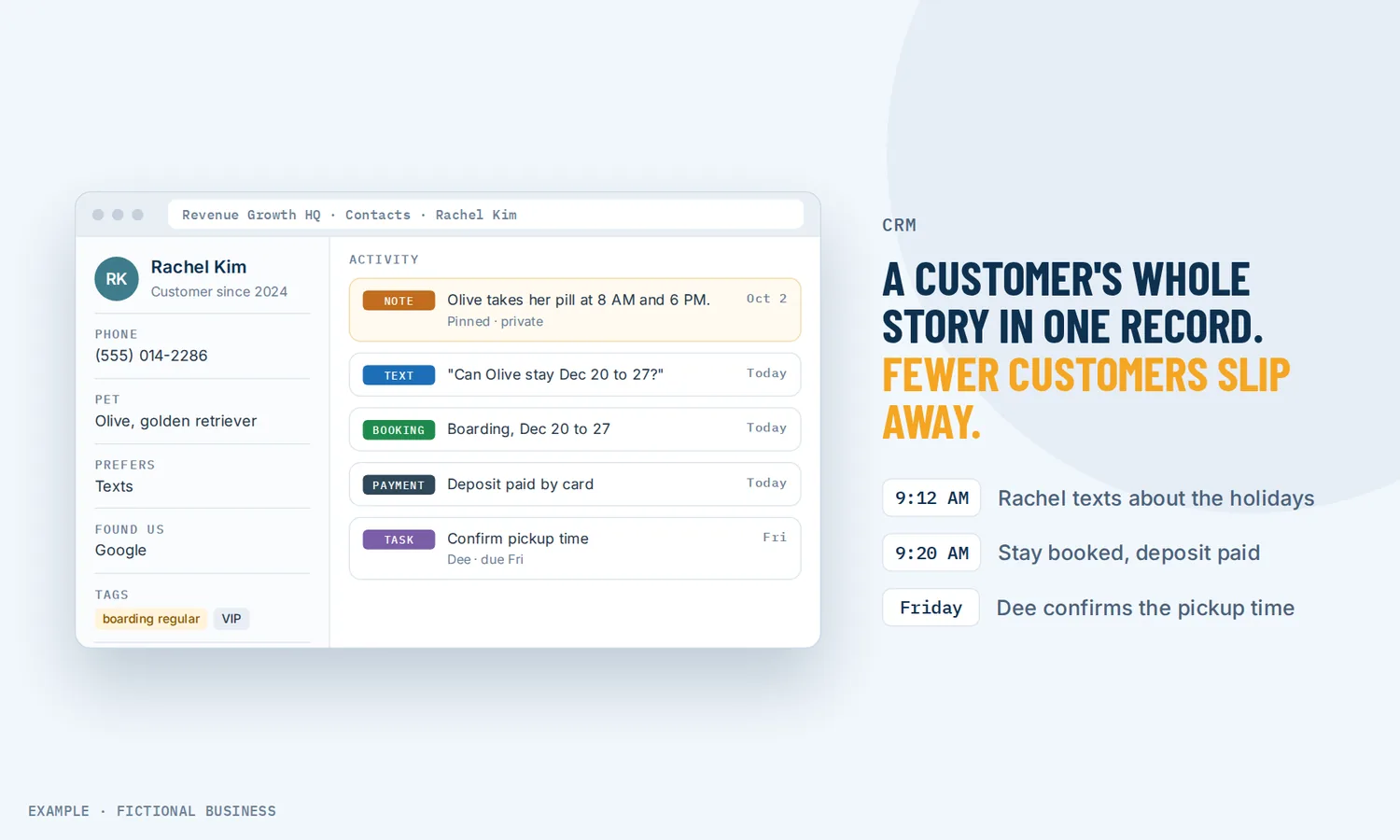
A CRM for small business is one place that holds each customer's details, notes, tasks, messages and bookings, so anyone on your team can open a name and see the whole story. For small business owners, that means less time hunting through inboxes and spreadsheets, and fewer customers who slip away because nobody followed up.
Choose 3 setups for us to build
What a CRM is and how it works
CRM stands for customer relationship management. In practice it is a customer database for small business use that does more than store names. Basic contact management software keeps names and numbers; a CRM gives each person a record, and everything your business does with that person collects on it.
Here is how it works on the Revenue Growth HQ platform:
- Contacts come in. Someone fills out a form on your website, books an appointment, or messages you on Facebook or Instagram, and a contact record is created for them. You can also add people by hand or import a spreadsheet.
- The record fills up. Their name, email and phone sit at the top. Your own fields hold what matters to your business, such as the service they want, their budget or how they found you. Tags mark groups, such as "past customer" or "VIP".
- Your team adds what it knows. Private notes record what was said on a call. Tasks with a due date and an owner make sure someone calls back.
- History collects on its own. Texts, emails, calls, appointments, form answers, invoices and payments show on the same record.
- Lists and follow-up use it. Saved filters pull out the right group of people, and changes to a record, such as a new tag, can start automatic follow-up.
What a CRM changes for a small business
The whole story before you pick up the phone
Without a CRM, a customer's history is split across your texts, your email, a notebook and someone else's memory. With one record, you see their last messages, their next appointment, what they paid and the note from last month's call before you say hello. Customers notice when they don't have to repeat themselves.
Fewer leads forgotten
A lead can go cold simply because nobody got back to them: the quote request that came in on a busy Friday, the person who said "call me next month". A task with a due date and an assigned team member turns "I'll follow up" into an item someone has to check off. A saved list of everyone who asked for a quote and hasn't booked shows you who is still waiting.
Marketing that goes to the right people
A spreadsheet can hold names, but messaging the right group from it is slow and easy to get wrong. When every contact carries tags and fields, you can pick "past customers tagged VIP" or "leads who asked about the premium service" in a few clicks and send them something that fits. Each person's channel preferences sit on the record too: a channel they have turned off is grayed out, and scheduled messages on it stop.
A business that doesn't live in one person's head
If you are the only one who knows which customers are waiting on what, every day off is a risk. A shared CRM lets a new hire or a part-time assistant pick up where you left off, and an owner on each task makes it clear who is calling whom.
How a CRM plays out
A home service business. Let's suppose you run a plumbing business with two vans. A homeowner fills out the quote form on your website, and a contact record is created with their address and the job they described. The office adds a note after the phone call and sets a task to send the estimate by Thursday, assigned to you. Two years later the same homeowner calls about a water heater. You open their record and see the earlier job, what they paid and that they prefer texts to calls.
A consultant or agency. Let's suppose you sell professional services to other businesses. Several people from one client company get in touch over time: the owner, an office manager and someone in finance. You group them under one company record so you can see everyone you know there. Your notes record what each person cares about, and a recurring task reminds you to check in with the owner every quarter.
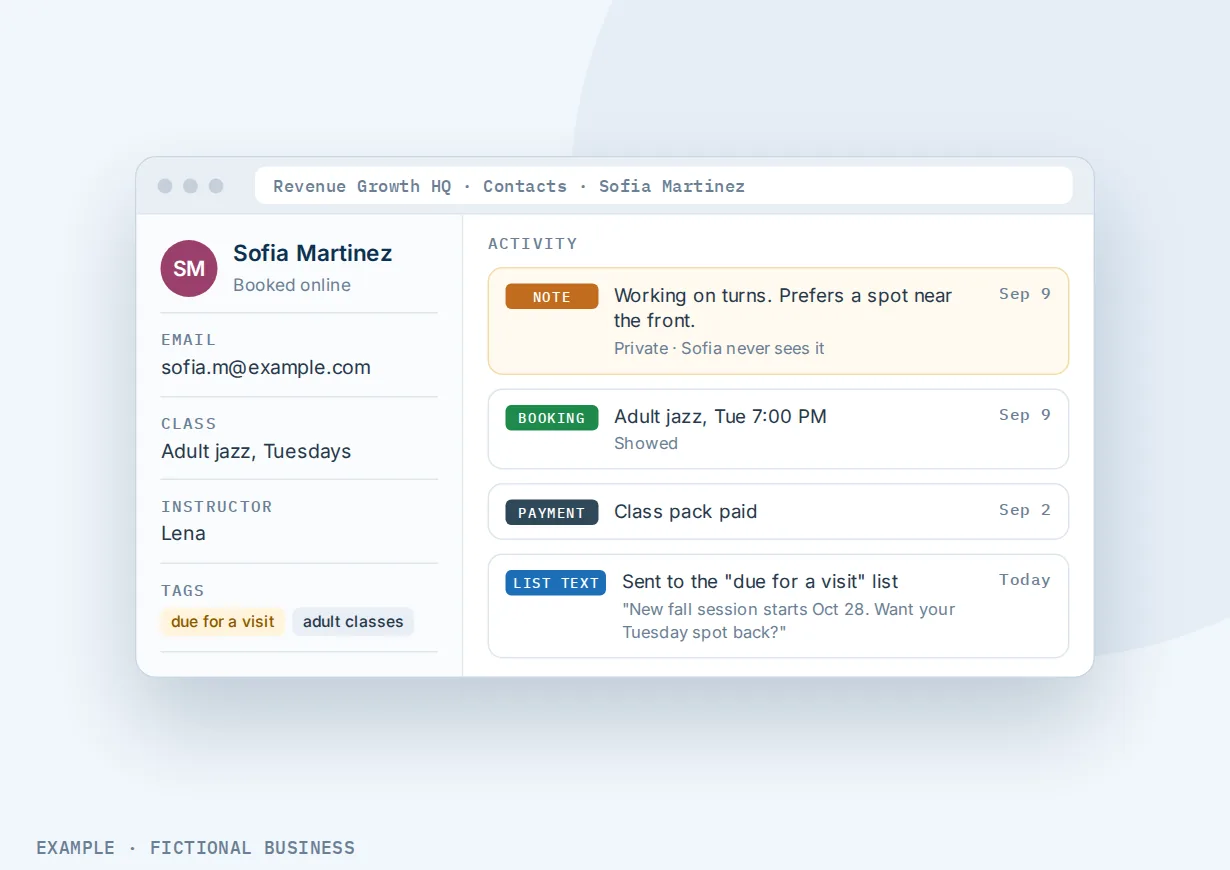
A salon or studio. Let's suppose you run a salon with a few stylists. Each client who books online gets a record with their appointments and payments on it. Stylists add private notes on color formulas and preferences, which the client never sees. Clients you tag "due for a visit" fall into a saved list, and you can send them all one message from it.
What to look for in a CRM for small business
Questions to ask before you commit:
- Do contacts arrive on their own? Forms, bookings and messages should create or update records without anyone retyping them. See forms that save answers to the customer's record.
- Can you add your own fields? Each business tracks something different. Look for custom fields that also work on your forms and in your messages.
- Does it stop duplicates? The same person filling out two forms should not become two records. Look for duplicate checks on email or phone and a way to merge records that already doubled up.
- Are notes and tasks on the record? Notes should be private to your team, and tasks should have a due date and an owner.
- Do messages show up on the record? A CRM that can't see your texts and emails leaves you checking several apps. Ideally it is the same place you reply.
- Can you build lists from it? Saved filters by tag, field or activity are what turn a contact list into marketing, such as email campaigns to a tag or saved list or one text to many customers at once.
- Can you get your data in and out? CSV import to move in, CSV export so you can take your customer list with you.
- Does it respect opt-outs? Contact preferences per channel (email, text, calls) should stop messages to people who asked not to get them.
- Does it work on your phone? You should be able to look up a customer, see their notes and call or text them from the free mobile app.
A simple CRM that covers the first five suits a one-person business. The more of the list you need, the more it pays to have the CRM inside the same system as your messages, calendar and payments.
A CRM works better with automation, an inbox, a pipeline and forms
A CRM holds what you know about each customer. The time it saves comes from what the rest of the platform does with that record.
CRM plus workflow automation. A change to a record can start follow-up: a new tag, a contact type moving from lead to customer, a field update or a new assigned team member. A workflow can also write back to the record: add tags, update fields, create tasks and assign new leads to team members in turn. See automatic follow-up built on your contact records.
CRM plus a unified inbox. Texts, email, Facebook, Instagram and website chat for each customer land in one conversation, with their contact record beside it. You reply with their history in view, and the messages show on the record. See all customer messages in one inbox.
CRM plus a sales pipeline. The record tells you who someone is; the pipeline tells you where a deal stands. Each deal on the board shows on the contact's record. If you track quotes or jobs through stages, pair your contacts with sales pipeline software on the same platform.
CRM plus forms and surveys. A form is how most records start. Each answer can go straight into a contact field, so the service a lead asked about or their budget is on the record before you call. See forms and surveys that fill in your contact records.
Your options: from free to done-for-you
The right choice depends on how many people work with your customers, what else the CRM needs to connect to, and how much setup you want to do yourself.
A spreadsheet. Free and familiar, and many businesses start here. It works while one person keeps it current, falls behind once several people use it, and can't see your messages, bookings or payments. A spreadsheet stores names; a CRM collects history.
Free CRM plans. Several CRMs offer a free tier that covers contacts, notes and tasks. It is a fair way to try the idea. Check what the free plan leaves out (users, automation, texting, your own fields) and what the paid tier costs once you rely on it.
Standalone small business CRM software. A dedicated CRM adds more control, reporting and automation, often for a monthly fee per user. The catch is that it is one more app: your texting, booking, reviews and payments live elsewhere, and you connect them with integrations that have to be kept working.
All-in-one platforms. Here, the CRM sits in the same system as your inbox, calendar, payments, marketing and automation. Records fill in from your forms, bookings and messages without a connector. The tradeoffs: more to set up, and more features than a business that only needs a contact list may want.
Hiring someone. An assistant or office manager can keep customer records and follow-up current. That has real value, but it costs wages, and the knowledge can leave with them. You can also hire someone to set up any of the options above, which saves your time but leaves you dependent on them for changes.
Here's our solution
Revenue Growth HQ is an all-in-one platform with the CRM at its center, alongside your website, forms, inbox, calendar, payments, reviews, automation and AI assistants. The CRM comes with the plan. The plan is $97 a month (or $970 a year) and includes $30 of usage credit each month for your phone number, calls, texts, email and most AI features. Use beyond $30 in a month is billed by use, at the same rates as buying the software directly, and you see the rates before setup.
Setup is a one-time $197. The CRM is what every setup runs on, so you choose 3 jobs from our list for us to build on it, such as new-lead follow-up, appointment reminders and online booking, or review requests. With any choice we build your knowledge base from your website, and when a choice calls or texts, we set up your business phone number and its texting registration. See the setups and choose your 3.
Limits to know
- Merging is permanent. Merging duplicate records can't be undone, and the record you keep wins any conflict on fields it already has filled. Check before you merge.
- Deleting a contact deletes its history. Messages, notes, tasks and appointments go with it. A deleted contact can be restored for about two months, then it is gone.
- Exports are a snapshot of your columns. An export includes the columns you have showing, only the most recent note (shortened) and no message history. Only admins can export.
- Saved lists are filters. You can't drop a hand-picked person into a saved list; tag them and filter on the tag instead.
CRM features included
- A contact record for each customer and lead
- Records created from forms, surveys, bookings and social messages
- Your own custom fields, used on forms, in messages and in filters
- Tags, added one at a time or in bulk
- Private notes with titles, pins and attachments
- Tasks with an owner, a due date and optional repeats
- Messages, calls, appointments, form answers and payments on the record
- Saved lists that update themselves, shareable with your team
- CSV import and export
- Duplicate checks on email or phone, and record merging
- Company records that group contacts from one business
- Contact preferences per channel (email, text, calls and more)
- Record changes that start automatic follow-up
- Look up contacts, see notes and tasks, and call or text from the mobile app
Frequently asked questions
What is a CRM?
A CRM (customer relationship management system) is software that keeps one record per customer or lead, with their details and the history of everything your business has done with them: messages, calls, appointments, purchases and notes. Your team works from the same records, so anyone can see where a customer stands and what should happen next.
Does a small business need a CRM?
Not on day one. A short list in a spreadsheet works while one person handles every customer. A CRM starts to pay when leads come from several places, more than one person talks to customers, or follow-up gets missed. If you have lost a job because nobody called back, that is the sign.
CRM vs spreadsheet: what is the difference?
A spreadsheet stores what someone types into it. A CRM collects history on its own: form answers, messages, bookings and payments land on the customer's record. A CRM also adds what a spreadsheet lacks, such as tasks with owners, private notes, duplicate checks and saved lists you can message directly.
Can I import my existing customer list?
Yes. Save your list as a CSV file from your spreadsheet or old system, upload it, and match each column to a contact field. Columns that don't match an existing field can become new custom fields or be skipped. You can set consent preferences as part of the import.
Can my team share the CRM?
Yes. Your team works from the same contact records, notes and tasks. Tasks can be assigned to a team member, new leads can be shared out automatically, and a saved list can be made visible to everyone. Some tools, such as merging duplicates and exporting, are limited to admins.
Can I take my customer data with me?
Yes. An admin can export contacts to a CSV file, including names, emails, phones, tags and the custom fields you choose to show. Message history is not part of the export, so keep that in mind if you plan a move.
What does a CRM cost for a small business?
Free CRM plans cover the basics, and paid CRM software often charges per user each month. On Revenue Growth HQ, the CRM is included in the $97-a-month platform, with $30 of usage credit each month; texts, calls, email sending and AI beyond that are billed by use. Setup is a one-time $197 for 3 setups of your choice built on your contact records.
Put your customer records to work.
The CRM comes with your Revenue Growth HQ plan. For a one-time $197 setup, we build 3 jobs of your choice on top of it, such as following up with new leads, booking with reminders, or asking for reviews. Pick them below. We also build your knowledge base from your website. The plan is then $97 a month.