
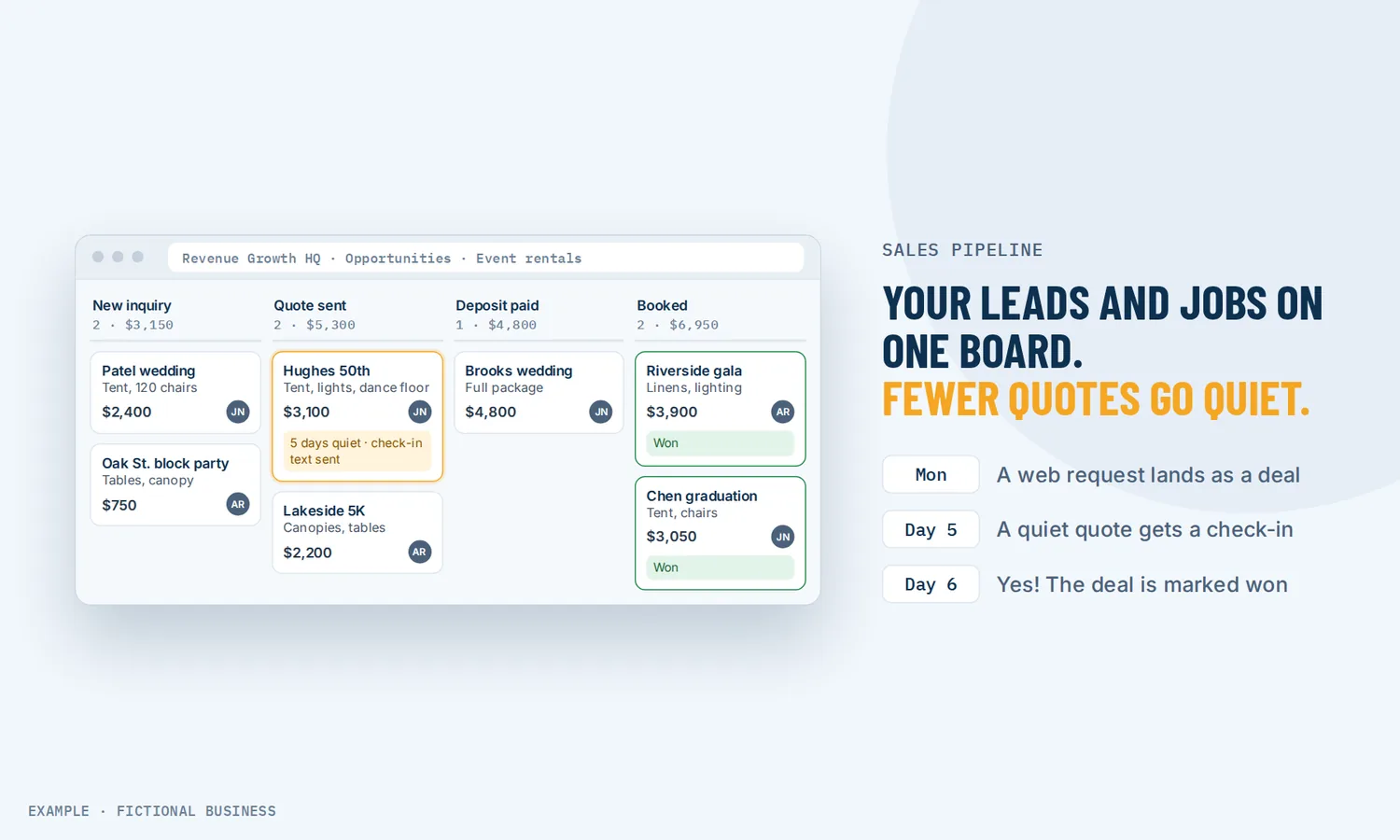
Sales pipeline software: see your leads and jobs at a glance, and lose fewer between quote and booked.
Sales pipeline software puts each lead and job on a board, in columns for the steps of your sales process, so you can see what is waiting on whom. For small business owners, that means fewer quotes that go quiet without anyone noticing, and a clear picture of what is likely to close this month.
Get new-lead follow-up set up for you
What a sales pipeline is and how it works
A sales pipeline is the set of steps a lead goes through on the way to becoming a paying customer, or not. A typical small business pipeline might read: new lead, contacted, quote sent, follow-up, won or lost. Pipeline software turns those steps into a board you can see and act on.
Here is how it works on the Revenue Growth HQ platform:
- You set the stages. Name the steps your business really uses, put them in order, and add or remove them later. A business with more than one kind of sale can run more than one pipeline.
- Leads become deals. Add a deal by hand, import a spreadsheet, or let a form, booking or call create one on its own. Each deal is tied to a contact and carries a value, an owner and any fields you add.
- You move cards as things happen. Drag a card to the next column when the quote goes out or the customer says yes. Each deal ends as Won, Lost (with a reason) or Abandoned.
- Quiet deals get noticed. A workflow can watch for deals that sit in a stage too long and send a follow-up or alert the owner.
- You see the numbers. Reports show open, won and lost value, why deals were lost, and where deals drop off.
What a sales pipeline changes for a small business
Fewer leads forgotten between "asked for a quote" and "booked"
Some sales are lost to silence: a quote goes out on Tuesday and nobody checks on it. When each open deal sits in a column, the ones that have gone quiet are easy to spot, and a workflow can flag them before you would.
Faster first contact
Speed to first contact matters. In a study of 1.25 million leads at 42 U.S. companies, published in Harvard Business Review in 2011, firms that tried to reach a lead within an hour were nearly seven times as likely to have a real conversation with a decision maker as firms that tried an hour later, and more than 60 times as likely as those that waited 24 hours or longer. The same researchers sent test leads to 2,241 U.S. companies: 37% replied within an hour, and 23% never replied at all. The research is from 2011 and about web leads, so treat the exact figures as dated. A "New lead" column in plain view makes it easier to reply fast.
A forecast you can read in seconds
Each deal carries a value, so the board doubles as a rough forecast. You can see how much is sitting in "quote sent" right now and how much closed this month, without building a spreadsheet.
Knowing why you lose
When a deal is marked Lost, the platform asks for a reason. After a few months, a chart of lost reasons tells you whether price, timing or slow follow-up is costing you most, which is a better guide to changes than a hunch.
How a sales pipeline plays out
A remodeling contractor. Let's suppose you run a remodeling business and quote a dozen kitchens a month. A request from your website form lands as a new deal in "New lead" with the job details attached. After the site visit, you move it to "Estimate sent." If a card sits there for five days with no update, a workflow texts the homeowner a friendly check-in and puts a task on your list. When the customer accepts the estimate, a workflow moves the card to "Won," and your crew lead sees it on their phone.
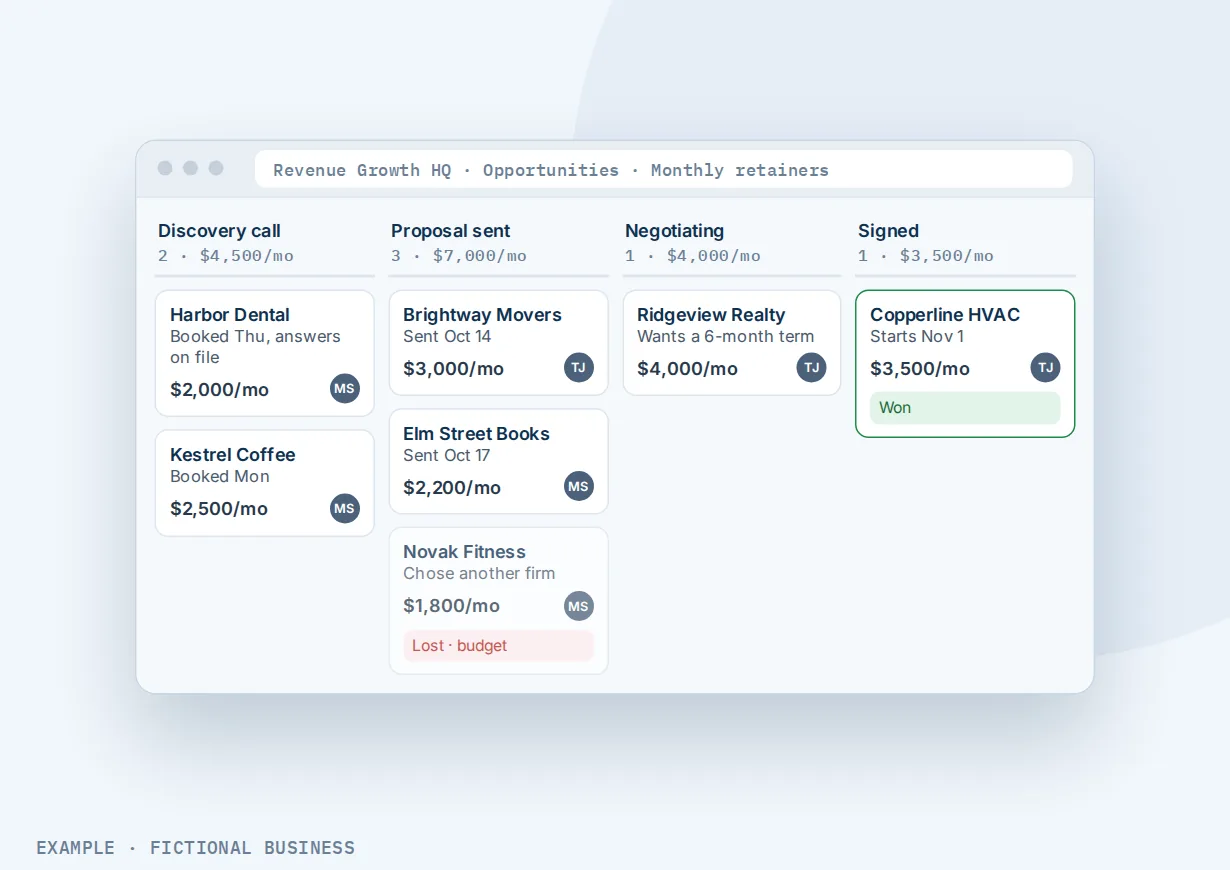
A marketing consultant. Let's suppose you sell monthly retainers to other businesses. Your pipeline runs: discovery call booked, proposal sent, negotiating, won or lost. A booked discovery call creates the deal, so you start with the prospect's answers on file. Each proposal carries its monthly value, so a glance at the board tells you whether next month looks thin. When a prospect picks someone else, you mark the deal Lost and choose "budget," and the reason report shows how often that happens.
A wedding photographer. Let's suppose you book weddings a year ahead. Inquiries from your contact form land on the board as new deals. You keep two pipelines: one for weddings and one for smaller portrait sessions, because the steps differ. The wedding board shows who has had a consult, who has a contract out and who has paid a retainer. A couple who goes quiet after the consult gets a check-in instead of being forgotten.
What to look for in sales pipeline software
Questions to ask before you commit:
- Can you set your own stages, and run more than one pipeline when you sell more than one kind of job?
- Is there a board you can drag cards across, plus a list view for sorting and filtering?
- Do new leads land on the board on their own from your forms, bookings, calls and messages, or does someone have to type them in?
- Is each deal tied to the customer's full record, with their messages, notes and history in one place?
- Can it follow up on deals that go quiet, by text, email or a task for the owner?
- Does it record why deals are lost, and report it?
- Can you see value by stage and by status, and win rates over time?
- Does it work on your phone, so you can update a deal from a job site?
- Can you import what you already have from a spreadsheet?
- Is pricing per user? Some pipeline tools charge more for each person you add.
A standalone tool can tick the first two boxes and still leave you copying leads in by hand. The more of the list you need, the more it pays to have the pipeline inside the same system as your contacts, inbox and follow-up.
A sales pipeline works better with automation, estimates and reporting
A board shows you where things stand. What feeds it and what it sets off decides whether deals actually move.
Pipeline plus workflow automation. Workflows can create a deal when a form is submitted or an appointment is booked, and react when a deal changes stage, changes status or goes stale. A deal that sits in "Quote sent" for a set number of days can trigger a text to the customer and an alert to the owner. A deal moved to Won can start your onboarding messages. See automating your follow-up.
Pipeline plus estimates. Send a price estimate the customer can accept or decline online. A workflow can watch for estimates that are sent, accepted or declined, and turn an accepted estimate into a deal or move the matching deal to Won. See sending estimates customers accept online.
Pipeline plus contact records. Every deal is tied to a contact, so opening a card shows the person behind it: their details, messages, notes and past jobs. More on the CRM for small business that holds those records.
Pipeline plus a reporting dashboard. Dashboards can show open, won, lost and abandoned value, deals and revenue over time, won deals this month for each team member, and lost deals by reason, filtered by pipeline and stage. See dashboards for your numbers.
Sales pipeline options: from free to done-for-you
The right choice depends on how many deals you track, how many people touch them, and how much you want the pipeline to do on its own.
A spreadsheet or whiteboard. Free and familiar. For a handful of jobs a month, it can be enough. The cost shows up later: nothing reminds you when a quote goes quiet, leads are typed in by hand, and the sheet does not know about your emails or calls.
Free pipeline tools. Several sales tools offer a free plan with a basic board. Check what the free plan leaves out (automation, reports, more than one pipeline, more than a few users) before you build around it. The leads usually still arrive somewhere else.
Paid pipeline apps. A dedicated pipeline app adds automation and reporting, often priced per user per month, so the bill grows with your team. It is one more app: your texting, booking and invoicing live elsewhere and need connectors.
All-in-one platforms. The pipeline sits with your contacts, inbox, forms, booking, estimates, invoices and automation. A form or booking can create the deal, and a stage change can start your follow-up, without a connector. The tradeoff is more to set up than a single board.
Hiring someone. A sales assistant or office manager can keep the board current and chase quotes. That has real value, but it costs wages, and follow-up stops when they are out. You can also pay someone to set up any of the options above.
Here's our solution
Revenue Growth HQ is an all-in-one platform with pipelines built in, next to your contact records, inbox, booking, estimates, invoices and automation. The plan is $97 a month (or $970 a year) after a $197 one-time setup, and pipelines are included. Each month includes $30 of usage credit for your phone number, calls, texts, email and most AI features; use beyond that is billed by use, at the same rates as buying the software directly. For the setup, you choose 3 setups from our list for us to build in your account, and new-lead follow-up can be one of them. See them all and choose your setups below.
Limits to know
- Four fixed statuses. Deals end as Open, Won, Lost or Abandoned. You can't rename or add statuses; your own steps go in stages.
- The board shows one pipeline at a time. To see all pipelines together, switch to list view, which can't sort by stage.
- Stale-deal follow-up starts when you set it up. It doesn't look back at deals that were already sitting idle.
- One deal per person per pipeline by default. Tracking a second job for the same customer in the same pipeline needs a setting switched on.
Sales pipeline features included
- Pipelines with stages you name, order and change
- More than one pipeline per account
- Board view with drag-and-drop, and a list view across all pipelines
- Deal value, owner, followers, source, tags and custom fields
- Open, Won, Lost and Abandoned statuses, with lost reasons
- Saved views with your filters, sorting and columns
- CSV import of contacts and deals
- Deals created by forms, bookings, calls and other workflow triggers
- Workflow triggers for new deals, stage changes, status changes and stale deals
- Dashboard widgets for deal value, status, lost reasons and trends
- Pipeline view, stage changes, calls, texts and notes in the mobile app
Frequently asked questions
What is a sales pipeline?
A sales pipeline is the series of steps a lead moves through on the way to becoming a customer, from first contact to a won or lost deal. Pipeline software shows those steps as columns on a board, with each lead or job as a card, so you can see where every deal stands and which ones need a nudge.
What sales pipeline stages should a small business use?
Use the steps you already follow, in plain words. A common sales pipeline template is: new lead, contacted, quote or proposal sent, follow-up, then won or lost. A service business might add "site visit booked"; a consultant might add "discovery call." Keep it to roughly five to seven stages, so it is clear where each deal belongs.
Is a sales pipeline the same as a contact database?
No. A contact database holds people: their details, notes and history. A pipeline tracks deals with those people as they move toward a sale. On Revenue Growth HQ, each deal is tied to a contact record, so you see the deal and the person together. A customer's contact record keeps their messages and notes from one deal to the next.
Can new leads go into the pipeline on their own?
Yes. A workflow can create a deal in the stage you choose when someone fills in a form, books an appointment, calls, pays or gets a tag. If the same person comes back, the workflow can update their existing deal instead of making a new one. You can also add deals by hand or import a spreadsheet.
How do I stop deals from going quiet?
Give each stage a time limit. A stale-deal workflow fires when a deal sits in a stage with no updates for the number of days you set, and it can text or email the customer, alert the owner or move the card. Pair it with a quick reply to new leads, since research links fast first contact to better results.
Can my team use it on their phones?
Yes. The mobile app shows your pipelines, lets you change a deal's stage from its card, and lets you call, text, add notes, tasks and tags from there. Each card shows the deal name, value, owner and up to four fields you pick.
What does sales pipeline software cost?
Free plans exist with basic boards, and paid pipeline apps often charge per user per month. On Revenue Growth HQ, pipelines are included in the $97-a-month platform, which comes with $30 of usage credit each month; texts, calls and AI beyond that are billed by use. Setup is $197 one time, and you choose 3 setups for us to build in your account.
Get new-lead follow-up set up for you
For a $197 one-time setup, we build 3 setups in your account, and new-lead follow-up arrives already ticked. You can swap it for any other on the list. We also build your knowledge base from your website, and set up your business phone number and its texting registration when a setup calls or texts. Then the plan is $97 a month.
Sources
- Oldroyd, J. B., McElheran, K. and Elkington, D. "The Short Life of Online Sales Leads." Harvard Business Review, March 2011. https://hbr.org/2011/03/the-short-life-of-online-sales-leads (checked 2026-10-18)