
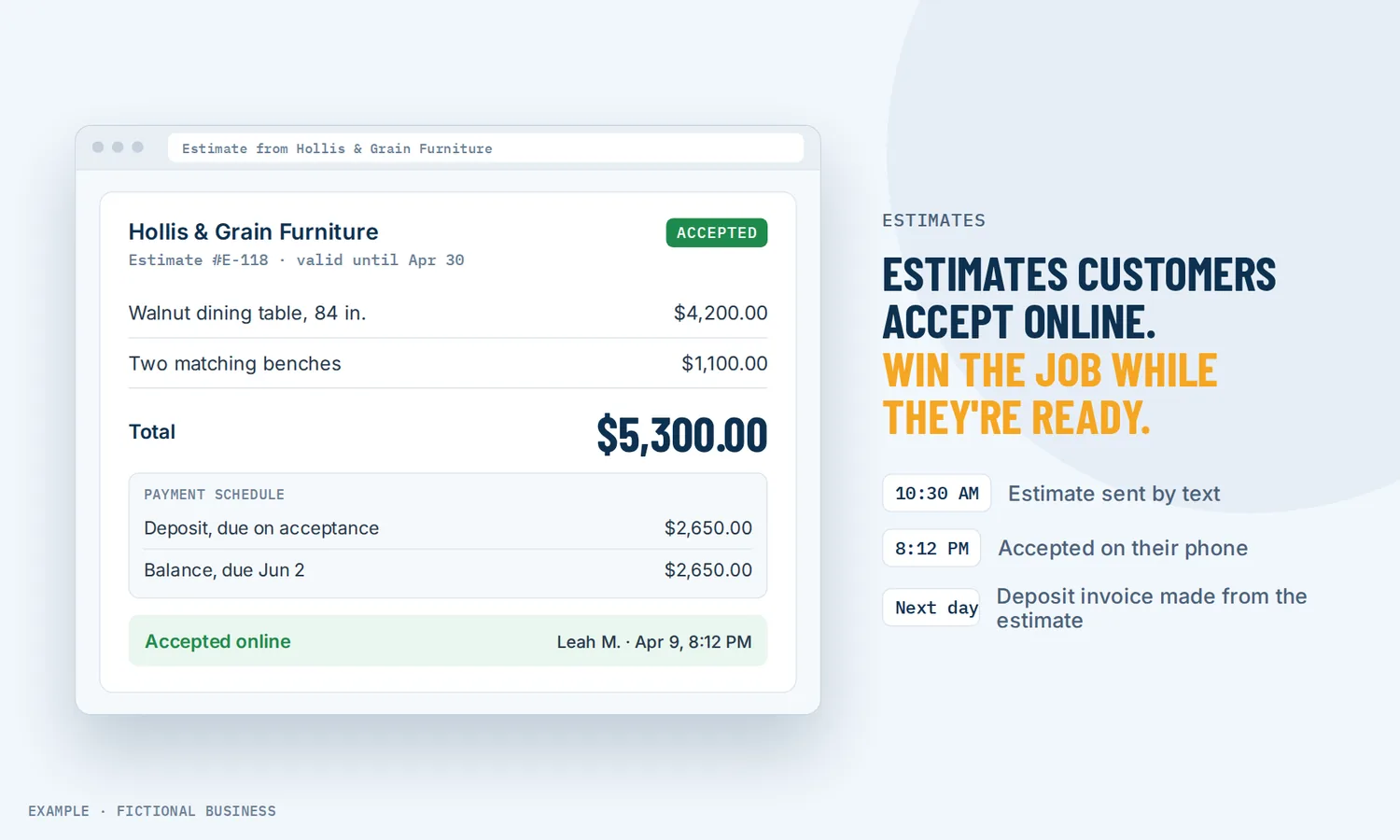
Estimate software for small business: quotes customers can accept online, and a yes that turns into the invoice.
Estimate software for small business lets you send a clear, branded price quote that the customer can accept or decline online, so you know where each job stands. On Revenue Growth HQ, an accepted estimate becomes the invoice, so you are not retyping the same job twice.
Get online payments set up for you
What estimate software is and how it works
An estimate is a priced offer: here is the work, here is what it costs, here is how long the price holds. Estimate software replaces the PDF or the number scribbled in a text with an online quote the customer can open, read and answer with one click.
Here is how it works on the Revenue Growth HQ platform:
- You set your branding and terms once. Logo, business details and the terms that appear on each estimate.
- You build the estimate. Pick the customer, add line items from your product list or type them in, set an expiry date, and add photos or files if they help the customer decide. A template fills in the layout, items and terms you use most.
- You send it. By email, by text (once business texting is set up), or both, from your computer or the mobile app.
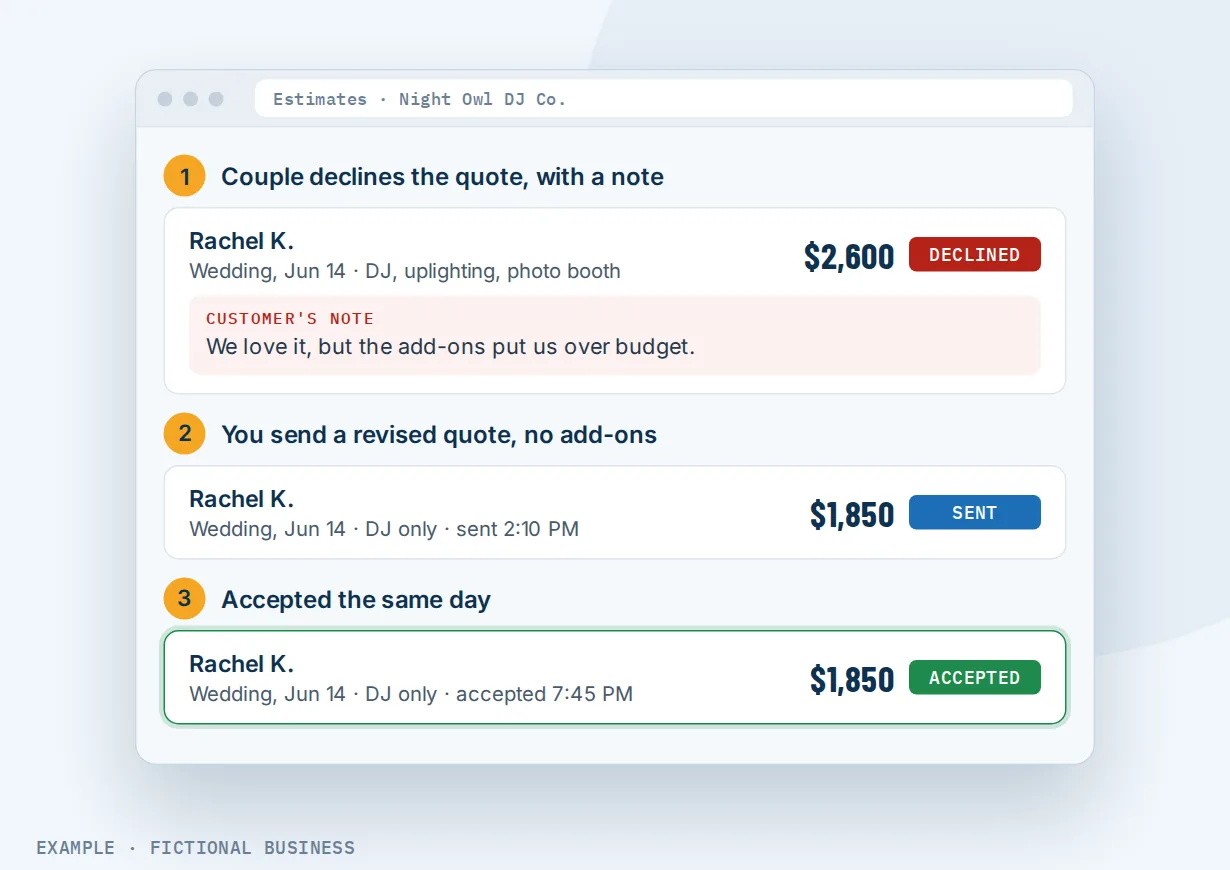
- The customer answers online. They accept or decline. If they decline, they can leave a note saying why. If they say yes by phone, you mark it accepted yourself.
- The yes becomes the invoice. Turn the accepted estimate into an invoice in one step, with the same items and photos, or, for estimates sent from the mobile app, set it up so the invoice goes out when the customer accepts.
Every estimate shows a status (draft, sent, accepted, declined or invoiced), and the dashboard totals the value of the estimates you have out.
What estimate software changes for a small business
Quotes go out while the customer still cares
A customer who asks for a price is comparing options right now. A quote that takes three days to type up can arrive after they have heard from someone else. With a template holding your usual items and terms, an estimate is a few edits away, and you can send it from your phone before you leave the job site.
You know which quotes are alive
A quote sent as an email attachment can sink in the customer's inbox. You do not know if they read it, and following up feels like guessing. Here, each estimate has a status, the dashboard shows the total value waiting on an answer, and a declined estimate can carry the customer's reason. That turns "I think I sent them something" into a list you can work through.
No retyping between quote and invoice
The usual path is to quote in one place, then rebuild the same job as an invoice in another. Each copy is a chance to drop a line item or mistype a price. When the accepted estimate becomes the invoice, the items, prices and photos come across as they were. The customer pays the number they agreed to.
Deposits agreed before the work starts
For larger jobs, you can attach a payment schedule to the estimate: a deposit due when the customer accepts, then the rest in installments on dates you set. The schedule is part of the estimate the customer accepts, so the deposit is agreed with the price instead of requested afterward.
How it plays out
A home service or trades business. Let's suppose you quote a bathroom remodel. On site, you open the mobile app, start from your remodel template, adjust the quantities and add two photos of the fixtures you recommend. The customer gets the estimate by text before you reach your truck. It includes a payment schedule: a deposit on acceptance and the balance on completion. When they accept, the invoice for the deposit goes out and they pay from their phone.
A marketing agency or consultancy. Let's suppose a prospect asks for a price on a website project after a discovery call. You send an estimate with three line items and a spec sheet attached, valid for 30 days. A workflow watches for the estimate being viewed and, if there is no answer, reminds you to call. When the prospect accepts, the deal moves forward in your pipeline and the work can be scheduled.
An event or catering business. Let's suppose you quote a wedding with a set menu and optional add-ons. Each dish carries a photo. The couple declines and leaves a note: the add-ons pushed it over budget. You send a revised estimate without them the same afternoon, and they accept it. Without the note, you might have lost the job without knowing why.
What to look for in estimate software
Questions to ask before you choose:
- Can the customer accept online? A button they can tap on a phone, instead of printing and signing a PDF.
- Can you send by text as well as email? Some customers answer a text in minutes and an email in days.
- Does it show status? Sent, viewed, accepted, declined, and a total of what is still open.
- Can it carry photos and files? Pictures of the product or spec sheets help a customer say yes without a second meeting.
- Can it take a deposit? A payment schedule on the estimate gets the deposit agreed at the same moment as the price.
- Does an accepted estimate become the invoice? Without retyping, and with the same items.
- Can you quote from your phone? With templates, so a quote takes minutes on site.
- Can an estimate start your follow-up? A thank-you on acceptance, a reminder to you when one goes quiet.
- Is it built for your kind of quoting? Construction takeoff (measuring plans and pricing materials from a cost database) is a different tool. Many service businesses only need a clear quote and a fast yes.
Estimates work better with automation and the rest of Get paid
An estimate is the start of a sale. What happens around it decides whether the yes arrives and how fast the money follows.
Estimates plus invoices. The accepted estimate becomes the invoice, with the same items and any payment schedule. From there, the invoicing tools take over: reminders, late fees if you use them, and card or bank payment online. See invoicing for small business.
Estimates plus your sales pipeline. Create an estimate straight from a deal, or link one to it, and it appears on that deal. An accepted estimate can start a workflow that moves the deal forward or creates a new one. A workflow can also send an estimate from a template when a deal reaches a stage you choose, such as "site visit done". See tracking each job from lead to won.
Estimates plus e-signature. For larger jobs, a click to accept may not be enough. A contract or proposal can carry your pricing and a signature field, and generate the invoice when the customer signs. See having customers sign agreements online.
Estimates plus automation. Estimate events can start a workflow, filtered by status, by the estimate's value or by the template it came from. A high-value estimate that has been viewed but not accepted can alert you to call. An accepted one can send a thank-you and a "what happens next" message. See automating your follow-up.
For small jobs where a formal estimate is too much, a payment link in the conversation can do the job instead: see text to pay.
Estimate options: from free to done-for-you
The right choice depends on how often you quote, how big the jobs are, and what you want the quote connected to.
A document template. A word processor or spreadsheet template costs nothing. You type the quote, export a PDF and email it. It works for a few quotes a month, but there is no accept button, no status and no link to the invoice.
Free and low-cost invoicing apps. Many invoicing and payment apps include estimates, often with online approval and conversion to an invoice. They are a real step up. They usually sit apart from your customer messages, pipeline and marketing, so the quote lives in one place and the conversation in another.
Trade-specific estimating software. Construction and field service tools add takeoff, cost databases, job scheduling and crew management. For a contractor bidding from plans, that depth is worth paying for. For a business that sells services or set packages, much of it goes unused.
All-in-one platforms. Here, estimates sit next to your contacts, inbox, pipeline, invoices and automation. An accepted estimate can move a deal, send the invoice and start your follow-up without a connector. The tradeoffs: more to set up, and more features than a business that only quotes may need.
Hiring someone. An office manager or virtual assistant can build and chase quotes for you. That frees your time but adds cost, and speed depends on their hours.
Here's our solution
Revenue Growth HQ is an all-in-one platform with estimates built in, alongside invoices, your pipeline, inbox and automation. The plan is $97 a month (or $970 a year) with $30 of usage credit each month; use beyond that is billed at the same rates as buying the software directly.
Setup is $197, one time, for 3 setups you choose from our list. Online payments can be one: we connect your Stripe account, add your prices, and set up quote and invoice templates and pay-by-text links. You'll need your own Stripe account: we connect it, you own it, and Stripe charges its own fees. PayPal, Square, Authorize.Net and NMI also connect for invoices; pay-by-text needs Stripe. See the setups and choose your 3.
Limits to know
- Taking payment needs a connected payment account. Without one, customers cannot pay the invoice or a deposit online.
- Accepting is a click, not a signature. For a signed agreement, send a contract through the e-signature tool.
- Templates are built on a computer. The mobile app uses your templates but cannot create or edit them.
- Links to a deal are fixed once finalized. To move an estimate to another deal, clone it and link the copy.
- It is not a takeoff tool. There is no plan measuring or construction cost library.
Estimate features included
- Branded estimates with your logo, business details and terms
- Send by email, text or both
- Online accept or decline, with the customer's notes on a decline
- Mark accepted or declined yourself after a phone call
- Expiry date on each estimate
- Status tracking: draft, sent, accepted, declined, invoiced
- Dashboard total of open estimates
- Templates for your common jobs
- Up to four photos per line item, plus up to 10 attached files
- Payment schedules: deposit on acceptance, then installments
- Accepted estimates turned into invoices without retyping
- Estimates linked to deals in your pipeline
- Estimate events that start workflows, filtered by status, value or template
- Workflows that send an estimate from a template
- Create and send estimates from the mobile app
Frequently asked questions
What is the difference between an estimate and an invoice?
An estimate is an offer: the work you propose and its price, sent before the job, which the customer can accept or decline. An invoice is a request for payment for work agreed or done. On Revenue Growth HQ, the accepted estimate becomes the invoice, so the customer is billed for exactly what they agreed to.
How do I write an estimate a customer will accept?
Describe the work in plain line items, so the customer can see what each part costs. Add a photo or spec sheet where it helps. State how long the price holds, what is not included and how payment works, including any deposit. Then send it quickly, by the channel the customer uses, and follow up if it goes quiet.
Can customers accept an estimate on their phone?
Yes. The customer opens the estimate from the email or text and taps to accept or decline. Photos on the estimate open in a gallery they can zoom into on a phone. If a customer says yes in a call instead, you can mark the estimate accepted yourself.
Can I take a deposit when a customer accepts an estimate?
Yes. Add a payment schedule to the estimate: a first payment due on acceptance, by percentage or fixed amount, then the rest on later dates. The payments are collected on the invoice that follows acceptance. You need a connected payment account, and the processor charges its own fees.
Can an accepted estimate turn into an invoice automatically?
You can turn an accepted estimate into an invoice in one step from the estimate or the dashboard. From the mobile app, you can also set an estimate to send its invoice when the customer accepts and take them straight to payment. Either way, items, prices and photos carry over without retyping.
Do I need construction estimating software instead?
If you bid from plans and need material takeoff or a construction cost database, yes, a trade estimating tool does that and this does not. If you quote services, packages or jobs you can price from your own list, an estimate tool tied to your invoices and follow-up is usually the better fit.
What does estimate software for small business cost?
Free invoicing apps often include basic estimates, and trade estimating tools charge monthly, sometimes per user. On Revenue Growth HQ, estimates are included in the $97-a-month plan with $30 of monthly usage credit. Extra use is billed by use, payments carry the processor's fee, and setup is $197 one time.
Get paid online for your estimates
For $197 one time, we build three setups in your Revenue Growth HQ account, with online payments already ticked. We connect your Stripe account, add your services and prices, and set up quote and invoice templates and pay-by-text links. You'll need your own Stripe account. The plan is then $97 a month.