
Small business KPI dashboard: your numbers on one screen, without the spreadsheet.
A small business KPI dashboard shows the few numbers that tell you how the business is doing (new leads, bookings, deals won, calls answered, revenue) on one screen that updates itself. For small business owners, that means knowing where the week stands without exporting reports from four apps every Friday.
Book a free Revenue Leak Audit
What a KPI dashboard is and how it works
A KPI (key performance indicator) is a number you have decided matters: how many leads came in, how many booked, how many bought. A dashboard puts those numbers side by side as counts, charts and tables.
The hard part is usually getting the numbers in. When bookings, deals, calls and payments live in separate tools, someone copies them into a spreadsheet. On the Revenue Growth HQ platform they live in one system, so the dashboard reads them directly.
Here is how it works:
- You create a dashboard. Start from suggested widgets for a goal, or add widgets one at a time. You can keep separate dashboards for sales, marketing and finance, and pick one as your default.
- You choose the numbers. Widgets cover contacts, appointments, deals, website visits, email, calls, text messages, conversations and payments, each as a number, a chart or a table.
- You set the period. Pick a date range for the whole dashboard and a period to compare against, such as this month against last month.
- You decide who sees it. Keep a dashboard private, or share it with your team at view, edit or full access.
- You get it by email. Schedule a report to go to your team, or to anyone with an email address, on the days you choose.
What a dashboard changes for a small business
You see the week without building a report
Most small business owners know their numbers matter; fewer can see them on a normal Tuesday. When the figures sit in four apps, checking them means exporting, pasting and adding up, so it tends to happen at month end. A dashboard that fills itself from your own records puts this week's leads, bookings and sales on one screen whenever you open it.
You catch a leak while it is small
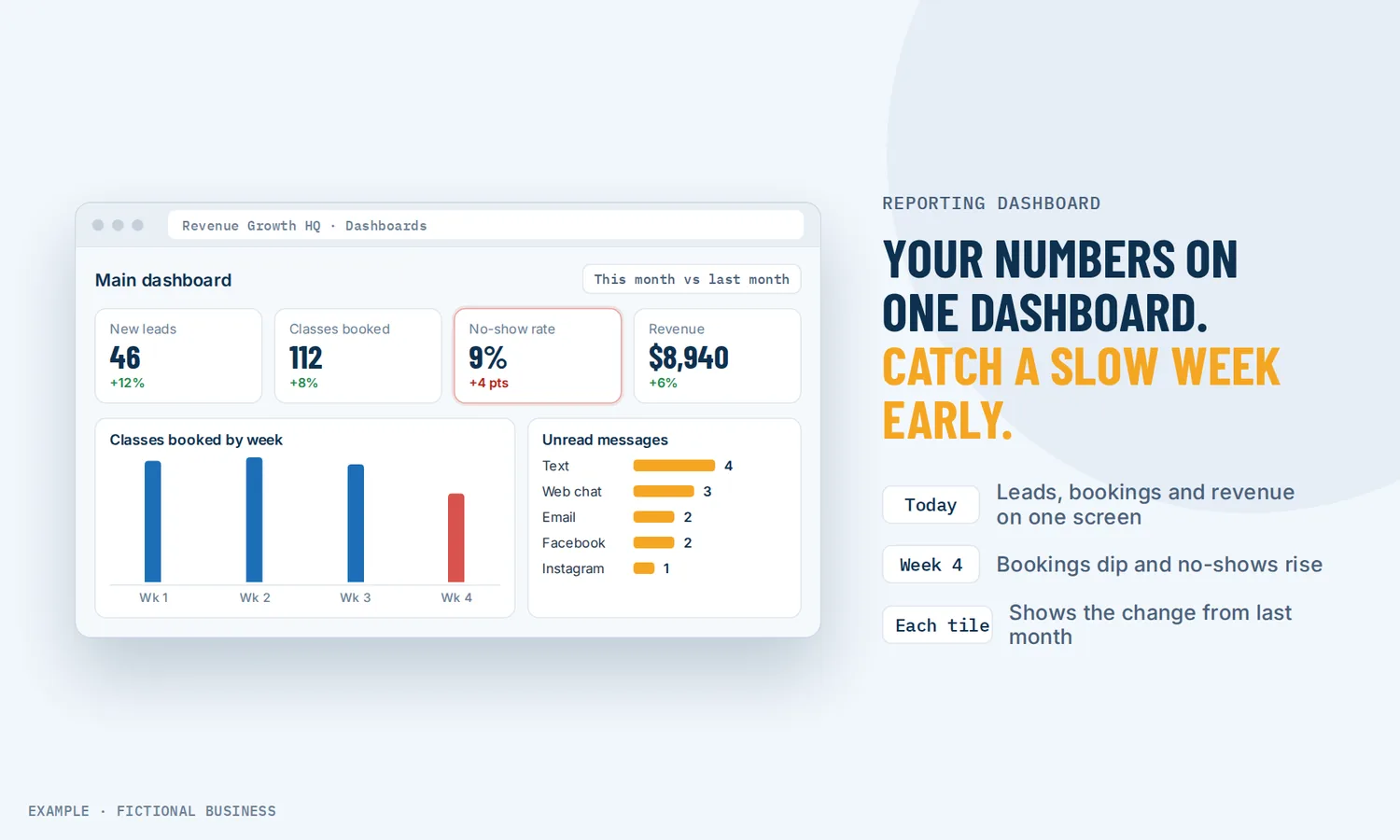
A dip in bookings, a rise in no-shows or a pile of unread messages is easy to miss for a month. On a dashboard it shows up next to last month's number. The appointment widgets track booked, showed, no-show and cancelled visits, plus the no-show rate over time. The conversation widgets show unread and unassigned messages by channel and by team member. A slow week becomes a Monday question, not a month-end surprise.
Your team works from the same numbers
When each person keeps their own count, meetings turn into arguments about whose spreadsheet is right. A shared dashboard gives everyone one version. You can also give each team member a view of their own work: a "logged in user" condition on a widget shows each person only their own contacts, appointments or deals. Owners see the whole business; staff see their part of it.
You judge changes by the numbers
Without a dashboard, decisions lean on what you remember: the busy Thursday, the one big sale. Side-by-side periods show the trend instead. If you raise a price, change an ad or add a reminder, the comparison column shows what moved in the weeks after, and a click on the number opens the records behind it.
How a KPI dashboard plays out
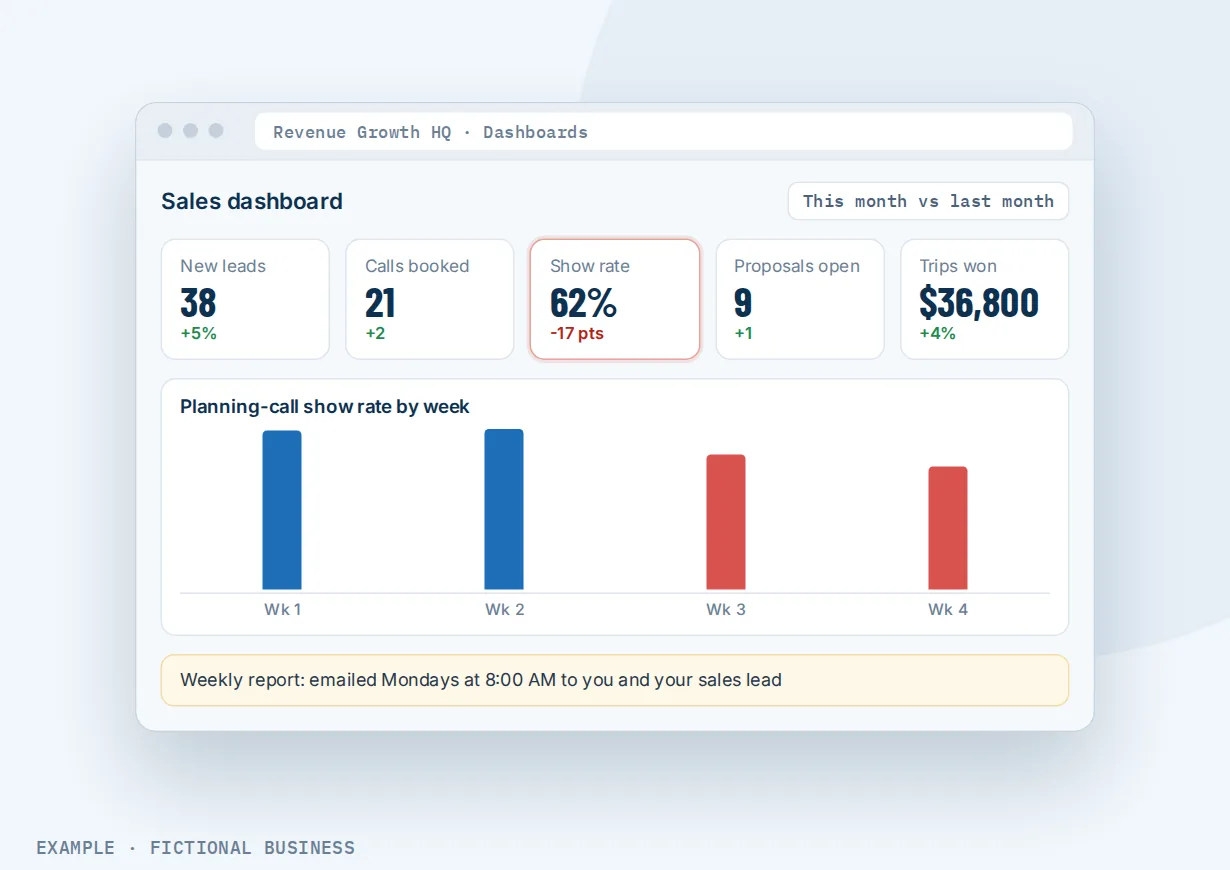
An agency or consultancy. Let's suppose you sell marketing services and close most of your work on discovery calls. Your dashboard shows new leads this month, calls booked, show rate, proposals open and deals won, with the value of each. Every Monday at 8 a.m., a report lands in your inbox and your sales lead's inbox. When the show rate drops for two weeks in a row, you see it in the comparison column and add a reminder step before the next week starts.
A home service business. Let's suppose you run a plumbing company with a dispatcher and four technicians. The dispatcher's dashboard shows incoming calls by status (answered, missed, busy), unread messages by channel and today's booked jobs. Your own dashboard adds won job value, invoices sent against invoices paid, and revenue for the month. Each technician sees a version filtered to their own jobs.
An online store or course business. Let's suppose you sell products and a subscription online. Your dashboard tracks total revenue, one-time against recurring revenue, new subscriptions against cancellations, failed payments and refunds. Website and funnel widgets show page views and opt-ins next to the sales numbers. If cancellations climb after a price change, you see the trend line bend before it shows up in your bank balance.
What to look for in a small business KPI dashboard
Questions to ask before you commit:
- Does it read your data where it already lives? A dashboard you have to feed by hand gets abandoned. Look for one connected to your contacts, bookings, deals, calls and payments.
- Can you keep it short? "Only a handful of metrics can rightly be called key, so a dashboard should contain no more than 10 to 12 KPIs," writes accountant Ann Means in New Jersey CPA magazine. A tool that lets you build several focused dashboards beats one crowded screen.
- Can you compare periods? This month against last month, or this quarter against the same quarter last year, tells you more than a number on its own.
- Can you click through to the records? A number that looks wrong should open the list of contacts or deals behind it.
- Can you control who sees what? Private and shared dashboards, view-only access, per-person views, and the ability to hide revenue figures from staff who do not need them.
- Can it send reports by email on a schedule, to people who never log in, such as a business partner or your accountant?
- Can you build your own metric, such as won deals divided by new leads, without exporting to a spreadsheet?
- Does it cover marketing too? Ad results, website visits and where leads came from belong next to the sales numbers.
A KPI dashboard works better with call tracking, a pipeline and lead sources
A dashboard is only as useful as the data feeding it.
Dashboard plus a sales pipeline. Deals give the dashboard its money numbers: open, won, lost and abandoned deals, the value of each, revenue over time and lost deals by reason. A sales pipeline that tracks every lead and job by stage supplies those counts, and the dashboard can show where in the pipeline deals stall. Choose a pipeline on the widget, or the numbers combine all your pipelines.
Dashboard plus call tracking. If the phone is where your customers buy, call numbers belong on the dashboard: incoming and outgoing calls by status, average call length, first-time callers, and totals by team member. With tracking phone numbers that credit each call to its source, you can also see which marketing made the phone ring, not just how often it rang.
Dashboard plus lead source reports. A rising lead count is good news only if you know where the leads came from. A report of leads and value by source shows how many leads each source brought in and how many were won or lost, so the dashboard's totals connect to what you spend on marketing. Facebook Ads, Google Ads and Google Analytics widgets can sit on the same screen.
Dashboard plus automated reports. The scheduled email report is automation in its simplest form: you set it once, and the numbers arrive daily, weekly or monthly at the time you choose. Send a test first, and a delivery log shows who received it. Because the data comes from the same contact records the platform keeps, there is no export step to break.
KPI dashboard options: from free to done-for-you
A spreadsheet. Free and flexible, and fine for a handful of numbers. The cost is time: someone exports from each tool and pastes it in, and the sheet is only as current as the last time they did.
Reports inside each app. Your booking tool, phone system, payment processor and ad accounts each have their own reports, usually at no extra charge. The catch is that they do not talk to each other. Seeing that a slow week of ads led to a slow week of bookings means opening several tabs and doing the math yourself.
A standalone dashboard tool. Business intelligence and dashboard apps pull data from many sources into one view, often with polished charts. They charge a monthly fee, and each connection to your other apps has to be set up and kept working.
An all-in-one platform. When contacts, bookings, deals, calls, messages and payments live in one system, the dashboard reads them without connectors. The tradeoffs: you are moving your work into that system, and its widgets cover its own data best.
Hiring someone. A bookkeeper, analyst or agency can build and run reports for you. That buys judgment as well as charts, but it costs fees, and the numbers arrive when they send them.
Here's our solution
Revenue Growth HQ is an all-in-one platform with dashboards built in, fed by the same contacts, bookings, sales pipeline, calls, messages and payments you use every day. The platform is $97 a month, and dashboards and scheduled email reports are included. Usage such as text messages, calls, email sending and AI is billed separately, by use. Setup is priced by how much you want done: we can build your dashboards and reports for you, or show you how and let you do more of it yourself.
The first step is a free 20-minute Revenue Leak Audit.
Limits to know
- One time zone. Widgets use the account's time zone and date format, not each viewer's.
- Deal counts follow the last status change. An older deal that was updated recently can be counted in this period, so deal totals may not match a count by created date.
- The account email report is fixed. The scheduled account summary lets you choose which sections to include, but not change what each section shows, and it skips sending unless at least four of its numbers are above zero.
- Numbers refresh periodically. Expect a short delay between a new booking or payment and the dashboard showing it.
KPI dashboard features included
- Multiple dashboards, with one set as your default
- Suggested widgets by goal, or build your own
- Number, donut, line, bar and table charts, dragged and resized to fit
- Widgets for contacts, appointments, deals, website and funnel visits, email, calls, texts, conversations and payments
- Facebook Ads, Google Ads, Google Analytics and Google Business Profile widgets
- Dashboard date range and comparison period
- Quick filters and widget conditions
- Click any widget to see and export the records behind it
- Custom metrics that combine up to four numbers in a formula
- Private or shared dashboards with view, edit and full access
- Per-person views and a permission to hide revenue figures
- Scheduled email reports to anyone, daily, weekly or monthly
- Your own colors, themes and backgrounds
- Clone a dashboard to start a new one
Frequently asked questions
What KPIs should a small business track?
Start with the numbers that connect marketing to money: new leads, booked appointments or calls, deals won and their value, and revenue. Add a number for each place customers slip away, such as no-shows, missed calls or unread messages. An accountant writing in New Jersey CPA magazine suggests no more than 10 to 12 KPIs on one dashboard. Fewer is easier to act on.
What is the difference between a dashboard and a report?
A dashboard is a live screen you check whenever you like. A report is a snapshot sent or exported at a point in time. On Revenue Growth HQ you get both: dashboards you open in the platform, and scheduled email reports that send the numbers to your inbox, or anyone else's, daily, weekly or monthly.
Can I send dashboard reports to my team automatically?
Yes. Schedule a report and enter the email addresses that should get it. Recipients do not need a login, so a business partner, investor or accountant can get the numbers too. You choose the frequency and the time of day, can send a test first, and a delivery log shows which addresses received each report.
Can each team member see only their own numbers?
Yes. Add a "logged in user" condition to a widget, and each person who opens the dashboard sees only their own contacts, appointments or deals. You can also make a dashboard private, give a role view-only access, and use a permission to hide revenue figures from staff who do not need them.
Can I build my own metrics, like conversion rate?
Yes. A custom metric combines up to four numbers with addition, subtraction, multiplication and division. For example, divide won deals by new leads and multiply by 100 to show a conversion rate. You choose whether it displays as a number, a percentage or currency. A custom metric can stop working if a field it uses is renamed or removed.
How often does the dashboard update?
The dashboard reads the same records your team works in, so a new lead, booking or payment shows up without an export or upload. The numbers refresh periodically rather than to the second, so allow a short delay after a change.
What does a KPI dashboard cost?
A spreadsheet and the reports inside each app cost nothing but time. Standalone dashboard tools charge a monthly fee, often more as you add data sources or users. On Revenue Growth HQ, dashboards and scheduled reports are included in the $97-a-month platform. Texts, calls and AI use are billed by use, and setup is priced by how much you want done.
See your own numbers: book your free Revenue Leak Audit.
Pick a time for a free 20-minute call. We'll look at where your leads come from, where they drop off, and which numbers belong on your dashboard so you can see the next leak early.
Sources
- Means, A. "KPI Dashboards for Small Business: Measure It to Manage It." New Jersey CPA, Jan/Feb 2020. https://www.njcpa.org/learn/article/2020/02/13/kpi-dashboards-for-small-business-measure-it-to-manage-it (checked 2026-10-18)