
Lead source tracking: put your marketing money where your customers come from.
Lead source tracking records where each new lead came from, such as a Google ad, a Facebook post, a referral or your website, and then follows that lead to a won or lost sale. For small business owners, it turns "I think the ads are working" into a number you can act on: how many leads and how much deal value each source produced.
Book a free Revenue Leak Audit
What lead source tracking is and how it works
Many small businesses know how many inquiries came in last month, but not which channel sent the ones that paid. Lead source tracking attaches a source to each deal and keeps it there while the deal moves to won or lost.
Here is how it works on the Revenue Growth HQ platform:
- The visit is recorded. When someone fills in a form or survey, books on your calendar, gives their details in the website chat or uses an order form, the platform saves the page they landed on, the site that referred them and any UTM tags or ad click IDs in the link.
- The channel is sorted. That visit is filed under paid search, paid social, social media, organic search, referral or direct traffic. Contacts added by hand or through an outside app get their own labels.
- The deal gets a source. You set the source name in the form, calendar or workflow that creates the deal in your pipeline, or type it on deals you add by hand: Google Ads, Referral, Website, Home show, whatever names you choose.
- You work the deal. It moves through your stages and ends as won, lost or abandoned, with a dollar value on it.
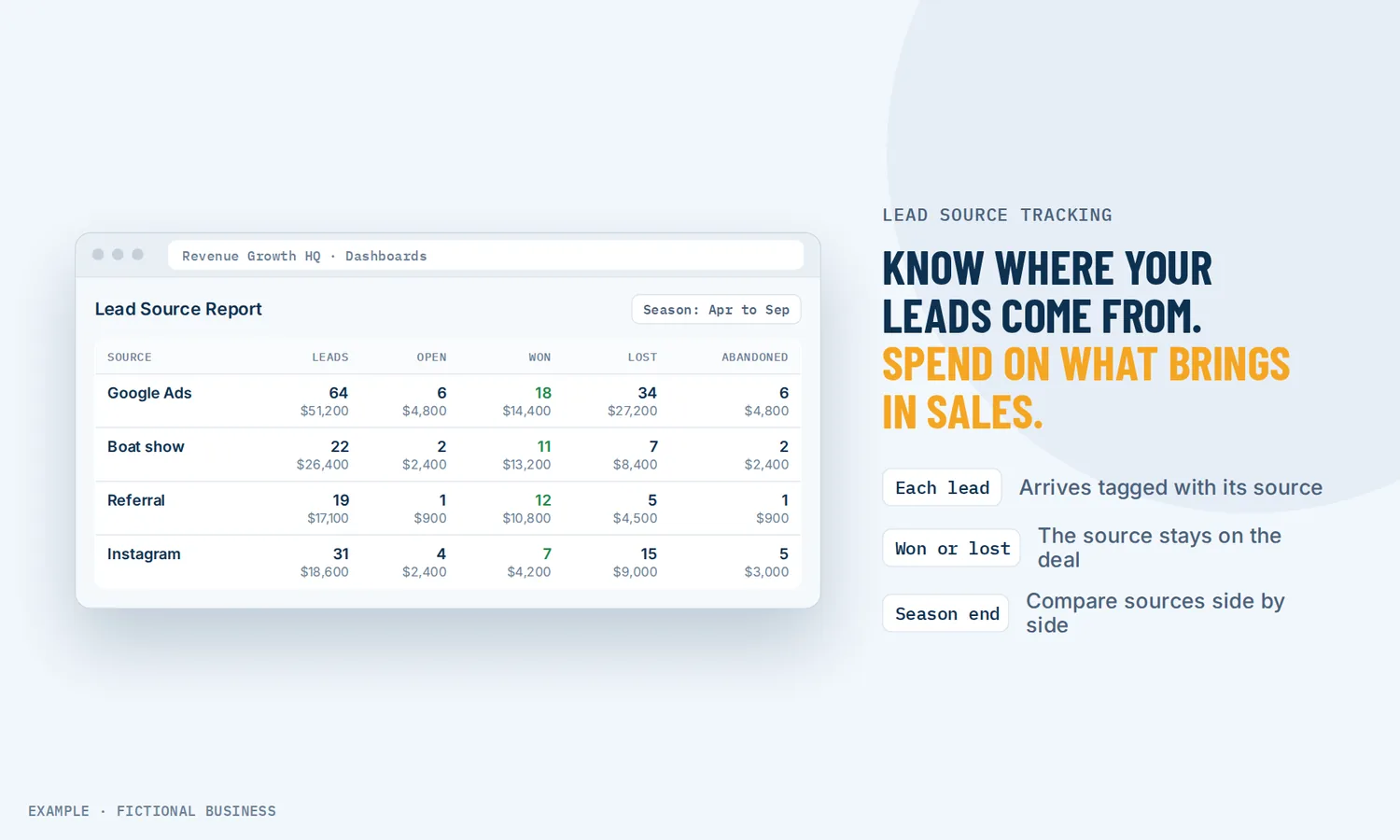
- The report adds it up. The Lead Source Report shows one row per source: total leads, open, won, lost and abandoned, each with a count and a value.
What lead source tracking changes for a small business
Ad money goes where the sales are
A channel with plenty of inquiries can still be a poor one if few of them buy. Because the report shows won deals and their value next to the lead count, you can compare a channel that brings a few large jobs with one that brings many small inquiries. To get cost per lead or return on ad spend, put the ad platform's spend next to these numbers; the report itself shows leads and value, not spend.
Less reliance on memory
Asking "How did you hear about us?" is worth keeping. But answers can be vague, and staff forget to ask on a busy day. Recording the source from the visit itself gives you a second, steadier record.
You see the leads that slipped through
The report lists open, lost and abandoned deals per source alongside the wins. Click any number to see the deals behind it. A pile of open Facebook leads nobody followed up becomes a list of names you can call today.
First touch and latest touch, both kept
Each contact keeps two records: the first attribution, set at their first interaction and never changed, and the latest attribution, which updates as they come back. Someone who first signed up from a blog post and came back weeks later through a paid ad to book a call carries both. You can filter the report by either.
How lead source tracking plays out
A home service business. Let's suppose you run a roofing company that spends on Google Ads, gets referrals and sets up a booth at a spring home show. Each source gets its own form link with a source tag, and the workflow that creates the deal sets the source name. At the end of the season the report shows the count and value of won deals from each channel side by side. The home show brought fewer leads but larger jobs; the ads brought more leads with many lost on price. Now you have a reason to keep the booth and rework the ad offer.
A consultant or agency. Let's suppose you sell a monthly service and get leads from LinkedIn posts, a podcast you appear on and a paid search campaign. Your intake form records the UTM tags from each link you share. The podcast row is small but has a high won value. Filtering by first attribution shows several paid search wins had first joined your email list through the podcast's sign-up link: the ads were closing deals the podcast started.
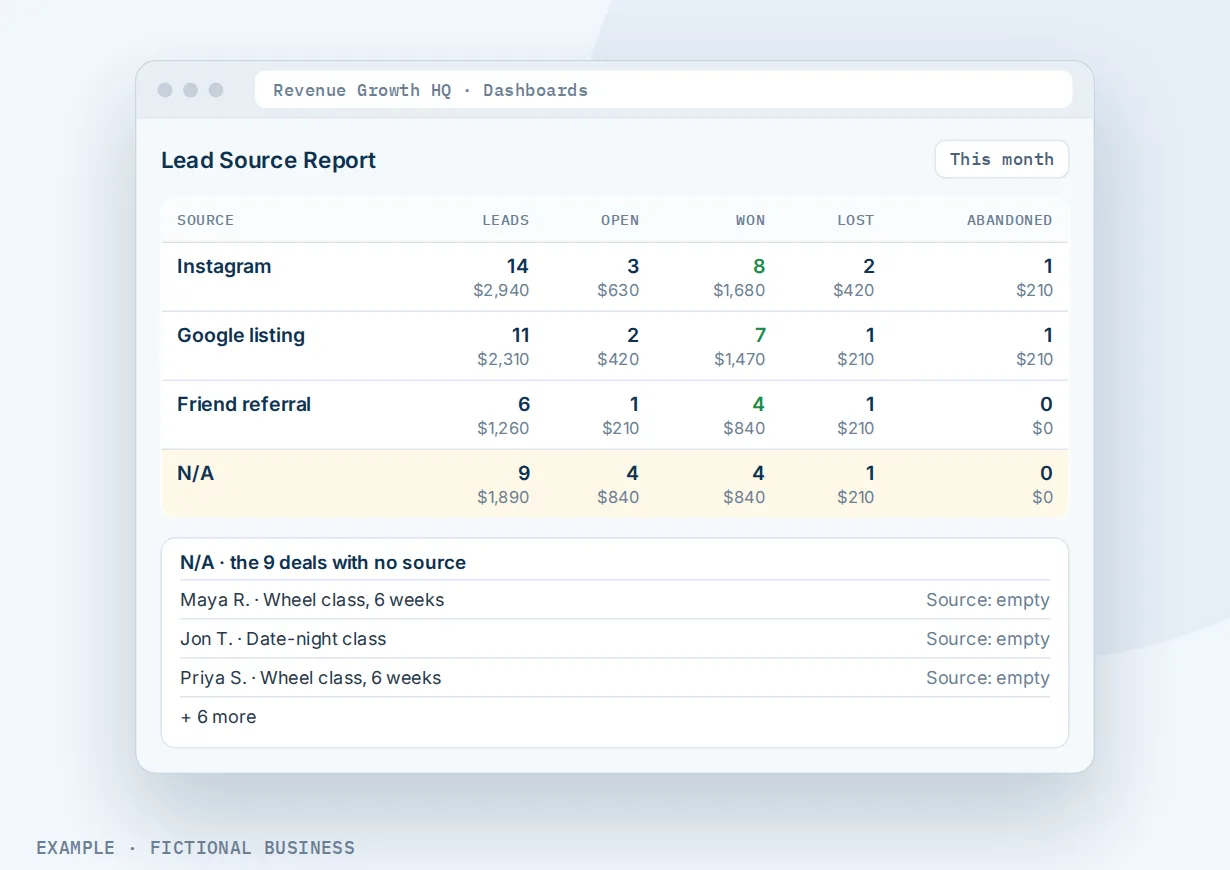
A studio or clinic. Let's suppose you run a physical therapy clinic with new patients from a doctor referral network, your Google listing and Instagram. Front desk staff create deals by hand for phone referrals and type the source from an agreed list of names, so the report doesn't split one channel into three spellings. When a month's report shows a large N/A row, you know some deals went in without a source, and you can click the row and fix them before the numbers mislead you.
What to look for in lead source tracking
Questions to ask before you choose a tool:
- Does it follow leads to the sale? Counting inquiries is easy. You want won, lost and value per source.
- Does it capture UTM tags and ad click IDs automatically from forms, bookings and chat, without a developer?
- Does it keep first and latest touch on the contact, so the original source is not overwritten by the last click?
- Can you set the source when a deal is created, from any form, calendar or automation, using names you control?
- Can you click from a number to the deals behind it? A total you can't open is hard to act on.
- Can you see deals with no source, so gaps are found and fixed instead of hidden?
- Does it credit phone calls to a source? If many customers call, you need tracking numbers or calls go unattributed.
- Does it work with forms on a website you already have, not only pages built in the same tool?
- Is it in the same system as your contacts and follow-up, so the source sits on the customer's record and you can act on what the report shows?
A spreadsheet can cover the first item for a small, steady business. The further down the list you need, the more it pays to have tracking inside the system where the deals live.
Lead source tracking works better with landing pages, call tracking, dashboards and automation
Lead source tracking only knows what the rest of your setup tells it.
Lead source tracking plus landing pages. A separate page per campaign makes the source clear before anyone fills in a form. Build a page for the spring offer or the home show, and its form records the visit's UTM tags and a source tag you choose, so each lead arrives labeled. See building pages for each campaign.
Lead source tracking plus call tracking. Visits that end in a phone call are a gap in most tracking, because a call carries no link. With tracking numbers that credit each call to its source, the call report shows top call sources with calls and deals won, so phone-heavy businesses get the same picture as web forms. Tracking numbers and call minutes are billed by use.
Lead source tracking plus a reporting dashboard. The Lead Source Report is a widget you add to a dashboard and filter by pipeline, team member, tags, lead value or attribution. Put it next to appointment, call and revenue widgets on a dashboard of your key numbers, and the whole team sees the same view.
Lead source tracking plus workflow automation and AI. The report reads each deal's source field, and a deal created with a blank source shows as N/A. A workflow fixes that at the start: when a form is submitted or a booking is made, it creates the deal in your pipeline with the source filled in. You can describe the workflow in plain words and the AI builder drafts its trigger and steps for you to check. See automating your follow-up.
Lead source tracking options: from free to done-for-you
A spreadsheet and a question. Free and simple: log each inquiry and ask how they heard about you. It works with one or two channels, but it depends on memory, and tying each row to a final sale is manual work.
Free web analytics. Free analytics tools show where website visits come from. They are good at traffic. They usually stop at the form, so they can't tell you which visit became a won deal or what it was worth, and visits from messaging apps can appear as direct traffic. In a 2023 test by SparkToro and Really Good Data, all visits from TikTok, Slack, Discord, Mastodon and WhatsApp were marked as direct, and 75% of visits from Facebook Messenger had no referral information.
Dedicated attribution software. Paid attribution tools model which ads and touchpoints led to a sale, often across many channels. They suit large ad budgets with someone to read the reports. For most small businesses they add a monthly fee, another login and an integration to maintain.
All-in-one platforms. Here, the source is captured by the same forms, calendars and chat that create the deal, and the report reads the same pipeline your team works from. The tradeoff: you set source names and workflows up once, and the numbers are only as clean as that setup.
Hiring someone. A marketing agency or analyst can set up tracking and report on it monthly. That saves time but adds an ongoing fee, and the data may live in their tools.
Here's our solution
Revenue Growth HQ is an all-in-one platform with lead source tracking built in, next to your forms, calendars, pipeline, inbox and automation. The platform is $97 a month, and lead source tracking is included. Usage such as text messages, calls, tracking phone numbers, email sending and AI is billed separately, by use, and you see the rates before setup. Setup is priced by how much you want done: we can set up your source names, campaign links and the workflows that label each deal, or show you how and let you do more of it yourself.
The first step is a free 20-minute Revenue Leak Audit.
Limits to know
- It counts deals, not people. One contact with three deals counts as three leads.
- Sources must be set when deals are created. There is no default; a deal without a source shows as N/A until someone fills it in.
- No ad spend in the report. It shows leads and value. For cost per lead, bring in spend from your ad accounts.
- Values are what you enter. A deal's value comes from the deal itself, not from payments; a blank value counts as zero.
- Some visits can't be traced. A visitor who leaves before submitting a form isn't attributed, organic search keywords often show as unknown, and forms embedded in iframes on another site aren't tracked.
Lead source tracking features included
- Lead Source Report: total, open, won, lost and abandoned per source, each with count and value
- Click any count to see the deals behind it
- Filters by pipeline, team member, tags, lead value, custom fields, source and attribution
- Report by created date or status-change date
- First and latest attribution saved on every contact
- UTM tags, ad click IDs, landing page and referring site captured from forms, surveys, bookings, chat and order forms
- Automatic sorting into paid search, paid social, social, organic search, referral and direct
- Source set by forms, calendars, workflows or by hand
- Tracking script for forms on an outside website
- Values shown only to users allowed to see them
Frequently asked questions
What is a lead source?
A lead source is the channel or event that brought a potential customer to you: a Google ad, a social post, a referral, a trade show, your website. Lead source tracking records that source on each lead and keeps it attached as the lead becomes a sale or is lost, so you can compare channels by results rather than by inquiries.
How do I track where my leads come from?
Use links with UTM tags for each campaign, send people to forms or booking pages that record those tags, and set a source on each deal when it's created. Keep asking "How did you hear about us?" as a cross-check, and use tracking numbers for calls. Then review leads, wins and value per source each month.
What is the difference between first touch and last touch attribution?
First touch credits the channel where a person first found you; last touch credits the most recent one before they became a lead. On the platform, each contact keeps both: the first attribution never changes, and the latest updates as they come back. Looking at both shows which channels start relationships and which close them.
Why do so many leads show as direct or unknown?
Links shared in messaging apps often arrive with no referral information, so the visit looks like someone typed your address. Search engines also hide most search keywords. Tagging the links you share with UTM parameters reduces the share of leads you can't place.
Can I track leads from phone calls?
Yes, with call tracking. Different numbers appear depending on where a visitor came from, each call is credited to that source, and the call report shows calls and deals won per source. Tracking numbers are rented monthly and calls are billed by use, so size the setup to how many of your leads call.
Does lead source tracking work with my existing website?
Yes, for standard HTML forms. A tracking script on your site records page views and form submits from common website forms, including WordPress form plugins and custom HTML forms, with their UTM tags. Forms loaded inside an iframe or a third-party widget aren't captured.
What does lead source tracking cost?
A spreadsheet and free analytics cost nothing but your time; dedicated attribution software adds a monthly fee. On Revenue Growth HQ, lead source tracking is included in the $97-a-month platform. Tracking phone numbers, calls and texts are billed by use, and setup is priced by how much you want done.
Find out which of your channels pays: book your free Revenue Leak Audit.
In a free 20-minute call, we'll look at where your leads come from today, which ones you can't trace, and where money spent on marketing may be leaking out before it turns into sales.
Sources
- Fishkin, R. "New Research: Dark Social Falsely Attributes Significant Percentages of Web Traffic as 'Direct'." SparkToro, April 27, 2023. https://sparktoro.com/blog/new-research-dark-social-falsely-attributes-significant-percentages-of-web-traffic-as-direct (checked 2026-10-18)