
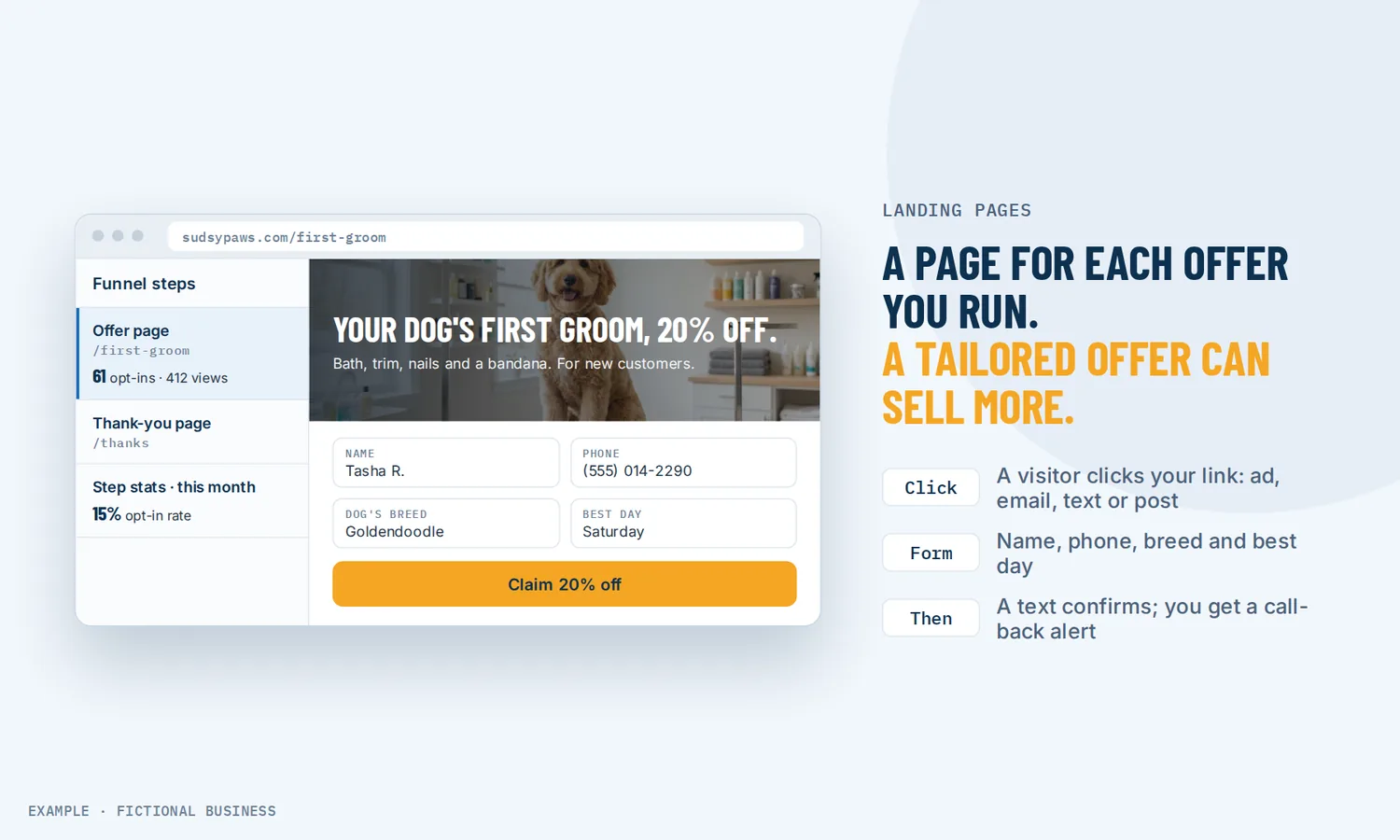
A landing page builder for one page per offer, with the form already wired to your contacts.
A landing page builder lets you make a single page for one offer, such as an ad, a promotion or a free download, with a form that turns the visitor into a lead. On Revenue Growth HQ, each form sent creates a contact and can start your follow-up, so the click you paid for does not end in an unread email.
Book a free Revenue Leak Audit
What a landing page is and how it works
A landing page is a page with one job. A visitor arrives from an ad, an email or a social post, reads about one offer, and takes one action: fills in a form, books a time or buys. There is no menu pulling them off to your about page.
Here is how it works on the Revenue Growth HQ platform:
- You start a page sequence. Begin from a template, a blank page, or a short description that AI turns into a first draft. A sequence can be one page or several steps, such as an offer page followed by a thank-you page.
- You build the page. Drag in a headline, text, images, a button and a form or booking calendar. Check the phone view and adjust it, since most visitors will see it there.
- You connect a domain and publish. Point your domain (or a subdomain) at the sequence. Each step gets its own web address, which is the one you put in your ad.
- The visitor acts. A form sent creates or updates a contact with the answers and where the visitor came from. A booking lands on your calendar. An order takes payment.
- Your follow-up starts. The form, booking or order can start a workflow: a text back, an email with the download, a task for your team.
What a landing page changes for a small business
Each offer gets a page that matches it
When an ad for a spring discount sends people to your home page, they have to find the offer themselves. Many will not bother. A landing page repeats the promise the ad made, explains it, and puts the form right there. You can run one page per offer, per season or per audience, without touching your main site.
Leads arrive with their details, and the follow-up starts
On some page tools, a form sent becomes an email in someone's inbox. Here it becomes a contact record with the answers saved, plus where it came from, such as the campaign named in your ad link. A workflow can reply by text or email while the visitor still remembers filling in the form.
You can see which page earns its keep
Each step shows its views, form fills, sales and the rate for each. As a rough benchmark, a 2024 industry report covering more than 41,000 landing pages found a median conversion rate of 6.6% across all industries, with industry medians from 3.8% to 12.3%. Your own numbers matter more, and split testing compares two versions on real traffic.
Simple pages are easier to win with
The same report found that 83% of landing page visits were on a phone, and that pages written at a 5th to 7th grade reading level converted at 11.1%, about 56% higher than pages written at an 8th or 9th grade level. Plain words and a form that fits a phone screen pay off.
How a landing page plays out
A home cleaning company. Let's suppose you run a cleaning business and want new customers in a slow month. You run a social media ad for a discount on a first clean. The ad links to a landing page with three photos, the price after the discount, a short list of what is included, and a form asking for the address, home size and preferred day. When someone sends the form, they get a text confirming you have it, and you get an alert to call them back. The contact record shows they came from that ad, so at the end of the month you can count the bookings it produced.
A consultant selling a workshop. Let's suppose you sell a low-cost online workshop to grow your client list. The page sequence has three steps: a sales page with an order form, a one-click offer for a recorded follow-up session, and a thank-you page with the joining details. Buyers who accept the second offer do not re-enter their card. A purchase starts a workflow that sends the workshop link and a reminder the day before.
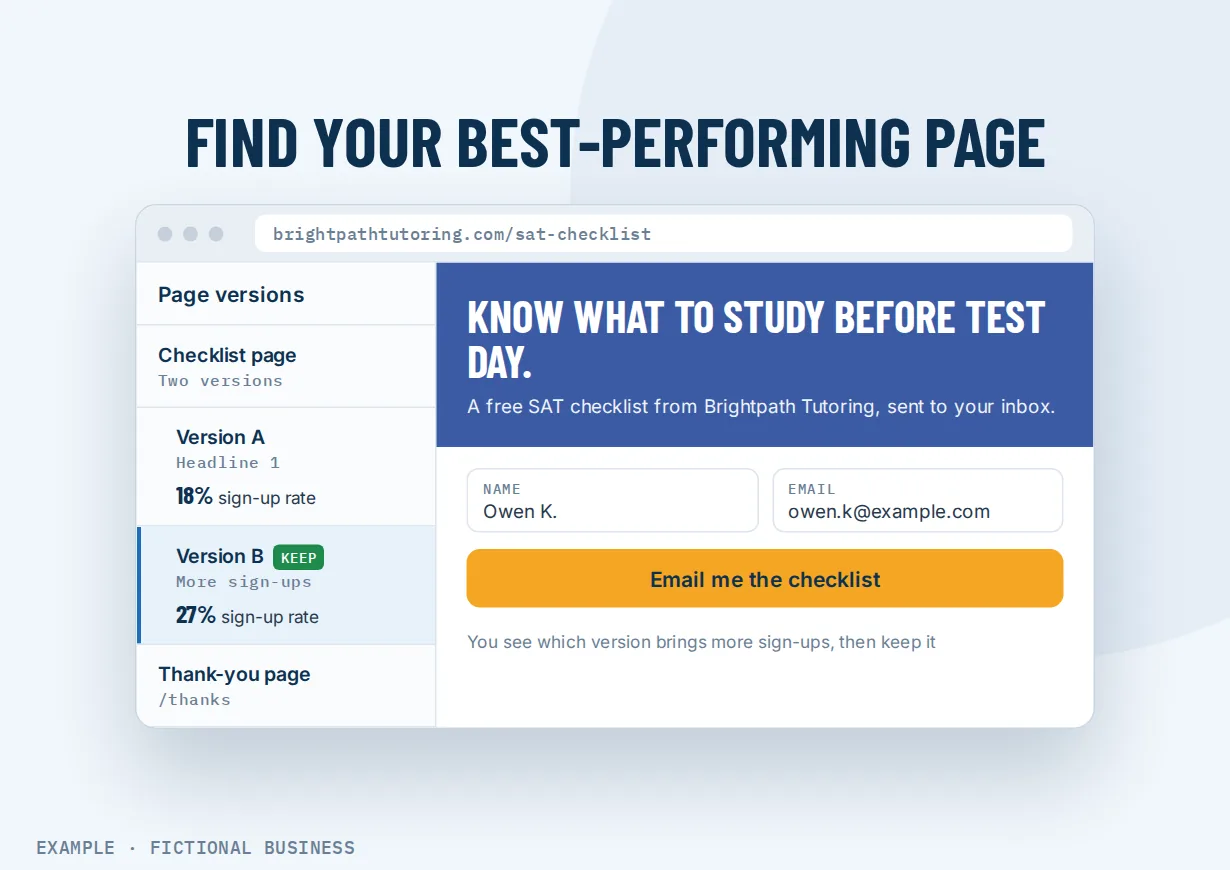
An accounting practice offering a free checklist. Let's suppose you run a small accounting firm and want leads before tax season. You offer a free year-end checklist in exchange for a name and email. The page has a short form and nothing else to click. A workflow emails the checklist and adds the contact to a short sequence that invites them to book a call. You split-test two headlines and keep the one with the higher sign-up rate.
What to look for in a landing page builder
Questions to ask before you commit:
- Can you build and edit pages yourself? A drag-and-drop editor, templates to start from, and a phone view you can adjust.
- Can a sequence have more than one step? An offer page, an order page, a thank-you page, each with its own address.
- Where do form answers go? A tool that only emails you leaves the follow-up to you. Look for forms that save answers to your contacts.
- Is the visitor's source kept? The campaign and ad that brought each lead should save on the contact, so you can tell which ads pay off.
- Can you test two versions? Split testing should divide traffic between a page and a variation and show the results side by side.
- Can you take bookings and payments on the page? A calendar element, order forms, an add-on at checkout and a one-click offer after purchase.
- Can you add your ad tracking code? Ad platforms need their tracking on the page to measure results.
- Can you use your own domain? Your pages should load on your business's address, with a secure connection.
- What does the form start? A good page is wasted if the lead waits until tomorrow for a reply.
A simple page tool that covers the first two suits a single campaign. The further down the list you need, the more it pays to have your pages in the same system as your contacts and follow-up.
Landing pages work better with automation, AI, forms and lead tracking
A landing page collects the lead. What happens in the next few minutes, and whether you can tell which ad sent it, decides what the page is worth.
Landing pages plus workflow automation. A form sent, a booking made or an order placed on a page can start a workflow. It can text the lead, email a download, tag the contact by offer, assign a team member or move a deal along your sales pipeline. An order workflow can tell a main purchase from an add-on and run different steps for each. See automating your follow-up.
Landing pages plus AI. You can describe the page to AI and get a first draft with layout and copy, then edit it. Check every claim, price and contact detail before you publish. Drafting a page with AI in the editor carries no extra usage charge today, within usage limits; other AI features are billed by use, and you see the rates before setup.
Landing pages plus forms and surveys. The form is the point of the page. A short form asks only what you need to follow up; a multi-step survey can qualify a lead before they book. Answers save to the contact record, and you can reuse the same form on several pages. See forms that save answers to your contacts.
Landing pages plus lead source tracking. Forms, calendars and order forms record where each lead came from: the first source that brought them and the latest one. Seeing which sources bring in leads tells you which ad or post is worth more spend. One detail matters: the source details from an ad link are only saved if the form is on the page the visitor landed on. Send them to a second page to fill in the form, and that information is lost. A form on the page, or a popup, keeps it.
Your options: from free to done-for-you
The right choice depends on how many offers you run, whether you take payments on the page, and what you want to happen after someone fills in the form.
Free page tools. Some email tools and link-in-bio services include a basic page builder at no extra cost. They suit one simple sign-up page. Check what they leave out: your own domain, split testing, payments, and where the form answers go.
Standalone landing page software. Dedicated tools offer polished templates, split testing and detailed reporting, for a monthly fee that varies by plan. The catch is that many stop at the form: your contacts, texts, email and bookings live in other apps, connected with integrations.
Sales funnel builders. These build multi-step sequences with order forms, add-ons and one-click offers after purchase. They suit businesses that sell online. Many also add email, and pricing varies widely by plan.
All-in-one platforms. Here, the pages sit in the same system as your contacts, calendar, inbox, payments and automation. A form sent can start your follow-up without a connector, and the lead's source stays on the record. The tradeoffs: more to learn at the start, and more features than a single sign-up page needs.
Hiring someone. A designer or agency can build pages that look custom. You usually pay per page or per project, and changes to a headline or price mean asking someone else.
Here's our solution
Revenue Growth HQ is an all-in-one platform with landing pages and page sequences included in the plan, alongside a full website for your business, forms, booking, your inbox, payments and automation. The platform is $97 a month. Usage such as text messages, calls, email sending and AI is billed separately, by use, and you see the rates before setup. Payments taken on a page carry the payment processor's own fee. Setup is priced by how much you want done: we can build your offer pages and their follow-up for you, or show you how and let you do more of it yourself.
The first step is a free 20-minute Revenue Leak Audit, where we look at where your ad and campaign traffic goes after the click.
Limits to know
- Keep the form on the landing page. Ad source details are lost if the visitor moves to a second page before sending the form.
- Split tests need setup care. A test needs your domain on the sequence, and your ad must point at the tested step. Some ad networks may not allow the redirect a test uses on a first page; testing the second step avoids that. You compare the results and pick the winner yourself.
- One one-click offer per step. To offer more after a purchase, add another step. Each click buys one unit.
- Page stats will not match Google Analytics. The two count visits differently, and ad blockers affect both.
Landing page builder features included
- Single pages and multi-step page sequences
- Templates, a blank start, or an AI first draft
- Drag-and-drop editor with desktop and phone views
- Your own domain or subdomain
- Forms, surveys and booking calendars on the page
- Popups, including when a visitor goes to leave
- One-step and two-step order forms, with coupons
- Checkout add-ons and one-click offers after purchase
- Split testing of a page against variations
- Views, sign-ups, sales and rates for each step
- Lead source and ad campaign details saved on the contact
- Ad tracking code for one page or the whole sequence
- Page titles and descriptions for search
- Forms, bookings and orders that start your follow-up
Frequently asked questions
What is the difference between a landing page and a website?
A website has many pages and a menu, and serves many kinds of visitor: new prospects, past customers, job seekers. A landing page has one offer and one action, such as a form or a booking, and usually no menu. Many small businesses use both.
How do I create a landing page?
Pick one offer and one action. Start from a template or a blank page, write a headline that repeats your ad's promise, add a short explanation, a few photos, and a form that asks only what you need to follow up. Check the phone view, connect your domain, publish, and point your ad at the page's address.
Do I need a separate landing page builder if I already have a website?
Not if your platform includes page sequences. On Revenue Growth HQ, landing pages sit next to your main site and use the same editor, forms and calendars, so there is no second tool to pay for or connect.
Can I take payments on a landing page?
Yes. A page can carry a one-step or two-step order form, an add-on at checkout, and a one-click offer on the next step. You connect a payment account such as Stripe, PayPal or Square, and the processor charges its own fees.
Can I A/B test my landing pages?
Yes. Split testing sends a share of visitors to a variation of a page and shows views, sign-ups and sales for each version. Make the difference big enough to matter, such as a new headline or offer, and let the test run before you choose.
What is a good landing page conversion rate?
It depends on the offer and the industry. A 2024 report covering more than 41,000 landing pages found a median of 6.6% across all industries, with industry medians from 3.8% to 12.3%. Compare your page with its own past results and with a variation rather than with a single benchmark.
Is a landing page the same as a sales funnel?
A landing page is one page. A sales funnel is the sequence a buyer moves through, for example an offer page, an order page, a one-click offer and a thank-you page. The same editor builds both: a sequence can be one step or several.
Ready to see where your ad clicks go?
Book a free 20-minute Revenue Leak Audit. We'll look at what happens after someone clicks your ads and posts, and where leads slip away before anyone follows up.
Sources
- Unbounce. "2024 Conversion Benchmark Report." 41,000+ landing pages, 57 million+ conversions. https://unbounce.com/conversion-benchmark-report/ (checked 2026-10-18)