
AI writing tool for small business: a first draft in seconds instead of a blank page.
An AI writing tool for small business turns a few plain answers about what you want to say into a first draft of a social post, a blog section, an email or an image, in the tone you have saved. For small business owners, that means less time staring at an empty box and more of your marketing actually going out.
Choose 3 setups for us to build
What an AI writing tool is and how it works
An AI writing tool is software that drafts marketing text and pictures from a short description. You still decide what to say and whether it is right. The tool does the first pass, so you edit instead of starting from nothing.
Here is how it works on the Revenue Growth HQ platform:
- You save your brand voice once. Your tone, your audience and the messages you want to repeat are stored, and the AI uses them when it writes social posts, blog content, emails and website copy.
- You start where you already work. The writer sits inside the social post editor and the blog editor, so there is no separate app to copy and paste from.
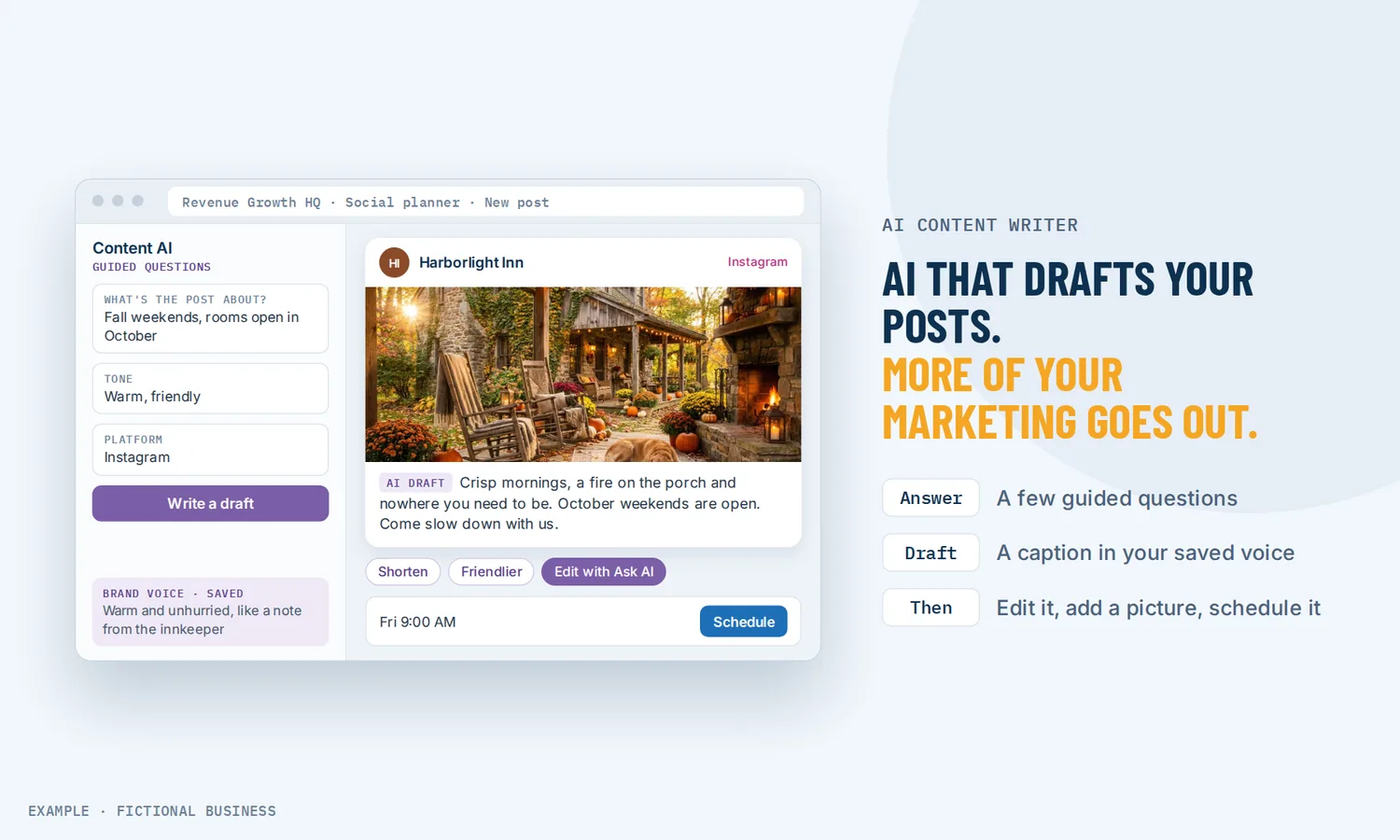
- It asks before it writes. In the social editor it walks you through a few guided questions, then drafts a post suited to the platform and the kind of post you picked.
- You refine in plain words. One-click edits change a draft, and you can type a request such as "make this friendlier" or "cut it in half" to the in-app assistant, Ask AI.
- You add a picture if you need one. Describe the image you want and get 1 to 5 versions in styles from photography to watercolor, or ask Ask AI to edit an image you already have. Images save to your media library.
What an AI writing tool changes for a small business
Marketing that gets written
Most small business owners know they should post more, blog more and email their list more. The hard part is the first sentence at the end of a long day. A draft that appears in seconds lowers that bar. In a 2025 survey for the U.S. Chamber of Commerce, 58% of small businesses said they use generative AI, up from 40% the year before, and writing is one of the easiest places to start.
Time back in your week
Editing a draft is faster than writing from scratch. Results vary widely: in a 2026 Tech.co survey, 22% of small business owners said AI saved them between six and ten hours in an average week, and 54% reported some productivity boost. Your own number depends on how much you write now and how much editing the drafts need.
One voice across every channel you use
When the owner writes the emails, a part-timer writes the posts and someone else touches the website, the business can sound like three different companies. A saved brand voice gives the AI the same tone and messages wherever it writes, so drafts start closer to how you actually talk to customers.
How an AI writing tool plays out
A home service business. Let's suppose you run a landscaping company and spring is your busy season. On a Sunday evening you open the social editor, answer the guided questions ("spring cleanup, booking now, friendly tone") and get a draft post for Facebook and one for Instagram. You ask Ask AI to shorten the Instagram one and generate an image of a fresh-mowed lawn to go with it. Then you schedule the week's posts.
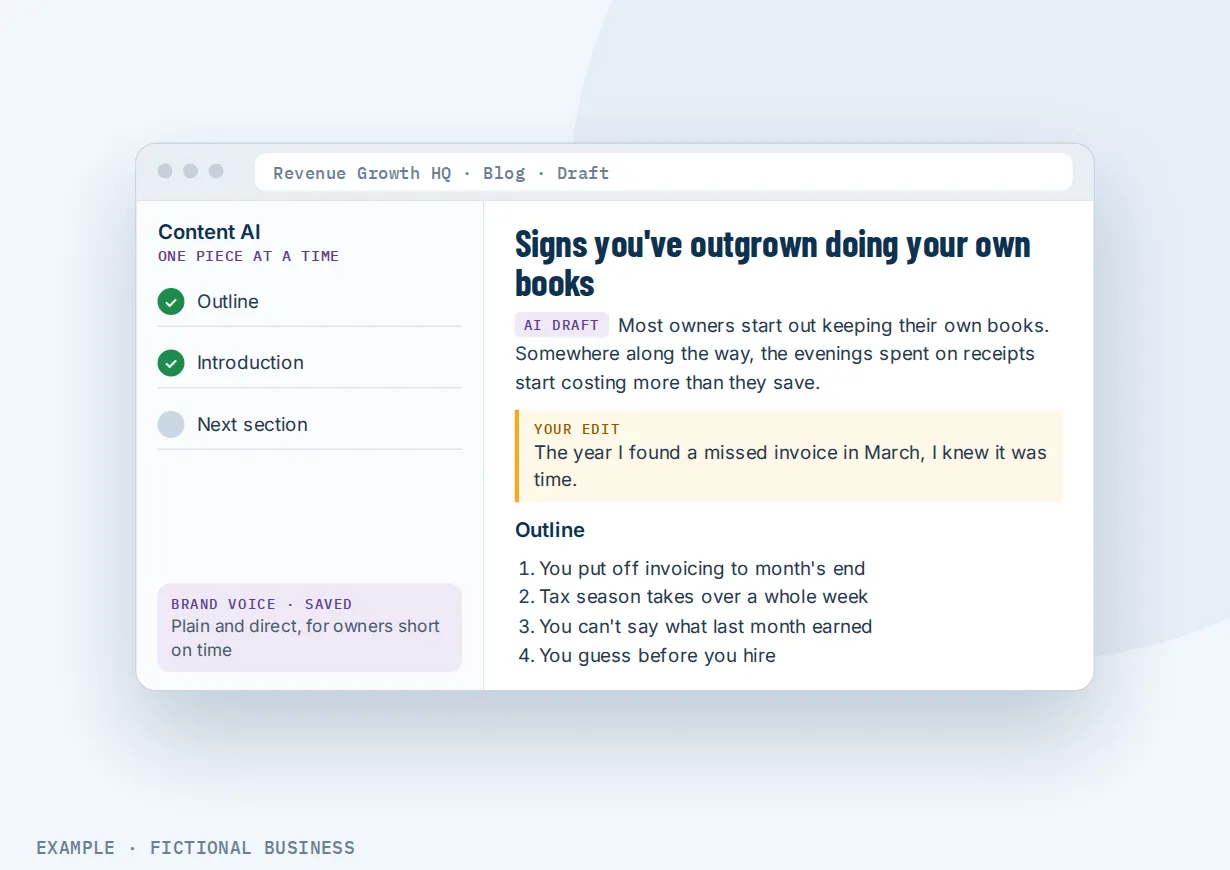
A consultant or coach. Let's suppose you sell coaching to other business owners and want a blog that shows what you know. In the blog editor, the AI drafts an outline for "five signs you've outgrown doing your own books", then an introduction, then one section at a time. You rewrite the parts that need your own stories and examples, and the post is ready in an evening instead of a weekend.
A retail shop. Let's suppose you own a gift shop and send a monthly email to your customer list. You ask Ask AI for an email template announcing your holiday hours and a new product line, preview it, and open it in the email builder to swap in your own photos. Because your brand voice is saved, the draft already sounds like your shop, not a generic store.
What to look for in an AI writing tool for small business
Questions to ask before you pick one:
- Does it work where you write? A tool inside your social, blog and email editors saves the copy-and-paste step between apps.
- Can it learn your voice? Look for a saved brand voice (tone, audience, key messages) so you aren't re-explaining your business in each prompt.
- Can you edit in plain words? "Shorter", "friendlier" or "add a call to book" should work without rewriting the prompt.
- Does it make images too? A tool that writes the post and makes the picture saves a second subscription.
- Can you find old drafts? Earlier generations should be saved so you can reuse a good idea.
- Is it clear what is finished and what is early access? Some AI features ship as test versions first. Know which parts you can rely on today.
- How is it billed? Some tools charge a flat monthly fee, others charge by how much they write. Check what a busy month costs, not just a quiet one.
- Does a person stay in charge? A good tool drafts and leaves publishing to you.
The more channels you write for, the more it pays to have the writer inside the system that publishes.
An AI writing tool works better with a blog, social posts, email and AI websites
A draft is only useful once it goes somewhere. The time saved comes from writing in the same place you publish.
AI writing plus your blog. In the blog editor, the AI writes an outline, an introduction or one section at a time, using your saved voice. You edit, add your own examples and publish to your site from the same screen. A tool that drafts a complete post with images and search settings in one go is in early access. See writing and publishing blog posts on your own site.
AI writing plus social post scheduling. The writer is built into the social post editor: answer the guided questions, get a draft for the platform you picked, edit it, add an AI image and schedule it with the rest of the month's posts. See planning and scheduling your social posts in one place.
AI writing plus email campaigns. Ask AI can create an email template from a plain description, change it in chat, show you a preview and open it in the email builder. You then send it to a tag or saved list. A separate email-building AI that follows your brand colors is in early access. See designing and sending marketing emails to your list.
AI writing plus an AI-built website. Writing and editing website and landing page copy with AI happens inside the site builder, and that part is in early access. Pages it writes stay editable with the normal controls. See building pages and sites from a conversation.
The same AI also drafts replies to your reviews and writes the emails and texts inside automatic follow-up. For the bigger picture of which jobs to hand to AI first, see which routine jobs AI and automation can take off your plate.
Your options: from free to done-for-you
The right choice depends on how much you write, how many channels you write for and how much of the writing you want to keep yourself.
Write it yourself. Free, and nobody knows your business better, but when time runs short the posts and emails slip first.
Free AI chat tools. General chat assistants will draft a post or an email if you describe your business each time. They are a fair way to try the idea. The tradeoffs: they don't know your saved voice unless you paste it in, and you copy every draft into your social, blog or email tool by hand.
Standalone AI writing apps. Dedicated writing apps add templates, brand voice and team seats, usually for a monthly fee per user. They are one more app and one more bill, and the drafts still have to be moved to where you publish.
All-in-one platforms. Here, the writer sits inside the same system as your social posts, blog, email and website, so a draft goes from the editor to the schedule without leaving the screen. The tradeoffs: more to learn, and some AI parts may still be in early access.
Hiring a writer or agency. A freelancer or agency writes content in your voice and can handle strategy. That has real value, but it costs more each month, and you wait on someone else for each post.
Here's our solution
Revenue Growth HQ is an all-in-one platform with an AI writing tool built into the social post editor, the blog editor and the in-app assistant, alongside your website, inbox, booking calendar, payments, reviews and automation. The plan is $97 a month (or $970 a year) and includes $30 of usage credit each month for your phone number, calls, texts and email. AI writing is billed by use, per word written and per image made, at the same rates as buying the software directly, and you see the rates before setup. AI is not unlimited: a month of heavy writing costs more than a quiet one.
Setup is a one-time $197. The AI writer comes ready in your account with the plan; the setup does not write your content. You choose 3 jobs from our list for us to build, such as new-lead follow-up, appointment reminders and online booking, or review requests. With any choice we build your knowledge base from your website, and when a choice calls or texts, we set up your business phone number and its texting registration. See the setups and choose your 3.
Limits to know
- Drafts need a person. Output depends on your prompt and your saved voice, and the AI does not check facts. Read each draft before it goes out.
- Some writing tools are in early access. Full blog drafts in one go, the email-building AI and AI website copy are test versions that have to be switched on. The social and blog editor writer and Ask AI are the finished parts.
- Controls differ by editor. The options you get in the social editor are not the same as in the blog editor or email builder.
- Usage adds up. Writing and images are billed by use, so a month of heavy drafting shows on your usage.
AI writing tool features included
- Social post drafts from guided questions, suited to the platform you pick
- One-click edits and plain-language changes with Ask AI
- Blog outlines, introductions and single sections in the blog editor
- Email templates from a plain description with Ask AI, opened in the email builder
- Images from a description, 1 to 5 versions, in photo, art and illustration styles
- Image editing and image descriptions with Ask AI, saved to your media library
- Saved brand voice used across social posts, blogs, email and websites
- Earlier drafts saved so you can find them again
- Early access: full blog drafts, the email-building AI and AI website copy
Frequently asked questions
What is the best AI writing tool for small business?
Usually the one inside the places you already write. Look for a saved brand voice, plain-language editing, images, saved drafts and clear billing. A free chat tool can be enough for occasional posts; a writer built into your social, blog and email editors saves the copy-and-paste step.
Can AI write my social media posts?
Yes. In the social post editor, the AI asks a few guided questions about your post, then drafts it for the platform and post type you picked. You can edit it with one click or ask Ask AI for changes such as a different tone, add an AI image and schedule it alongside your other posts.
Can AI write a whole blog post?
It can write an outline, an introduction or one section at a time in the blog editor, and you build the post from those pieces. A tool that writes a complete draft with images and search settings in one go exists, but it is in early access and has to be switched on. Either way, add your own examples before you publish.
Will AI content sound like my business?
Closer than a generic tool, if you save your brand voice: your tone, who you are writing for and the messages you repeat. The AI uses it for social posts, blogs, email and website copy. Expect to edit. Your stories, prices and opinions come from you, not the AI.
Is AI-written content accurate?
Not on its own. The AI writes from your prompt and your saved voice, and nothing in it checks facts. Treat each draft as a first pass and check names, prices, dates and claims before it goes out.
Can it make images as well as text?
Yes. Describe the image you want and choose from 1 to 5 versions in styles such as photography, digital art, watercolor or 3D. Ask AI can also edit an image you already have or describe one you attach. Images save to your media library for reuse.
What does an AI writing tool cost?
Standalone writing apps often charge a monthly fee per user. On Revenue Growth HQ, the writer is part of the $97-a-month plan. AI writing is billed by use, per word written and per image made, at the same rates as buying the software directly. You see the rates before setup.
Put a first draft on every blank page.
The AI writer comes with your Revenue Growth HQ plan. For a one-time $197 setup, we build 3 jobs of your choice in your account, such as following up with new leads, booking with reminders, or asking for reviews. Pick them below. We also build your knowledge base from your website. The plan is then $97 a month.
Sources
- U.S. Chamber of Commerce Technology Engagement Center with Teneo Research. "Empowering Small Business: The Impact of Technology on U.S. Small Business." 2025. https://www.uschamber.com/technology/empowering-small-business-the-impact-of-technology-on-u-s-small-business (checked 2026-10-25)
- Cawley, C. "Business Leaders Save a Full Work Day With AI." Tech.co, 2026. https://tech.co/news/business-leaders-save-full-work-day-ai (checked 2026-10-25)