
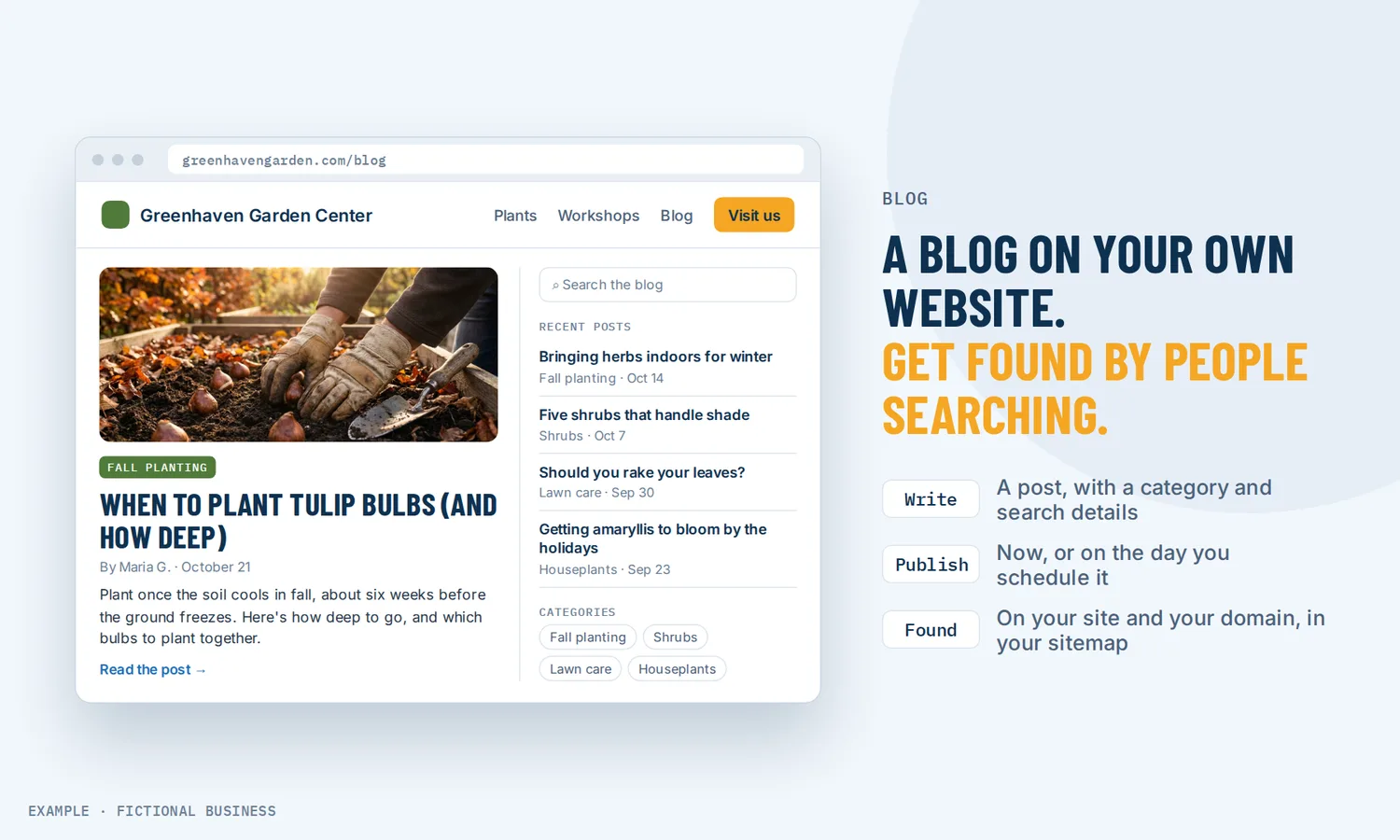
Start a blog for your business on your own website, next to your customers.
To start a blog for your business, you need a place on your own website to write, publish and list posts, plus the search settings that help people find them. On Revenue Growth HQ, the blog comes with the website we build for you. You write the posts, or draft them with AI, and they publish on your own site, in the same system as your contacts and follow-up.
What a business blog is and how it works
A business blog is a set of articles on your own website that answer the questions your customers ask before they buy. Each post is a page search engines can find.
Here is how it works on the Revenue Growth HQ platform:
- The blog sits on your site. Your blog's post list goes on any page of the website, and the posts use your site's address, such as yourbusiness.com/blog or blog.yourbusiness.com.
- You write a post. Start from a blank post in the editor, or have AI draft one for you to edit. Each post gets an author and a category.
- You fill in the search details. A web address for the post, an SEO title, a short description, keywords, a cover image with alt text, and a canonical link when the post first ran somewhere else.
- You publish or schedule it. Save it as a draft, publish it now, or pick a future date and time and it publishes on its own.
- Search engines and readers find it. After a one-time setup, your sitemap updates itself when a post goes live, and an RSS feed lists your published posts for email and social media.
What a blog changes for a small business
Answers that keep working after you write them
A customer who searches "how much does it cost to re-roof a garage" or "what to ask a bookkeeper before hiring one" is close to buying. A post that answers that question on your site keeps working long after you write it, in a way a social post that scrolls away in a day does not. HubSpot's 2026 State of Marketing report found small businesses are 23% more likely than average to see a return from blog posts, and marketers still rank website, blog and SEO as their top channel for return.
Readers who are already on your site
When the blog lives on your own website instead of a separate blogging service, a reader is one click from your services page, your booking calendar or your contact form. A visitor who fills in a form after reading a post becomes a contact in the same system that runs your follow-up, so the post and the sale are not in two different places.
A clearer picture of what readers want
Blog analytics show page views and trends, your top posts, which links readers click, the device split and views by category. Over time you see which topics bring people in.
Effort that fits the result
Blogging takes time. Orbit Media's 2026 survey of 1,042 content marketers found the average post takes 3 hours, 20 minutes to write and runs 1,312 words. In the same survey, 92.4% now use AI for blogging, yet only 13.9% say their blog delivers strong results, an all-time low. AI speeds up the writing, so what sets a post apart is what you put in it. The same source reports, from its past surveys, that original research improves the likelihood of performance by 50%. A small business has its own version of original research: your prices, your process and the questions your customers really ask.
How a business blog plays out
A bookkeeping practice. Let's suppose you run a small bookkeeping practice. Every January, clients ask the same five questions about year-end paperwork. You write one post per question in the fall and schedule them to publish a week apart in December. Each post has the category "Tax season", a short SEO description and a link to your intro call calendar at the end.
A home renovation company. Let's suppose you run a kitchen and bath remodeling business. You blog twice a month: one post on cost ranges for a job type, one on a project from start to finish with your own photos. Each new post appears in your blog feed, and the feed sends it on to your social accounts and your monthly email, so one piece of writing reaches three places.
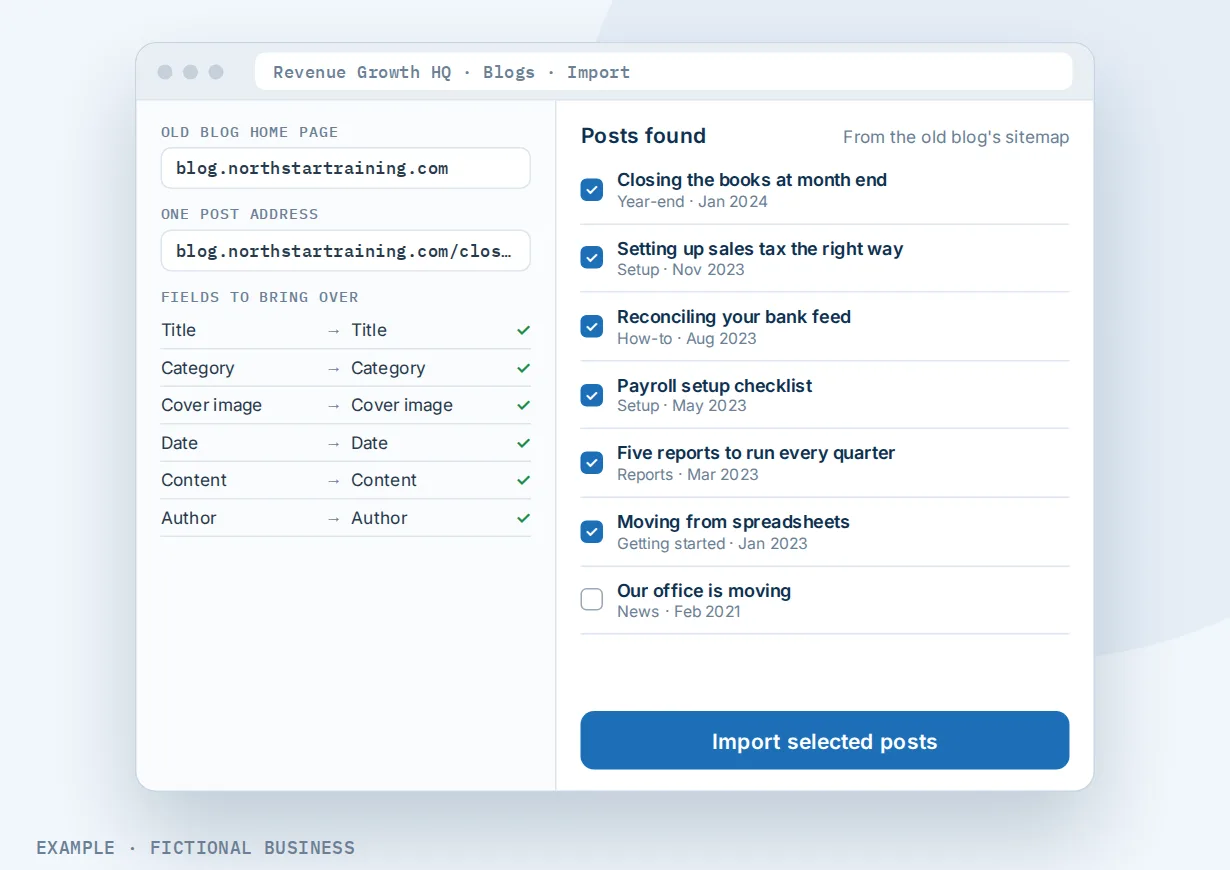
A software consultant moving an old blog. Let's suppose you sell setup and training for an accounting software package, and you have 200 posts on an old blogging service. You give the importer your old blog's home page and one post address, map the fields, and pick the posts to bring over. Titles, categories, cover images, dates, content and authors come across.
Blog post ideas for a small business
- The questions customers ask before they hire you, one per post
- What a typical job costs, with the factors that move the price
- A project from start to finish, with your photos
- Your process, step by step, so a new customer knows what happens next
- Seasonal checklists your customers can use
What to look for when you start a business blog
Questions to ask before you pick where your blog lives:
- Is the blog on your own website and domain, or on a separate service with its own address?
- Can you set the search details per post? SEO title, description, web address, cover image alt text and a canonical link.
- Is there a sitemap that updates when you publish, so search engines learn about new posts?
- Can you schedule posts for a future date and time?
- Can you sort posts by category and author, and let readers search them?
- Is there an RSS feed you can feed into your email and social posts?
- Can AI help you draft, and what does it cost?
- Can you bring your old posts over, by importing from your old blog's address or from a spreadsheet?
- Do you get reader numbers by post and by category?
- Does a reader who fills in a form become a contact you can follow up?
A free blogging service may cover the first few. The rest favor a blog inside the same system as your website and customers.
A small business blog works better with your website, AI writing and social posts
A post gets a visitor. Where the post lives and where it travels decides how many people read it and what they do next.
Blog plus your website. The blog is part of the website we build for your business. The post list drops onto any page, posts sit on your own site address, and a reader who wants to talk to you is a click away from your contact form, website chat or booking calendar.
Blog plus AI writing. An AI writer for posts, emails and pages can draft a long post from a topic or a short prompt, with headings, an SEO title, a description and keywords. One version works inside the blog editor and is a Labs (early-access) feature you switch on for your account. Another drafts the post in a chat for you to paste in. AI use is billed by use.
Blog plus social posts. Your blog's RSS feed can feed a social post scheduler for your accounts, so each new post goes out to your social accounts after it is published, without writing it twice.
Blog plus email. The same RSS feed can feed an email campaign, so readers on your email list hear about each new post.
Your options: from free to done-for-you
The right choice depends on where your website lives, how much you plan to write, and whether you want the blog to start follow-up.
Free blogging services. You can start a blog in minutes on a free service. The tradeoff: the blog usually lives on the service's address, not yours, and readers who like a post are not on your website or in your customer list.
A blog on your current website builder. Most builders include one, which suits a site that already lives there. Forms, booking and follow-up may sit in other apps.
Self-hosted blogging software. You get full control and a large library of add-ons. In return, you or someone you pay looks after hosting, updates, security and add-on conflicts.
Hiring a writer or agency. Someone else writes the posts, but you still supply the expertise and approve each one, at a cost per post or per month.
All-in-one platforms. Here the blog sits on the same website as your contact form, chat, booking calendar and customer records, so a reader who acts becomes a contact in the system that runs your follow-up. The tradeoff: more to learn at the start.
Here's our solution
Our Website package is built for you, for a one-time $197 setup. We build a website for your business from your answers to one survey, with a contact form that sends each inquiry to your inbox and phone, website chat that answers visitors' questions and takes their details, and an AI phone receptionist that answers your business line. We build your knowledge base from your website and set up your business phone number for the receptionist. The blog comes with the website we build. Writing the posts is yours to do, by hand or with an AI draft you edit. See what the website package includes.
After that, the site runs on Revenue Growth HQ, an all-in-one platform with the website builder, blog, booking, forms, chat, your inbox, social posting, email and automation. The plan is $97 a month (or $970 a year) and includes $30 of usage credit each month for your phone number, calls, texts, email and most AI features. Use beyond $30 in a month is billed at the same rates as buying the software directly.
Limits to know
- No reader comments. Readers cannot comment on posts.
- No separate page per category yet. Each post has a category, and the post list can sort or filter by category, but a page of its own for each category is planned, not available.
- Posts are fixed content. A post cannot greet a reader by name, and forms and surveys cannot go inside a post. Link to a page that has the form instead.
- The sitemap needs one setup step. After that it updates itself when you publish.
- Imports depend on the old blog's sitemap. The importer finds posts the old blog's sitemap lists. A spreadsheet import takes up to 60 posts per file.
Blog features included
- A blog on your own website, on your domain
- Post editor with drafts, publishing and scheduling
- Authors and categories on every post
- Blog search for readers
- Post list on any page, sorted by date, category or author
- Standard and compact layouts, with styling for cards, images and headings
- SEO title, description, keywords, web address and canonical link per post
- Cover images with alt text
- Sitemap that updates when you publish
- RSS feed of published posts
- Import from another blog's address or from a spreadsheet
- Blog analytics: views, top posts, link clicks, devices and categories
- AI drafting of posts, billed by use (the in-editor writer is a Labs feature)
Frequently asked questions
How do I start a blog for my business?
Pick where it lives, ideally on your own website. Then write down the ten questions customers ask most, and answer one per post in plain words, with your own prices and examples. Fill in each post's SEO title and description, set up your sitemap, and publish on a schedule you can keep. On our Website package, the blog comes with the site we build, so you start at the writing step.
Do I need a blog for my business?
Not every business does. A blog helps most when customers search for answers before they buy, such as cost, how-to and comparison questions. HubSpot's 2026 report found small businesses are 23% more likely than average to see a return from blog posts. If your customers find you only by referral, time spent on your Google listing or reviews may pay back sooner.
How often should I blog for my business?
As often as you can write a useful post and keep it up. For most small businesses, that means once or twice a month rather than daily. A steady schedule of useful posts does more than a burst of thin ones. Scheduling helps: write several posts in one sitting and set them to publish over the coming weeks.
Can I add a blog to my existing website?
If your site is built on Revenue Growth HQ, the blog's post list drops onto any page. If your main site lives elsewhere, the blog can run on its own subdomain, such as blog.yourbusiness.com, with a link from your main menu. Our Website package builds the whole site on the platform, with the blog included.
Can AI write my blog posts?
AI can draft them. You give it a topic or a short prompt, and it writes headings, text, an SEO title, a description and keywords for you to edit. The in-editor writer is a Labs (early-access) feature, and AI use is billed by use. Read and edit each draft, and add what only you know: your prices, your process and your photos.
Can I move my posts from my old blog?
Yes, in most cases. The importer takes your old blog's home page and one post address, and brings over titles, categories, cover images, dates, content and authors for the posts you pick. It finds posts through the old blog's sitemap. You can also import from a spreadsheet, up to 60 posts per file.
Can readers comment on my posts?
No. Comments on posts are not available. If you want reader questions, end each post with a link to your contact form or booking calendar, or let website chat take the question.
Get your website, with the blog ready to write in
For a one-time $197 setup, we build your website from your answers to one survey, with a contact form, website chat and an AI phone receptionist on your business line. The blog comes with the site, ready for your first post. The plan is then $97 a month. The package is below.
Sources
- Orbit Media. "Blogging Statistics: 2026 Survey of 1,042 Content Marketers." Published September 8, 2026. https://www.orbitmedia.com/blog/blogging-statistics/ (checked 2026-10-25)
- HubSpot. "Marketing Statistics," reporting the HubSpot State of Marketing Report 2026. https://www.hubspot.com/marketing-statistics (checked 2026-10-25)