
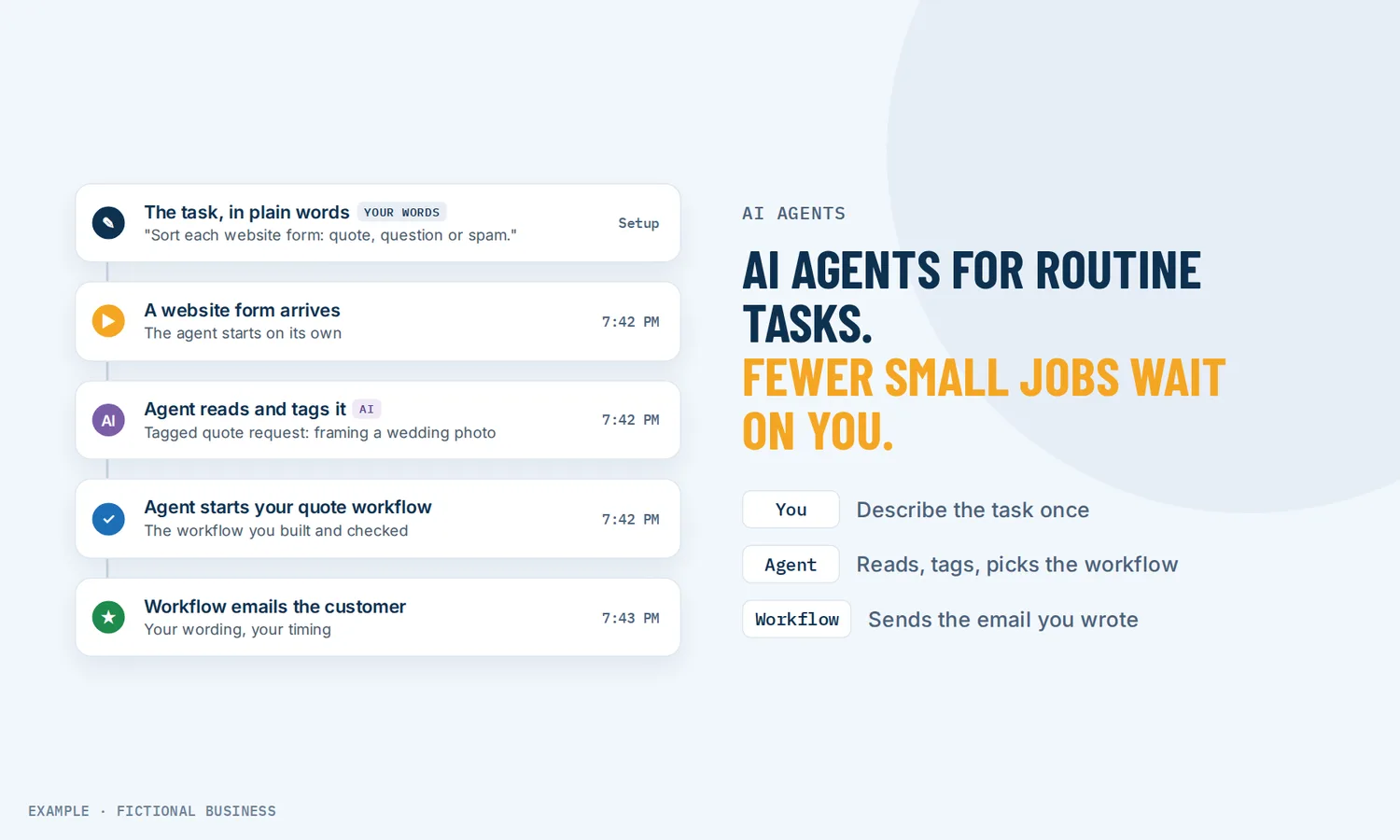
AI agents for small business: hand off the routine tasks that need a little judgment.
AI agents for small business are AI helpers you give a task in plain words, such as "every Monday, find new leads nobody has answered and create a follow-up task for each," and the agent runs that task on a schedule or when something happens in your account. For small business owners, that means fewer small jobs waiting on you after hours.
Choose 3 setups for us to build
What an AI agent is and how it works
An AI agent is software that takes a goal, decides the steps, and uses the tools you allow to carry them out. A chatbot answers questions; an agent does work inside your business, such as updating a customer record, adding a note or starting a follow-up.
Here is how it works on the Revenue Growth HQ platform:
- Describe the job. You write what the agent should do in plain words. A guided builder turns that into the agent's instructions, the events that start it and the tools it may use, and it asks you when something is unclear.
- Choose when it runs. On a schedule (once, every few hours, on chosen weekdays, monthly), or when something happens: a new contact, a form or survey sent, an appointment, a tag change, a deal created or moved, or a chat. A workflow can also call the agent as one of its steps.
- Choose what it may touch. Tools include updating contact fields and tags, creating tasks, notes and appointments, starting workflows, reading your knowledge base, searching the web, and connecting to outside apps such as Google Sheets, Google Docs, Notion or Trello.
- Test it, then publish. A test panel shows what the agent would do before it goes live. It runs only once you publish it.
- Check its work. An activity feed lists each run with the steps it took, the tools it used and its final answer, so you can see what it did and adjust the instructions.
What an AI agent changes for a small business
Tasks that need judgment
Most automation follows fixed rules: when a form comes in, send this text, wait a day, send that email. That suits jobs where the answer never changes. Plenty of small jobs need someone to read something and decide: is this message a quote request, a question or spam? Which leads went quiet? What did this customer actually ask about? An agent takes that kind of task. You describe the outcome, and it works out the steps each time.
Small jobs done on time
The weekly lead review and the notes before tomorrow's appointments are the tasks that slip when you are busy. An agent on a schedule does them at the hour you set, in your account's time zone, whether or not you remembered.
Work that stays inside your records
The agent works in the same account as your contacts and calendar, so its work lands where your team looks. Its tasks and notes show on the contact, and a workflow it starts sends from your own number and email.
A clear record of what it did
Each run is logged with its trigger, its steps and its result, and you can rate its replies. You can start small, review a few weeks of runs, and widen the job once you trust it.
Small businesses are already using AI: a U.S. Chamber of Commerce survey found almost 60% of small businesses say they use AI for business operations, more than double from 2023. Use is uneven by size, though. Census Bureau survey data from December 2025 to May 2026 found fewer than 20% of firms with four or fewer employees reported using AI. An agent puts it to work on the routine jobs.
How an AI agent plays out
A home service business
Let's suppose you run a landscaping company and quote requests come in through your website form. Each time a form arrives, an agent reads the message, tags it as a quote request, a general question or spam, and starts the matching workflow: quote requests get your quote follow-up, questions go to the office, spam gets no reply. You still see every form, already sorted.
A consultant or agency
Let's suppose you sell professional services and leads trickle in from several places. Every Monday at 8am, an agent looks over last week's new contacts and creates a follow-up task, assigned to you, for each one nobody has answered yet. You start the week with a list instead of a search.
A clinic, salon or studio
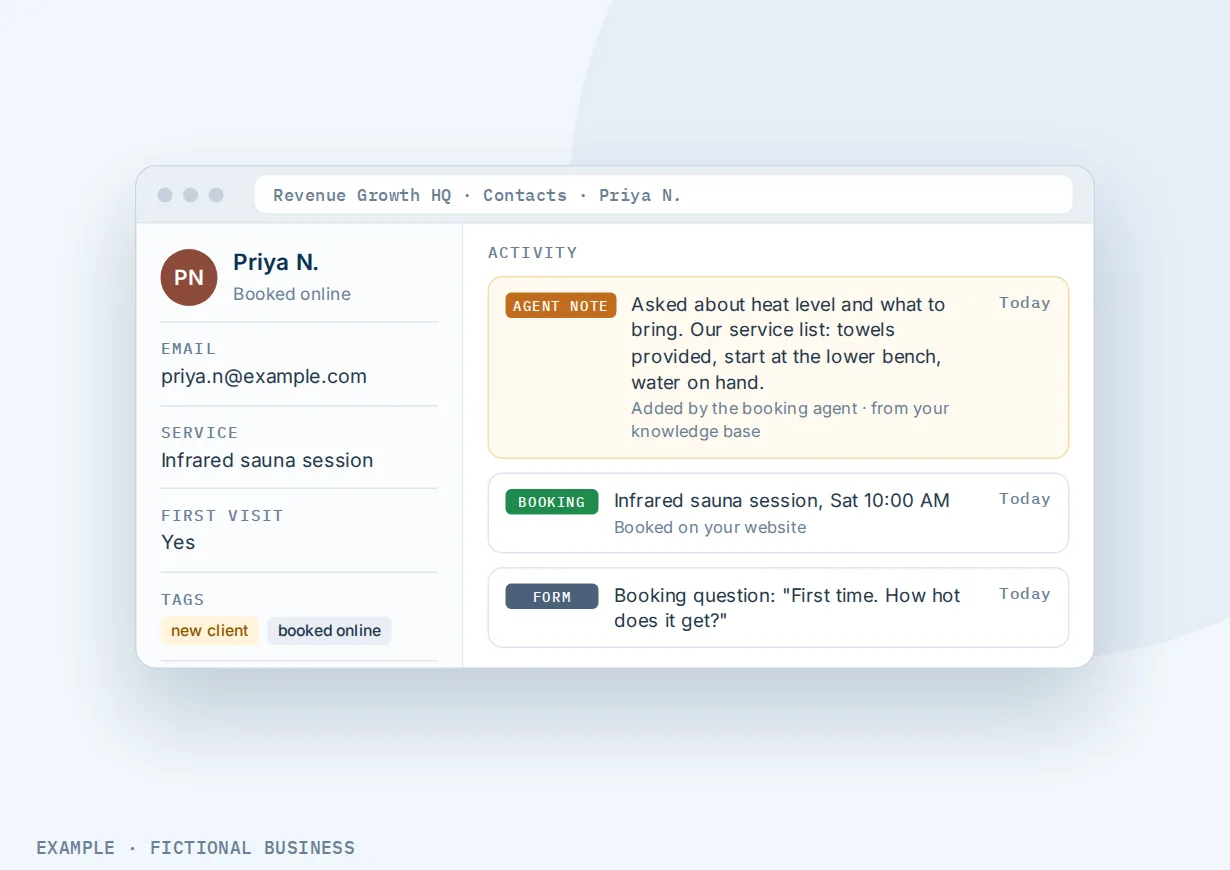
Let's suppose you run a wellness studio with several services. Each time a client books, an agent adds a note to their record summarizing what they asked about, drawn from your service descriptions in the knowledge base. The person who sees them walks in already knowing what the client came for.
What to look for in an AI agent platform
Questions to ask before you choose the best AI agent platform for your small business:
- Does it work inside your customer records? An agent that can't see your contacts, calendar and messages ends up copying data between apps. Look for one that can update records, add notes and create tasks directly.
- Can it start on a schedule and on events? Some jobs run weekly; others should start the moment a form or booking comes in. You want both.
- Can you limit its tools? You should choose exactly what each agent may touch, and leave everything else off.
- Can it hand off to your rule-based automation? Sending a text or email is best left to a workflow you have already set up and checked. Look for an agent that can start a workflow, and a workflow that can call an agent.
- Can you test before it goes live? A test run should show what the agent would do without touching real customers.
- Is there a log of every run? You need to see what it did, step by step, after the fact.
- Is the cost clear? Agents usually bill by AI use per run. Ask how a run is counted and what a busy trigger costs compared with a weekly schedule.
AI agents work better with automation and safeguards
An agent works best as one part of a system: rules where rules work, judgment where needed, safeguards around both.
AI agents plus workflow automation. An AI agent handles tasks that need judgment, written as an instruction; workflow automation follows the rules you set. The two work together in both directions. An agent can start a workflow, which is how it sends texts and emails: the workflow does the sending, with the timing and wording you approved. And a workflow can call an agent as one of its steps, so the workflow sets when the task happens and the agent works out how to do it, with its answer feeding the steps that follow.
AI agents within your wider AI and automation plan. Agents sit beside an AI chat assistant, an AI receptionist and AI writing. If you are deciding what to set up first, read where AI and automation fit in a small business.
AI agents plus clear safeguards. An agent acts on its own once published, so the guardrails matter: narrow tools, tested instructions and a habit of reading the activity log. For the wider picture of what can go wrong with AI and how to prevent it, see what can go wrong with AI and the safeguards that prevent it.
Your options: from free to done-for-you
The right choice depends on how much of the task needs judgment, where your customer data lives, and how much you want to set up yourself.
Do it yourself. Free, and you know the work best, but the weekly review waits until you have time.
Rule-based automation alone. Workflows handle jobs that follow the same steps every time. They can't read a message and decide what kind it is unless you add AI steps, but for many small businesses they are the right place to start.
General AI assistants. A chat assistant in a browser can draft and sort, but you copy the input in and the result out, and it doesn't run on its own.
Standalone agent tools. Dedicated agent builders can be powerful. The catch is that your contacts, calendar and messages live somewhere else, so each agent needs connectors that have to be set up, paid for and kept working.
Hiring someone. An assistant handles judgment tasks well, at the cost of wages, and the work stops when they are away.
Here's our solution
Revenue Growth HQ is an all-in-one platform with AI agents built in, alongside your CRM, forms, inbox, calendar, workflows, AI chat assistant and AI receptionist. The plan is $97 a month (or $970 a year) and includes $30 of usage credit each month for your phone number, calls, texts, email and most AI features. Agent runs are not paid from that credit: each run is billed by the AI it uses, so a busy trigger costs more than a weekly schedule. Agent runs, and other use beyond $30 in a month, are billed at the same rates as buying the software directly. You see the rates before setup.
Setup is a one-time $197. You choose 3 jobs from our list for us to build in your account, such as new-lead follow-up, appointment reminders and online booking, or review requests. With any choice we build your knowledge base from your website, which an agent can draw on, and when a choice calls or texts, we set up your business phone number and its texting registration. See the setups and choose your 3.
Limits to know
- No approval step before it acts. Once published, an agent carries out its task without asking first; you review its work afterward in the activity log. Start with tasks that are safe to automate, such as adding notes, tags and tasks, and widen its tools once you trust it.
- It doesn't send texts or emails itself. It starts a workflow that does, and those messages are billed by use like any other.
- Results can vary. The agent decides how to do the task each time. If a job must run the same way on every run, build it as a workflow.
- We describe what agents are built to do, not results we have measured.
AI agent features included
- Agents built from a plain-words description in a guided builder
- Schedules: once, by interval, on chosen weekdays or monthly, in your time zone
- Event triggers: new contact, form or survey sent, appointment, tag change, deal created or moved, chat
- A workflow step that calls an agent and uses its answer
- Tools for contact fields, tags, tasks, notes and appointments
- Starting workflows, which send texts and emails
- Knowledge base access: documents, tables and your website
- Web search
- Connections to outside apps such as Google Sheets, Google Docs, Notion and Trello
- A test panel and free test runs before publishing
- An activity log of every run, with steps, tools and results
- Unpublish to stop an agent at any time
Frequently asked questions
What is an AI agent?
An AI agent is software that takes a goal written in plain words, decides the steps, and carries them out with the tools it is allowed to use. Unlike a chatbot, which answers questions, an agent does work: it can update records, add notes, create tasks or start a follow-up. It runs on a schedule or when something happens, such as a new form or booking.
AI agents vs automation: what is the difference?
Workflow automation follows the rules you set: a trigger and fixed steps that run the same way every time. An AI agent takes a task that needs judgment, written as an instruction, and works out the steps itself, so its output can vary. They work best together: a workflow can call an agent, and an agent can start a workflow.
What are good AI agent use cases for small businesses?
Repetitive tasks that need a little reading and deciding: sorting incoming form messages, flagging leads nobody answered, adding a summary note before an appointment, tidying tags, or drafting content ideas from your own pages. Start with tasks where a mistake is easy to fix, such as notes and tags.
Can an AI agent text or email my customers?
Not directly. An agent can start a workflow, and the workflow sends the text or email with the wording and timing you set. That keeps customer messages in a sequence you have checked. Texts and emails sent this way are billed by use, like any others.
Does an AI agent ask before it does something?
No. Once you publish an agent, it carries out its task without an approval step. You see each run in an activity log afterward, with the steps it took and the tools it used. That is why it pays to test first, limit its tools to what the job needs, and start with low-risk tasks.
How much do AI agents cost to run?
Each run is billed by the AI it uses, so cost depends on how often the agent runs and how much work each run does. A weekly schedule costs far less than an agent that runs on every new contact. On Revenue Growth HQ, the $97-a-month plan includes $30 of usage credit each month for other usage; agent runs are billed separately, and you see the rates before setup.
Do I need technical skills to build an AI agent?
No coding is needed. You describe the job in plain words, and a guided builder sets up the instructions, triggers and tools, asking when something is unclear. You do need to decide what starts it, what it may change, and how you will check its work.
Put the routine tasks on autopilot, carefully.
AI agents come with your Revenue Growth HQ plan, billed by use. For a one-time $197 setup, we build 3 jobs of your choice in your account, such as following up with new leads, booking with reminders, or asking for reviews, and we build your knowledge base from your website. Pick them below. The plan is then $97 a month.
Sources
- U.S. Chamber of Commerce Technology Engagement Center. "Empowering Small Business: The Impact of Technology on U.S. Small Business." 2025. https://www.uschamber.com/technology/empowering-small-business-the-impact-of-technology-on-u-s-small-business (checked 2026-10-25)
- Grundy, Breaux and Khatiwoda. "AI Use Among Businesses." U.S. Census Bureau, 2026. https://census.gov/library/stories/2026/05/ai-use-businesses.html (checked 2026-10-25)